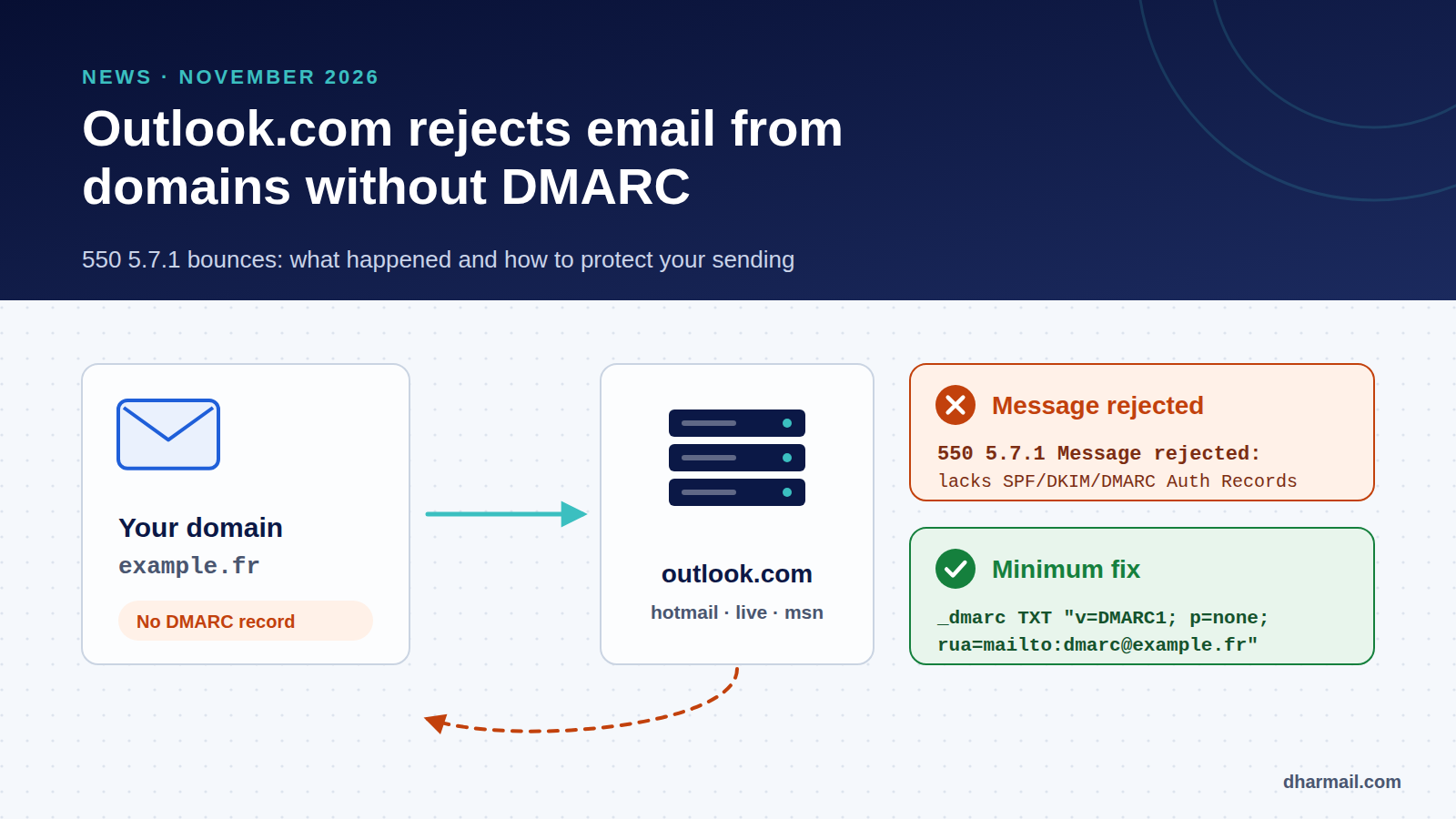
Since 5 November 2026, many administrators have seen Outlook.com, Hotmail, Live and MSN reject part of the email sent from domains that do not publish a DMARC record. The bounce is explicit: 550 5.7.1 Message rejected: Message lacks SPF/DKIM/DMARC Auth Records. Small senders were affected, not only high-volume ones.
Microsoft made no announcement. Its moderators later described a service degradation, and several sources report a fix on 9 November. Whether it was an incident or a preview of a lasting rule, the email deliverability lesson is the same: a domain that sends email without DMARC can now be rejected without warning. Here is what is known, what remains uncertain, and what to do.
Key takeaway: publish at least
v=DMARC1; p=none; rua=mailto:…on every domain that sends email, and make sure SPF or DKIM is aligned with the domain shown in the From header. A DMARC record alone is not enough if neither mechanism aligns.
Timeline: what was observed
5 November 2026. The provider MailRoute sees the first rejections from Microsoft consumer domains in its outbound logs. The same day, administrators open threads on the Microsoft Q&A forum and date the start of the bounces to 4–6 November. Microsoft gave no prior notice.
6–8 November. Reports multiply. Rejections are intermittent: one message goes through, the next bounces, and a resend may succeed. One administrator says about half of their clients are affected. German outlet heise and specialist vendors (EasyDMARC, URIports) document the issue.
9 November. A Microsoft moderator on the Q&A forum mentions “an ongoing Exchange service issue”, classified as a service degradation. Later that day, administrators report that the bounces seem to stop.
10 November. According to EasyDMARC and URIports, the Microsoft 365 admin center describes an incident (reference EX1545193): an update to spam enforcement rules allegedly marked and blocked messages incorrectly and was rolled back. Service Health is admin-only and we could not check it directly. The sources describe it as closed, and the notice reportedly does not mention DMARC.
The bounce message and what it means
The most common rejection looks like this:
550 5.7.1 Message rejected: Message lacks SPF/DKIM/DMARC Auth Records (AS9031519)
Remote-MTA: live-com.olc.protection.outlook.com
A 550 is a permanent failure: the sending server will not retry. Microsoft does not publicly document the AS9031519 reference. Some messages were also refused with 550 5.7.23, normally tied to an SPF failure. Unlike the 550 5.7.515 code from the 2025 rule, this message does not say which check failed, so you need to read headers and DNS to find out.
Only consumer recipients were affected: outlook.com, hotmail.com, live.com, msn.com and their country variants. According to EasyDMARC, Microsoft 365 business tenants do not appear to be affected as recipients, without official confirmation. If your customers are consumers or freelancers using a Hotmail address, the impact on quotes, invoices and order confirmations may have been direct.
Why well-configured domains were also rejected
Some reports come from senders with SPF, DKIM and DMARC correctly published. Some headers even showed spf=pass, dkim=pass and dmarc=pass on refused messages. That does not fit a simple “no DMARC, no delivery” rule. It does fit the theory of a faulty spam filter that Microsoft reportedly rolled back.
At the same time, several administrators saw rejections stop as soon as they published a DMARC record. Both observations can be true: the filter seemed to hit domains without DMARC first, while also catching other messages by mistake. In practice, you cannot rely on a mailbox provider’s leniency. You can remove the most likely cause of rejection.
What Microsoft officially requires since 2025
Microsoft’s documented rule dates from April 2025. It targets senders sending more than 5,000 messages a day to its consumer services from the same From domain. Since 5 May 2025, those senders must meet three conditions:
| Requirement | Expected level |
|---|---|
| SPF | Must pass for the sending domain |
| DKIM | Must pass |
| DMARC | At least p=none, aligned with SPF or DKIM (ideally both) |
Non-compliant messages receive 550 5.7.515 Access denied, sending domain … does not meet the required authentication level. Microsoft also recommends valid From and Reply-To addresses, a working one-click unsubscribe and list hygiene. Other providers are tightening too: Spamhaus now checks the DNS identity of every sending IP.
The November episode shows that the 5,000-message threshold is no safe harbour. A filter can tighten without notice, and small domains without DMARC were the first exposed.
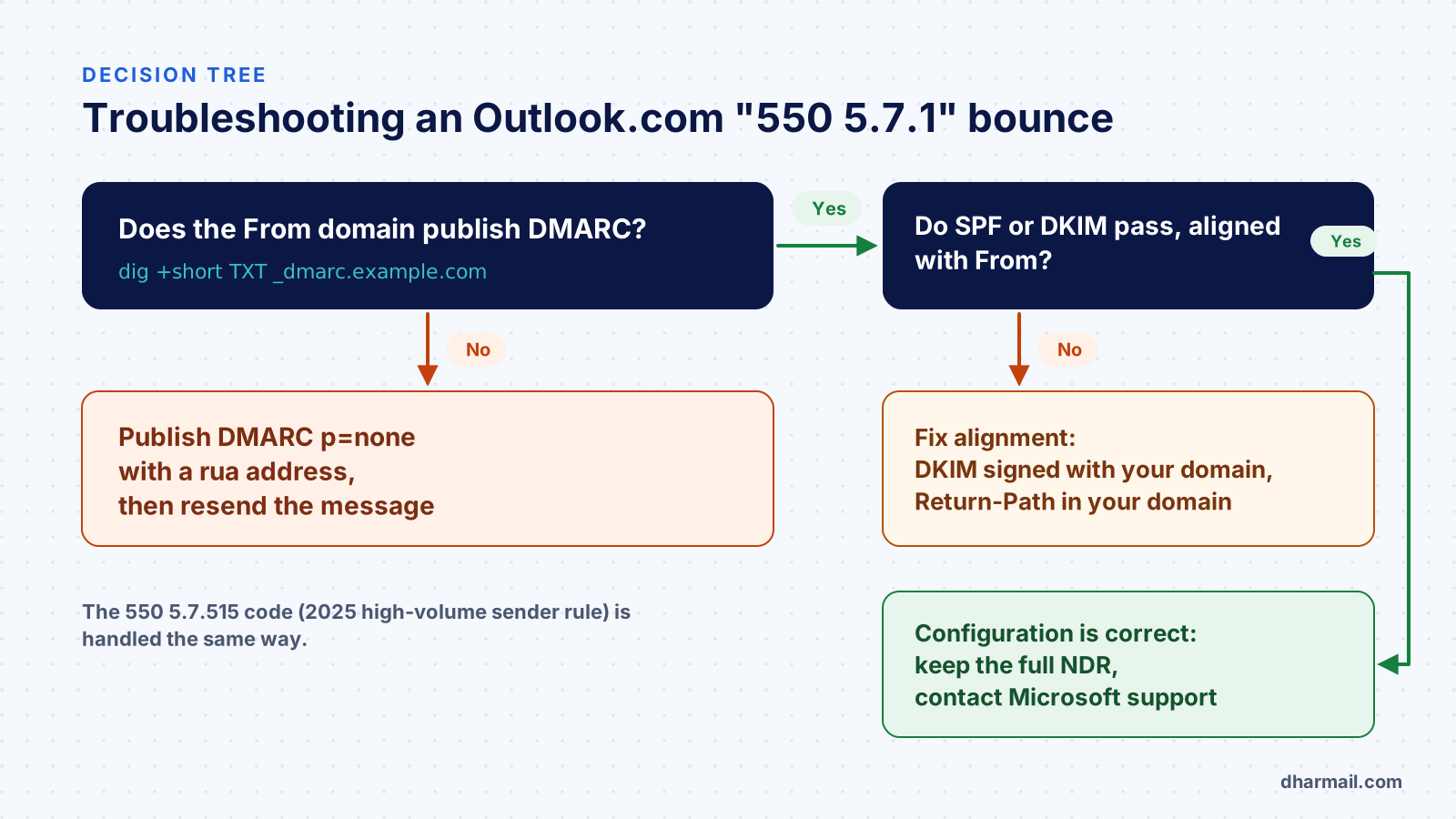
The minimum fix: publish DMARC properly
First, check whether your domain publishes a record:
dig +short TXT _dmarc.example.comIf there is no answer, publish a TXT record at _dmarc:
_dmarc.example.com. TXT "v=DMARC1; p=none; rua=mailto:dmarc@example.com"The p=none policy blocks nothing: it only asks receivers to evaluate DMARC and send you reports. It is the minimum required by Microsoft, Google and Yahoo. The rua tag is optional in the standard but essential in practice: without reports, you do not know who sends with your domain. Our guide to reading a DMARC XML report shows how to use them.
Publishing DMARC is not enough if neither SPF nor DKIM aligns. DMARC passes only if one of them succeeds for the domain in the From header. The most common mistakes:
- Microsoft 365 signs with
onmicrosoft.com. Without DKIM enabled for your custom domain, the signature passes but does not align. - A third-party tool uses its own bounce domain. The Return-Path belongs to the platform, so SPF passes for it, not for you.
- SPF exceeds 10 DNS lookups. The result becomes
permerror; our list of SMTP errors shows how it surfaces in bounces. - Two DMARC records coexist. The standard requires a single record; with two, DMARC is ignored.
If messages are still rejected
- Keep the full NDR, including the
Remote-MTAline and the bracketed reference. Microsoft uses it to trace the message. - Collect one accepted and one rejected message from the same flow and compare their
Authentication-Resultsheaders. - Check every sending tool: mailbox, CRM, invoicing, website, marketing platform. One unaligned tool is enough to cause failures.
- Resend after fixing. A
550is not retried automatically: the original message never reached the recipient. - Contact Outlook.com sender support through its dedicated form if your setup is correct and rejections continue.
After the fix: move DMARC forward
p=none avoids rejection for missing DMARC, but does not protect your domain against spoofing. Once the reports show your legitimate sources, move the policy to p=quarantine, then p=reject. Do it in steps, checking at each stage that no legitimate flow fails. Our method to configure SPF, DKIM and DMARC without breaking email delivery covers these steps.
This is not only about security. It also makes your reputation readable for Gmail, Yahoo and Microsoft. It does not guarantee inbox placement, which also depends on your sending practices and recipient engagement.
FAQ
Do I need DMARC if I send little email?
Yes. Microsoft’s official rule targets senders of more than 5,000 messages a day, yet the November 2026 rejections hit low-volume domains. A p=none record with reporting costs nothing and removes that risk.
Is 550 5.7.1 the same as 550 5.7.515?
No. 5.7.515 matches the documented 2025 rule for unauthenticated high-volume senders. The 5.7.1 … lacks SPF/DKIM/DMARC Auth Records message appeared in November 2026 and is not documented by Microsoft. Both are handled the same way: DMARC presence first, then alignment.
Is Microsoft 365 affected as a sender?
Yes, if your domain sends from Microsoft 365 without DMARC, or if DKIM still signs with the onmicrosoft.com domain. Enable DKIM for your custom domain and publish a DMARC record.
Is p=none enough?
To avoid rejection for missing DMARC, yes. To protect your domain from spoofing, no: you eventually need quarantine or reject, once legitimate sources are aligned.
Has Microsoft confirmed a new rule?
No, as of writing (10 November 2026). The only public statements come from forum moderators describing a service degradation. We will update this article if Microsoft publishes an official position.
Conclusion
Whether the November bounces were an incident or a tightening, the conclusion is the same: DMARC is now part of the minimum setup for any domain that sends email. Publish a record with reporting, align every sending tool, then strengthen the policy based on real data. If your flows are numerous or poorly documented, Dharmail’s SPF, DKIM and DMARC audit and configuration service (page in French) starts with that inventory.
Sources and references
- heise online — Outlook.com: The email is real — but it still isn’t getting through (9 November 2026)
- MailRoute — Outlook.com Is Quietly Rejecting Email From Domains Without DMARC (6 November 2026)
- EasyDMARC — Microsoft Is Now Rejecting Mail From Domains Without DMARC (updated 10 November 2026)
- URIports — Microsoft Now Requires DMARC, Even for Low-Volume Email Senders
- Microsoft Q&A — 550 5.7.1 Message rejected: Message lacks SPF/DKIM/DMARC Auth Records
- Microsoft Q&A — SPF validation error (moderator reply, 9 November 2026)
- Microsoft Tech Community — Strengthening Email Ecosystem: Outlook’s New Requirements for High-Volume Senders (April 2025)
- Microsoft Support — Fix NDR error 550 5.7.515 in Outlook.com