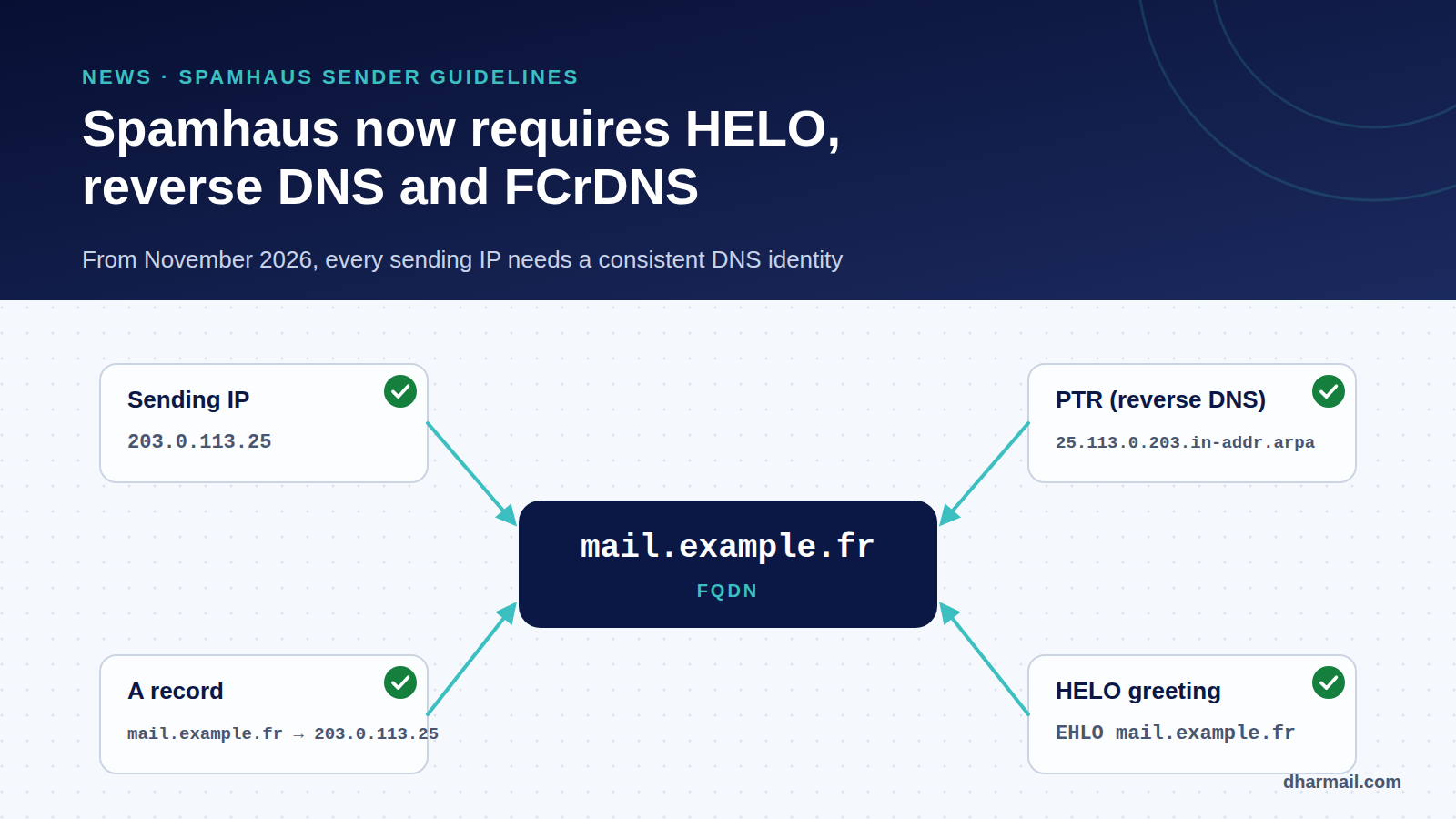
On 21 October 2026, Spamhaus published its Sender Guidelines, a single reference of the rules senders must follow to avoid being listed. The most concrete change is technical: from November 2026, Spamhaus is gradually enforcing a requirement for every sending IP to have a valid HELO, a reverse DNS (PTR) record and a matching A record. An IP that fails these checks can be listed on the CSS or XBL zones.
Many spam filters query these lists, so a listing can hurt your email deliverability far beyond a single mailbox provider. The good news: these checks are easy to verify, and most fixes take a day.
Key takeaway: the sending IP, its PTR, the A record of that PTR and the HELO name must all point to the same fully qualified hostname, for example
mail.example.com. If you send only through Microsoft 365, Google Workspace or an ESP, this applies to their servers; your own relays, servers and devices still need checking.
What Spamhaus published
The document is titled One clear set of rules: the Spamhaus Sender Guidelines. It comes with a detailed guidelines page and a companion page for ESPs and large senders. Spamhaus brings together rules that were previously scattered and separates what is required from what is recommended. The stakes are stated plainly: all senders must meet the minimum requirements “to avoid being listed”.
The announcement sets the timeline: from November 2026, enforcement of basic DNS requirements rolls out gradually over several months. Spamhaus has published neither an exact start date nor a month-by-month schedule. Treat your IPs as in scope now.
The three DNS checks, explained
1. Reverse DNS (PTR) to a fully qualified hostname
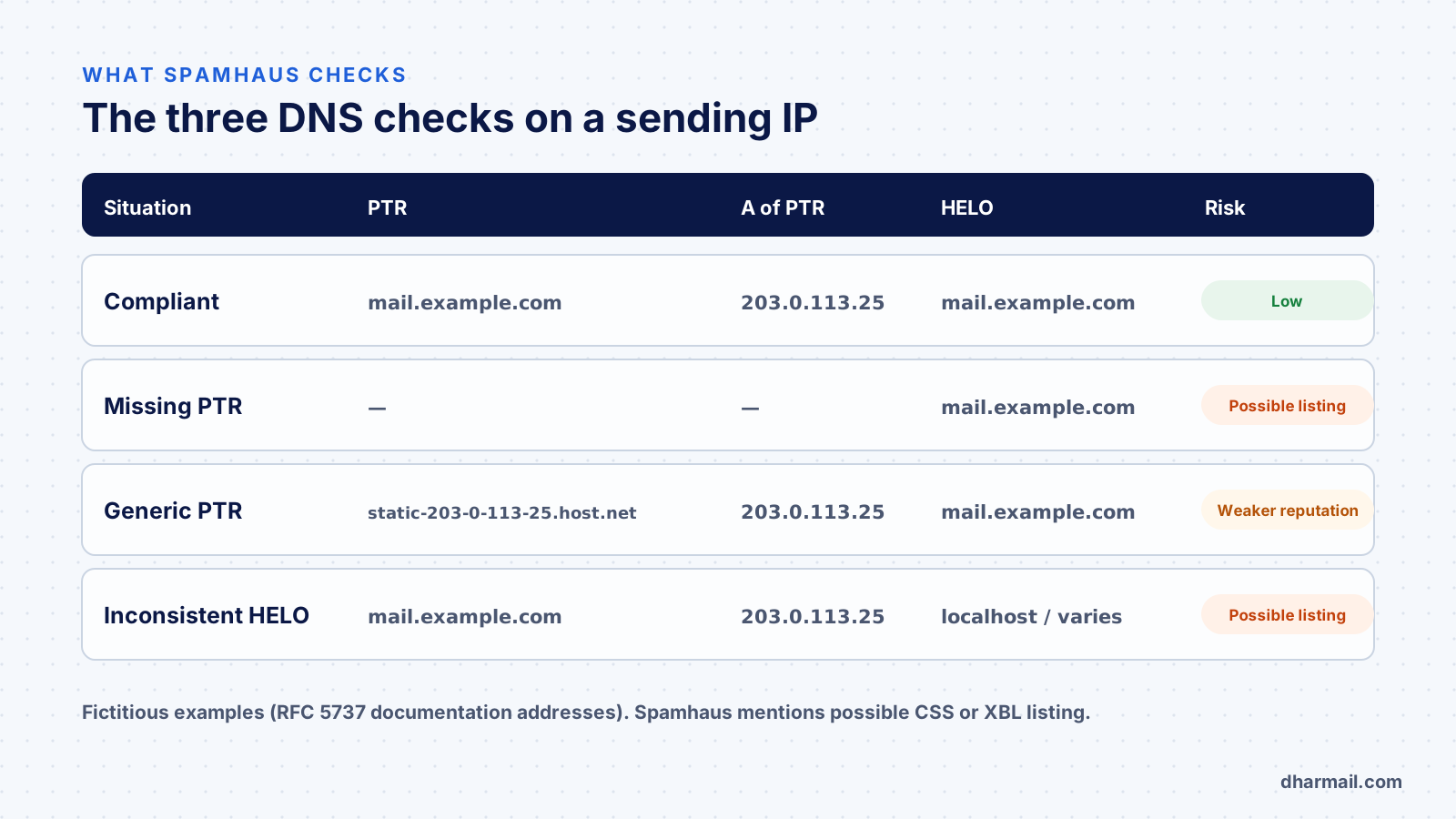
Forward DNS turns a name into an IP. Reverse DNS does the opposite: it maps an IP to a hostname through a PTR record. Spamhaus requires every sending IP to have a PTR pointing to a fully qualified domain name (FQDN). According to Spamhaus, an IP without reverse DNS is treated as suspicious.
Generic PTRs assigned automatically by a hosting provider are discouraged. A name such as static-203-0-113-25.hosting.example.net says nothing about the sender and “can negatively impact reputation”. Spamhaus recommends a branded hostname.
2. An A record that points back to the same IP (FCrDNS)
The PTR hostname must itself resolve to the sending IP, through an A record (or AAAA for IPv6). This is forward-confirmed reverse DNS, or FCrDNS. The two-way check shows that whoever controls the IP and whoever controls the name agree. A PTR pointing to a non-existent name, or to a name resolving elsewhere, fails.
3. A resolvable, stable HELO/EHLO
At the start of every SMTP connection, the sending server introduces itself with HELO or EHLO, followed by a hostname. Spamhaus requires that name to resolve to the connecting IP and to stay the same across connections from that IP. Placeholder values (localhost, internal machine names), hosting defaults and changing names can lead to a listing. Several HELO values from one IP suggest, in Spamhaus’s words, residential proxy or malware behaviour.
Matching the HELO to the PTR is only recommended. The Spamhaus ESP page sums up best practice: use the same hostname for the HELO, the PTR and the A record.
The other Sender Guidelines requirements
The guidelines go beyond DNS. Requirements marked required include:
| Area | Spamhaus requirement |
|---|---|
| Consent | Confirmed opt-in; if no confirmation is received, do not send |
| Authentication | SPF and DMARC for every sending domain, DKIM aligned with the From domain (setup guide) |
| SPF | No more than 10 DNS lookups |
| DKIM | Key of at least 1,024 bits, 2,048 recommended |
| Bounces | Bounce rate below 5% |
| Unsubscribe | Requests actioned within 2 days; one-click List-Unsubscribe-Post header for bulk commercial mail |
| IPv6 | Sending address within a /64 or larger allocation, with reverse DNS |
Purchased, rented or harvested lists are ruled out. For ESPs, Spamhaus also asks for throttling of customer accounts with complaint rates above 0.3%. These rules overlap with Gmail, Yahoo and Microsoft requirements, with one notable addition: confirmed opt-in, stricter than the legal rules for some B2B email. Our article on one-click unsubscribe covers the List-Unsubscribe implementation.
Who is actually affected?
The check applies to the IP that connects to the receiving server, so it all depends on your architecture:
- You send only through Microsoft 365, Google Workspace or an ESP (Brevo, SendGrid, Mailjet…). The IPs belong to the provider, which manages PTR and HELO. Direct risk is low, provided every flow really goes through it.
- You run a server or relay: on-premises Exchange, Postfix, security gateway, application server, VPS. You are directly affected.
- Devices or applications send directly: printers, business software, websites using a shared host’s
mail()function. These are often the forgotten flows, and the worst configured.
Shared hosting deserves attention. The IP and its PTR belong to the host. You cannot fix them, but you can route website email through a properly configured authenticated relay.
How to check your IPs in ten minutes
First, identify the real sending IP. It appears in the first Received header added by the receiving server, on a message you send yourself at a Gmail or Outlook address.
Received: from mail.example.com (mail.example.com [203.0.113.25])
        by mx.google.com with ESMTPS id …
The first name is the announced HELO, the second is the PTR seen by the receiver. Then check the PTR and its consistency:
# PTR of the sending IP
dig +short -x 203.0.113.25
# → mail.example.com.

# The PTR name must resolve back to the same IP (FCrDNS)
dig +short A mail.example.com
# → 203.0.113.25
Spamhaus offers a HELO/DNS checker on the Sender Guidelines page. It notes that results are not available for all IPs and may not reflect recent changes. Our list of SMTP errors helps recognise rejections tied to IP reputation.
Fixing the most common cases
Missing or generic PTR. The PTR is not edited in your DNS zone: it is set by whoever owns the IP (host, carrier, cloud provider). Most consoles offer a “reverse DNS” field per IP. Choose a name in your own domain, then create the matching A record in your zone.
Wrong HELO. The announced name is set in the mail software:
# Postfix (main.cf)
myhostname = mail.example.com
smtp_helo_name = $myhostname
In Exchange Server, the send connector’s FQDN field sets the announced name. Behind network address translation (NAT), check the public IP actually used, not the internal one.
New dedicated IP. Fix PTR and HELO before the first send, then follow a gradual email warm-up.
Several outbound IPs. Each IP needs its own consistent PTR. A hostname can resolve to several IPs, but each PTR must point to a name that resolves to that IP.
If your IP is already listed
Fix the cause first, or the IP will be listed again. Spamhaus has replaced its former removal center with an IP and domain reputation checker, which shows the list involved and the next steps. An XBL listing often points to a compromised device or proxy behind the same public IP. A CSS listing usually concerns spam sending or misconfigured infrastructure. In both cases, document the fix before requesting removal.
FAQ
Are the Sender Guidelines mandatory?
Spamhaus is not a legal authority. But many filters use its lists: failing the minimum requirements exposes you to a listing, and therefore to rejections by receivers that query them.
Are Microsoft 365 or Google Workspace affected?
Their sending IPs are managed by Microsoft and Google. Check instead the flows that bypass them: application servers, printers, websites, legacy relays.
What is the difference between PTR and FCrDNS?
The PTR maps a name to the IP. FCrDNS additionally checks that the name resolves back to the same IP. Spamhaus requires both.
Must the HELO match the PTR?
Recommended, not required. What is required: a HELO that resolves to the connecting IP and stays stable.
When could my IP be listed?
Rollout started in November 2026 and spans several months, with no published schedule. Treat every sending IP as in scope now.
Conclusion
The new Spamhaus rules ask for nothing exotic: a consistent DNS identity for every IP that sends email. The real work is finding all those IPs, including forgotten devices and applications. If you see rejections or a listing, Dharmail’s deliverability troubleshooting service (page in French) starts from the error message to isolate the cause.