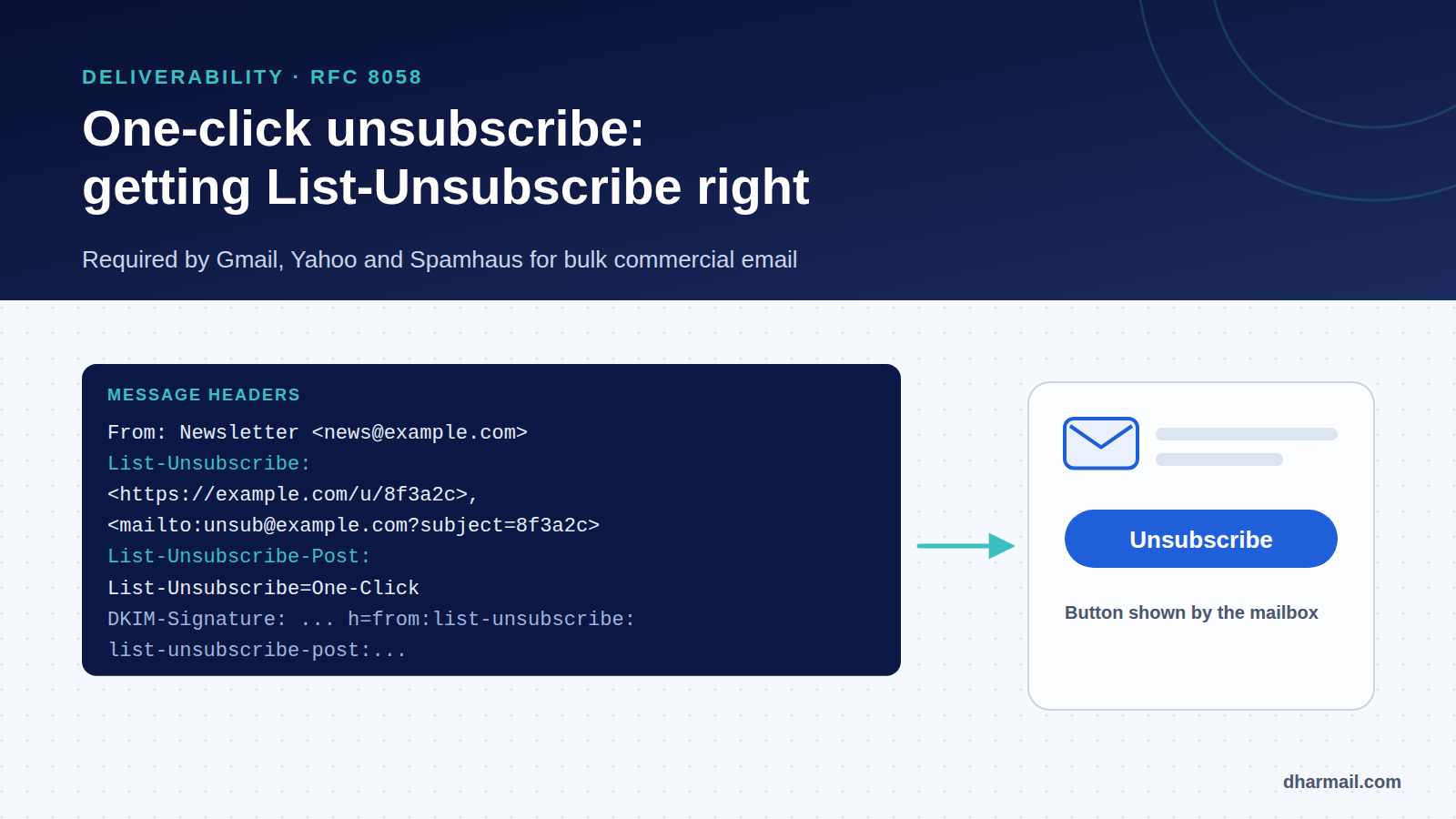
When a subscriber no longer wants your email, they have two options: unsubscribe, or click “Report spam”. The first costs you nothing. The second damages your reputation. Gmail and Yahoo understood this: since 2024, they have required bulk senders to offer one-click unsubscribe, triggered straight from the mailbox interface. Spamhaus added it to its own rules in October 2026.
The feature relies on two technical headers, List-Unsubscribe and List-Unsubscribe-Post, defined by RFC 8058. They are often misconfigured, even when an unsubscribe link sits at the bottom of the message. This guide explains what they must contain, how to implement them and how to check that they work.
Key takeaway: a footer link is not enough. Bulk commercial email must carry
List-Unsubscribe(with an HTTPS URL) andList-Unsubscribe-Post: List-Unsubscribe=One-Click, covered by a valid DKIM signature. The request must be processed without login or confirmation, and mail must stop within two days.
Why one-click unsubscribe matters for deliverability
A subscriber who cannot find how to unsubscribe ends up reporting your messages as spam. The complaint rate is one of Gmail’s heaviest signals: Google asks senders to stay below 0.1% and never reach 0.3%, as shown in Google Postmaster Tools.
By showing an “Unsubscribe” button next to the sender name, Gmail and Yahoo offer an easier exit than the spam button. Every successful unsubscribe is a complaint avoided. For senders, it protects reputation, not just compliance.
What Gmail, Yahoo, Microsoft and Spamhaus require
| Party | Requirement |
|---|---|
| Gmail | Bulk senders (over 5,000 messages a day to Gmail): one-click unsubscribe for marketing and subscribed messages, visible link in the body, processed within 2 days |
| Yahoo | One-click unsubscribe via List-Unsubscribe, requests honoured within 2 days |
| Microsoft | Working unsubscribe link recommended for high-volume senders to Outlook.com |
| Spamhaus | Requests actioned within 2 days; one-click List-Unsubscribe-Post required for bulk commercial mail |
Transactional email (order confirmation, password reset, invoice) is not covered by Gmail’s requirement. If a message mixes transactional content and promotion, it counts as marketing again.
The two headers, line by line
Here is a compliant example:
List-Unsubscribe: <https://example.com/unsubscribe/8f3a2c91e4>,
 <mailto:unsubscribe@example.com?subject=8f3a2c91e4>
List-Unsubscribe-Post: List-Unsubscribe=One-Click
List-Unsubscribe has existed since RFC 2369 (1998). It holds one or more addresses in angle brackets, separated by commas. For one-click unsubscribe, it must contain an HTTPS URL. A mailto: address can be added for clients that only support that format.
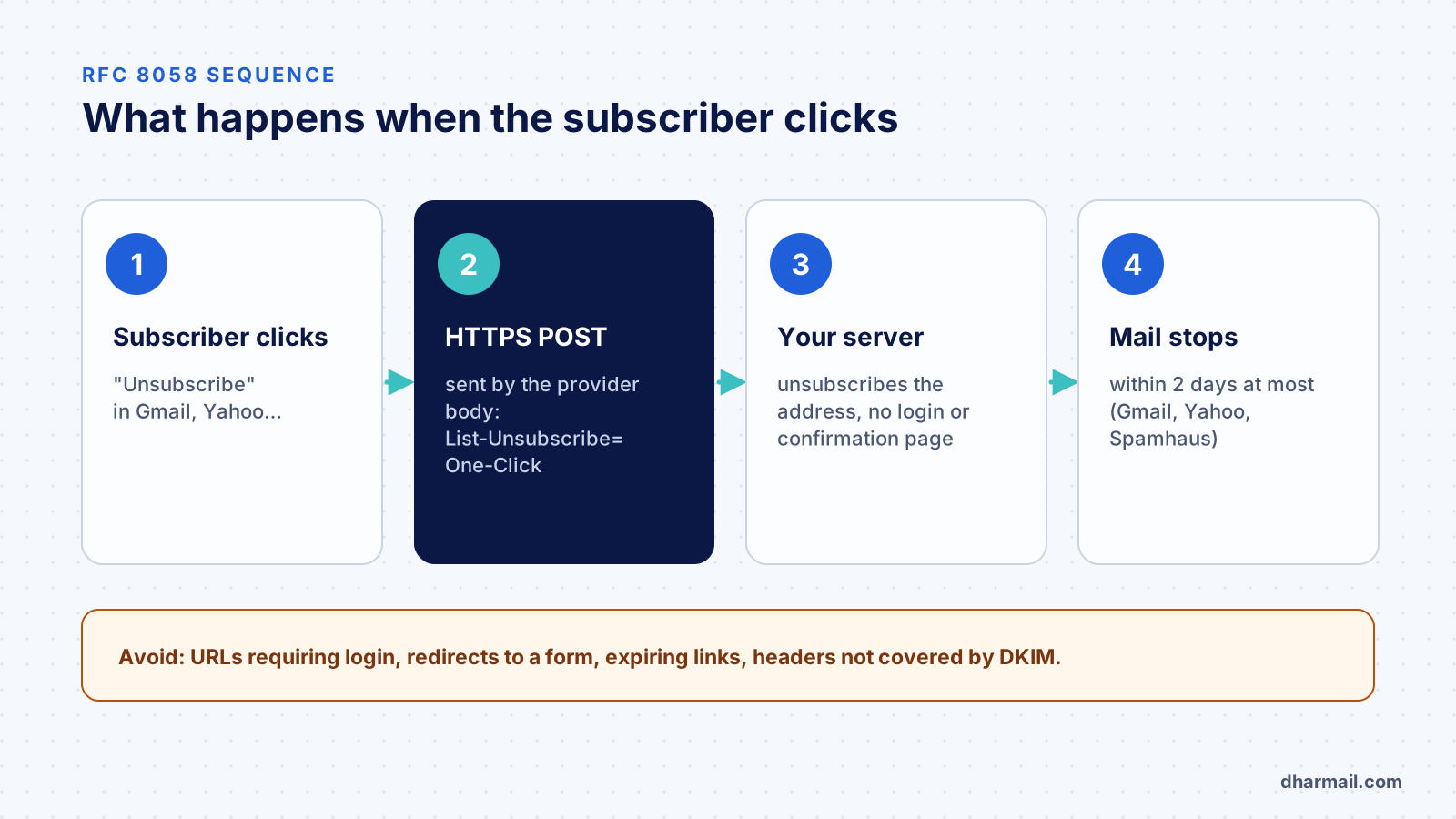
List-Unsubscribe-Post is what RFC 8058 adds. Its value is always exactly List-Unsubscribe=One-Click. It tells the mailbox it may unsubscribe the user by sending a POST request to the HTTPS URL, without opening a page.
Why a POST and not a plain link? Because security filters and antivirus tools automatically visit links in email to scan them. If a simple visit (GET request) unsubscribed the user, these bots would unsubscribe people without their knowledge. The POST separates a deliberate action from a scan.
The URL must identify the subscriber, without being guessable
The URL must tell you which recipient is leaving which list, with no other information: the mailbox request carries no cookie or session. Use an opaque, unique token per recipient and list, hard to guess. A URL containing the email address in clear text would let anyone unsubscribe anyone.
The DKIM signature must cover both headers
RFC 8058 requires a valid DKIM signature covering at least List-Unsubscribe and List-Unsubscribe-Post. Otherwise a third party could alter the URL in transit. Check the h= list in the DKIM-Signature header:
DKIM-Signature: v=1; a=rsa-sha256; d=example.com; s=s1;
 h=from:to:subject:date:message-id:list-unsubscribe:list-unsubscribe-post; …
If the two headers are missing from it, Gmail and Yahoo may ignore one-click unsubscribe. A gateway that adds or rewrites content after signing causes the same kind of failure, as our DKIM “body hash did not verify” case study shows.
Implementing one-click unsubscribe
With an ESP (Brevo, Mailjet, SendGrid, ActiveCampaign…)
Most email platforms add both headers automatically and handle the unsubscribe. Check three things: the option is enabled for your campaigns; the DKIM signature uses your domain, not the platform’s; and the unsubscribe updates your CRM if contacts are synced. Our guide to creating a sending subdomain covers DKIM signing with your domain.
With an in-house application
If your application sends its own newsletters, the implementation comes down to a few rules:
- Generate a token unique per recipient and list, stored server-side.
- Add both headers to every marketing message, before DKIM signing.
- Accept a POST on the URL with a
List-Unsubscribe=One-Clickbody (application/x-www-form-urlencodedormultipart/form-data). - Unsubscribe immediately, with no login or confirmation page, then reply with
200or202. RFC 8058 forbids redirects: many browsers turn a redirected POST into a GET. - Make it idempotent: a second identical request must not cause an error.
- Serve a page for GET: a person opening the URL in a browser should see a confirmation page, but the visit alone must not unsubscribe.
Keep the visible unsubscribe link in the message body too. Gmail requires it, and not every mail client shows a button.
Test before calling it compliant
Read the real headers. Send a campaign to a Gmail address, open the message, then ⋮ > Show original. Check that both headers are there and that dkim=pass shows for your domain.
Simulate the mailbox request with a test address:
curl -i -X POST \
  -H "Content-Type: application/x-www-form-urlencoded" \
  --data "List-Unsubscribe=One-Click" \
  "https://example.com/unsubscribe/8f3a2c91e4"
The response should be a success (200 or 202), with no redirect. The address should then show as unsubscribed in your tool.
Unsubscribe handling also matters during a warm-up, when every complaint weighs more.
Check that mail stops. The unsubscribe must take effect within two days at most, including campaigns already scheduled.
If the button does not appear in Gmail despite correct headers, that is not necessarily an error: Gmail shows it at its discretion, depending notably on sender reputation and message type.
The most common mistakes
- URL requiring a customer login before unsubscribing.
- Redirect to a preference form instead of a direct unsubscribe.
- Token that expires after a few days: subscribers often reopen old emails.
- Headers added after DKIM signing by a relay or gateway: the signature no longer covers them.
- Unsubscribe recorded in the ESP but not the CRM, which re-imports the contact at the next sync.
- Several sending tools: a contact unsubscribed from one platform keeps getting mail from another.
FAQ
Is the link at the bottom of my email enough?
Not for bulk marketing to Gmail and Yahoo. The body link is still needed, but it must come with the List-Unsubscribe and List-Unsubscribe-Post headers.
Do transactional emails need List-Unsubscribe?
Gmail does not require it for purely transactional messages. As soon as a message includes promotion, it is treated as marketing.
Is a mailto address enough?
Not for RFC 8058 one-click unsubscribe, which relies on an HTTPS URL. A mailto: address can be added alongside it.
Should I ask the subscriber to confirm?
No. The one-click request must unsubscribe directly. You can offer a preference centre on the page served for GET, without making the unsubscribe depend on an extra choice.
How quickly must an unsubscribe be processed?
Gmail, Yahoo and Spamhaus ask for two days at most. Nothing stops you from doing it immediately, which is better.
Conclusion
One-click unsubscribe is a small setup with a big effect: it turns some potential complaints into neutral unsubscribes. Check your headers on a real message, test the POST request and make sure unsubscribes reach every tool. Dharmail’s email deliverability audit (page in French) includes this check among the signals that protect your reputation.