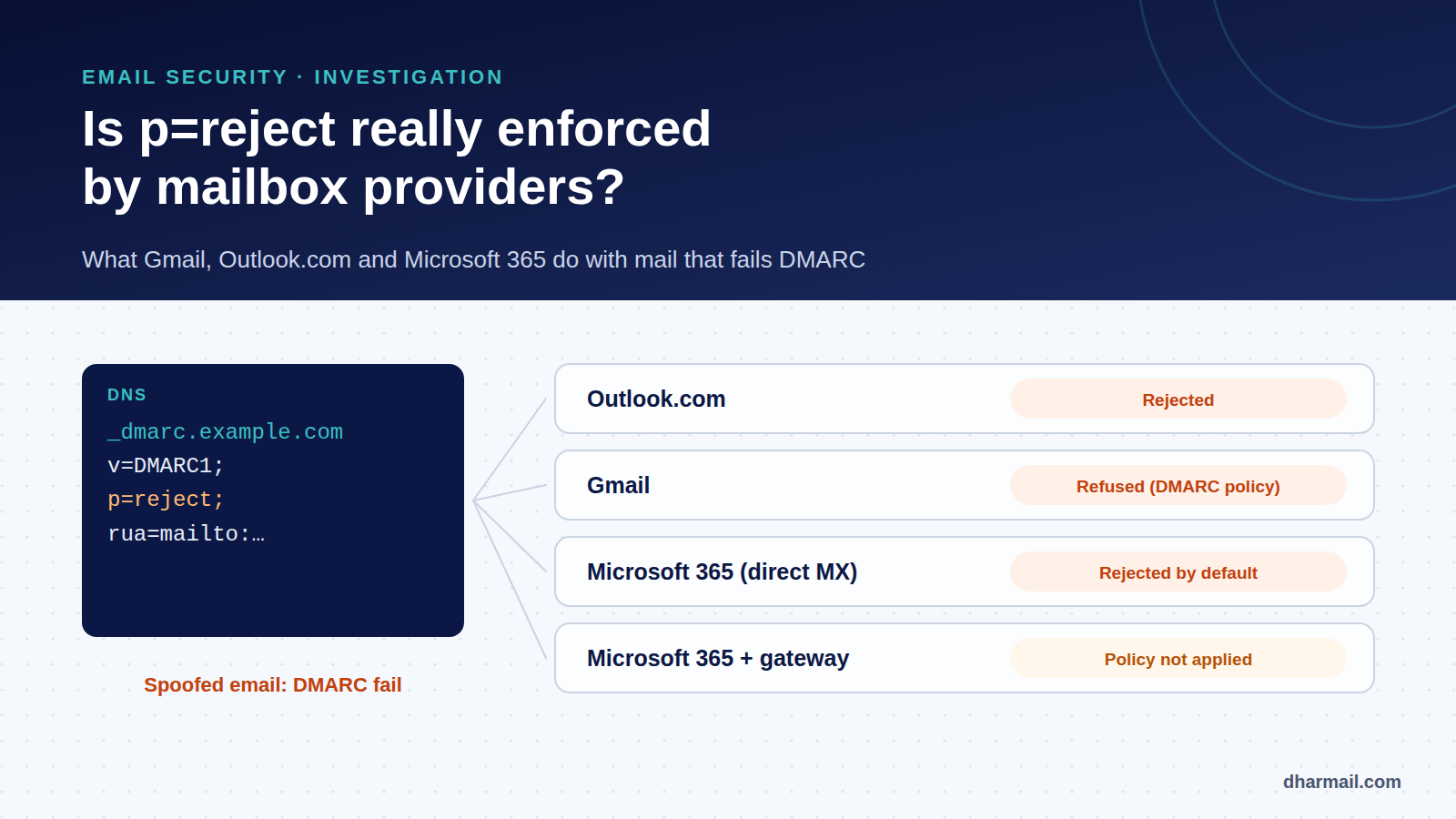
You spent weeks inventorying your flows, fixing SPF and DKIM, then moving DMARC up to p=reject. Logically, an email spoofing your domain should now be refused everywhere. Is that really the case?
The short answer: yes at the major mailbox providers, but not always and not everywhere. The standard itself gives the receiver the final say, several providers handle quarantine in their own way, and some enterprise architectures silently stop applying your policy. Here is what the standard, provider documentation, an academic study and your own DMARC reports say.
Key takeaway: Outlook.com and Microsoft 365 (default configuration) reject failing messages when the domain publishes
p=reject, and Gmail refuses them citing the DMARC policy. But the standard allows overrides,p=quarantineis applied inconsistently, and a Microsoft 365 tenant whose MX points to a third-party gateway does not apply your policy. Your DMARC reports are the only way to check.
What the standard says: the receiver has the final word
DMARC is a request from the domain owner, not an order. RFC 9989, which replaced RFC 7489 in 2026, states it plainly in section 5.4: the final handling of any message is always a matter of local policy and is left to the receiver’s discretion. The older RFC 7489 already said a receiver “may” accept failing email despite a reject policy.
This is not a loophole: it is a safety valve. A receiver can have good reasons not to reject a failing message, for example because it was forwarded or came from a mailing list that changed its content. The RFC 7489 aggregate report schema even included a reason field to report these overrides, with values such as forwarded, mailing_list, trusted_forwarder or local_policy.
Microsoft: a change of course in 2023
For years, Microsoft had a reputation for not strictly enforcing p=reject. On 19 July 2023, Microsoft announced a change to its defaults, rolled out from that date with admins given until mid-August to adjust.
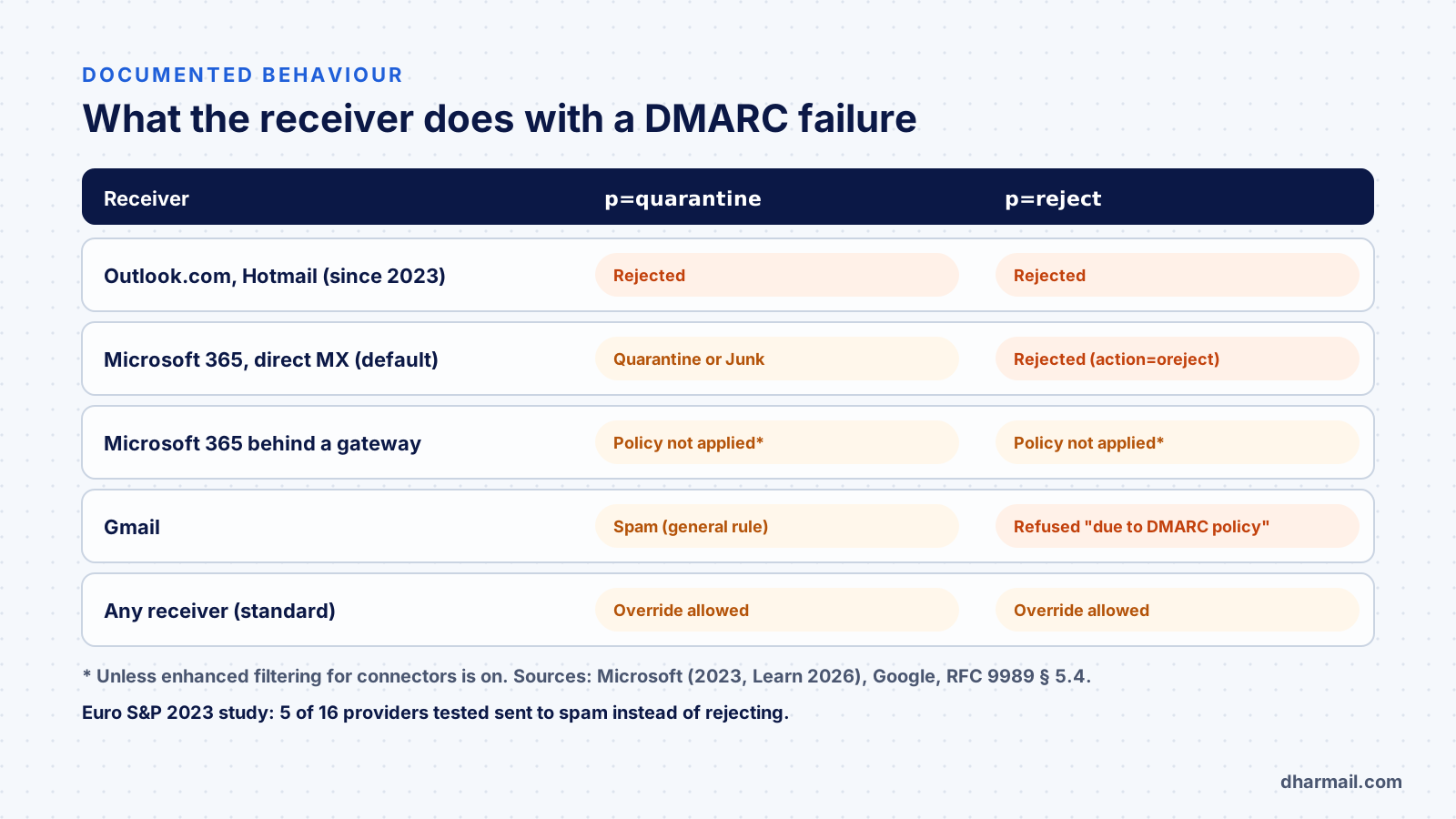
For Outlook.com, Hotmail and Live, Microsoft says it rejects mail failing DMARC when the sending domain’s policy is p=reject or p=quarantine. The rejection looks like this:
550 5.7.509: Access denied, sending domain example.com does not pass DMARC verification and has a DMARC policy of rejectFor Microsoft 365, the anti-phishing policy now honours the sender’s policy by default. Microsoft Learn’s 2026 documentation details the behaviour when “Honor DMARC record policy” is on:
| Published policy | Microsoft 365 handling | Shown in Authentication-Results |
|---|---|---|
p=none |
No DMARC-specific action | dmarc=fail action=none |
p=quarantine |
Junk Email folder or quarantine, depending on configuration | action=quarantine |
p=reject |
Rejected during the SMTP session | action=oreject |
The “o” in oreject stands for origin: the originating domain’s policy triggered the rejection.
The exception that changes everything: the MX points to a gateway
Microsoft’s 2023 announcement is explicit: if the recipient domain’s MX points to another security solution (a third-party filtering gateway in front of Exchange Online), “Honor DMARC” is not applied. The one exception: with enhanced filtering for connectors enabled, Microsoft applies the policy again.
The practical consequence: in a company with a security gateway, an email spoofing your own domain can reach your employees’ mailboxes even if you publish p=reject. Microsoft Learn also lists other causes for a dmarc=fail action=oreject message being delivered anyway: the setting disabled, an allow list, safe senders or a mail flow rule.
Gmail: an explicit refusal citing the DMARC policy
Gmail’s documentation lists a dedicated refusal code, whose temporary variant is:
451 4.7.26 Unauthenticated email from example.com is not accepted due to domain's DMARC policyThe message is clear: your policy is the reason for the refusal. Al Iverson, a well-known deliverability expert, summed it up in November 2026 on Spam Resource: consumer Gmail and Outlook.com reject failing mail, and Google Workspace and Microsoft 365 do so by default too.
An academic study adds a useful detail: at Gmail, a user cannot force delivery of a message failing DMARC when the domain publishes p=reject, whereas they can for p=none or p=quarantine.
What a study of 16 major mailbox providers shows
The Forward Pass study, presented at the IEEE Euro S&P security conference in 2023 by a team of researchers, tested 16 major mailbox providers (and 4 mailing list services) with domains publishing none, quarantine and reject. Its measurements date from 2022 and 2023, and its main subject is email forwarding security, but it documents DMARC handling:
- 5 of 16 providers put failing messages in the spam folder instead of rejecting them, even under
p=reject: Outlook, Fastmail, GMX, Inbox.lv and Pobox. For Outlook, this has changed since Microsoft’s 2023 announcement. - Every provider tested lets users override a DMARC decision in some form. Gmail, iCloud, Mail.ru, Hushmail, Onet and Zoho allow it for
noneandquarantine, but notreject; Yahoo only fornone; Fastmail, GMX, Inbox.lv and Pobox for every policy. - The study also noted that in May 2020, about two thirds of Alexa top 1 million domains with DMARC were still at
p=none.
Above all, the study confirms the key point: p=quarantine leaves the receiver a lot of latitude. Spam, quarantine, rejection or delivery with a warning: the outcome varies by provider.
The problem starts with the sender
Before asking whether receivers enforce DMARC, remember that few domains publish a policy that actually protects them. According to DmarcDkim.com data we follow for France, on 2 November 2026, out of 21,286 domains observed, only 10.1% had full protection (p=reject at 100%), and 71.8% had no effective protection. In the May snapshot, the same source’s worldwide average was 11.2%. Our article on DMARC adoption in France details these figures and their limits.
In other words: “do providers enforce my policy?” is only a question for a minority of domains. For the rest, there is nothing to enforce.
How to check what receivers do with your email
1. Read the disposition field in your DMARC reports
Each aggregate report shows, per source, the policy actually applied by the receiver:
<policy_evaluated>
  <disposition>none</disposition>
  <dkim>fail</dkim>
  <spf>fail</spf>
  <reason><type>forwarded</type></reason>
</policy_evaluated>
Here, the receiver saw a DMARC failure on a p=reject domain but did not reject it because the message had been forwarded. That is not necessarily a problem: it is the intended use of the override. Our guide to reading a DMARC XML report explains how to use these fields.
Note: Microsoft only sends aggregate reports when the recipient domain’s MX points directly to Microsoft 365, and does not send detailed failure reports.
2. Run a spoofing test on your own mailboxes
From an unauthorised server, send a message using your domain in the From field to test mailboxes at Gmail, Outlook.com and your own tenant. The rejection, or the Authentication-Results header of the received message, shows the real handling.
3. Check your own tenant
If your MX points to a security gateway, check with your provider that spoofing of your internal domain is blocked upstream, or enable enhanced filtering for connectors in Microsoft 365. See also our article on Direct Send and internal spoofing.
What to conclude
- Move to
p=rejectonce your flows are ready: it is the only policy handled in a broadly consistent way by the major providers.quarantineis a useful step, not an end point. - Do not confuse published policy with real protection: DMARC reports show what receivers actually do.
- Protect the inbound side too: DMARC protects your domain at other receivers; in your own organisation, your mail configuration decides.
- Keep an eye on forwarding: a forwarded message can fail DMARC without any spoofing. Our article on SRS and forwarding explains why.
FAQ
Does Gmail reject emails that fail DMARC with p=reject?
Gmail refuses unauthenticated email citing the domain’s DMARC policy, with a 4.7.26 or 5.7.26 code. A Gmail user cannot force delivery of a message blocked by p=reject, according to the Euro S&P 2023 study.
Does Microsoft 365 enforce DMARC by default?
Yes since 2023: the anti-phishing policy honours the sender’s policy by default. Unless the tenant’s MX points to a third-party gateway without enhanced filtering, or an allow list overrides it.
Why does my DMARC report show disposition=none when I am at p=reject?
The receiver applied an override: forwarding, mailing list, trusted forwarder or local policy. The reason field shows it when filled in.
Is p=quarantine enough?
It already protects, but its handling varies: spam, quarantine, even rejection at Outlook.com. For consistent protection, the goal remains p=reject.
Does DMARC guarantee no fake email will get through?
No. It protects against exact spoofing of your domain at receivers that enforce it. It does not protect against lookalike domains or a genuinely compromised mailbox.
Conclusion
The major mailbox providers enforce p=reject much more strictly than a few years ago, notably since Microsoft’s 2023 change. But DMARC remains a request the receiver can adapt, quarantine is interpreted freely, and some enterprise architectures stop applying your policy. The right stance: aim for p=reject, read your reports and check your own configuration. Dharmail’s domain spoofing protection service (page in French) covers all three.
Sources and references
- IETF — RFC 9989, DMARC, section 5.4 “Policy Enforcement Considerations”
- IETF — RFC 7489, DMARC (obsoleted), section 6.7 and appendix C
- Microsoft — Announcing New DMARC Policy Handling Defaults for Enhanced Email Security (19 July 2023)
- Microsoft Learn — Configure DMARC and inbound email handling
- Microsoft Learn — Recommended settings for EOP and Defender for Office 365
- Google — Gmail SMTP errors and codes
- Liu et al. — Forward Pass: On the Security Implications of Email Forwarding Mechanism and Policy, IEEE Euro S&P 2023
- Spam Resource — Ask Al: Do Microsoft or Google ever ignore p=reject? (6 November 2026)
- DmarcDkim.com — DMARC Adoption in France