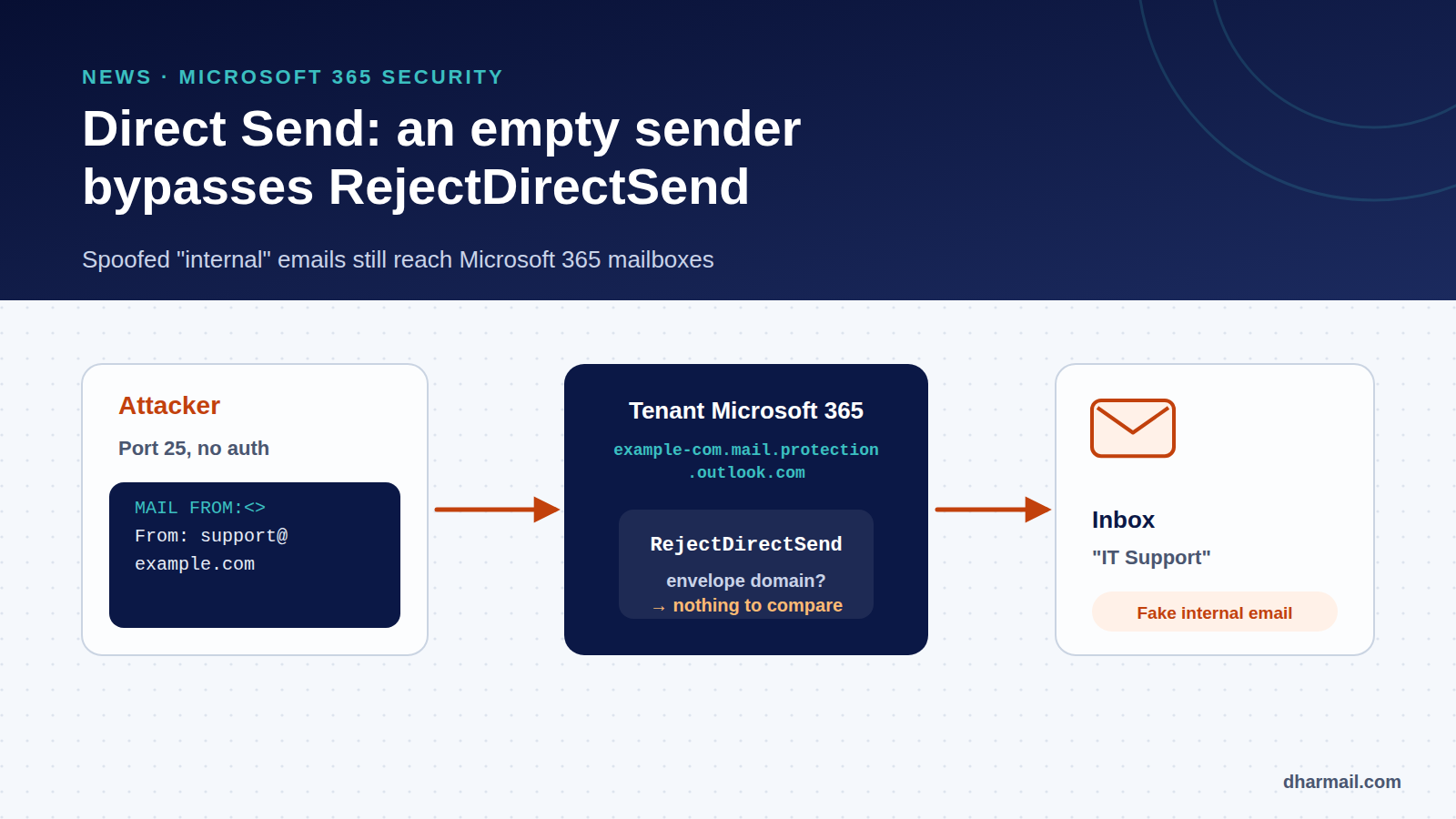
An email signed “IT Support”, sent from an address on your own domain, asking you to approve a shared document: this is the typical scenario of campaigns abusing Direct Send, an Exchange Online feature. No account is stolen, no password compromised. The attacker simply sends straight to your Microsoft 365 tenant’s receiving server.
Microsoft added a setting in 2025 to block this, RejectDirectSend. But on 4 September 2026, ReliaQuest researchers described a technique that bypasses it with an empty envelope sender. Here is how the attack works, what the setting really blocks and the configuration that actually closes the door.
Key takeaway: RejectDirectSend alone is not enough. The strongest control observed is an inbound connector restricted to the IPs or certificate of your legitimate devices, combined with RejectDirectSend and the removal of filtering exceptions.
What is Direct Send?
Direct Send lets a device or application send email to mailboxes in your own tenant without authentication. It uses SMTP on port 25 to the tenant’s MX endpoint, in the form example-com.mail.protection.outlook.com. The sender address must belong to an accepted domain of the tenant, but needs no mailbox.
Microsoft documents this for multifunction printers, scanners and business applications that only send internally. External recipients are refused. It is convenient: no password stored in a device. It is also the problem: the server does not check who is sending.
How the attack works
The campaigns documented since May 2025 (Varonis, reported by BleepingComputer, then Rapid7) all follow the same pattern:
- The attacker finds the target’s MX endpoint, published in DNS.
- They send an unauthenticated SMTP message with a company address in the From field: management, IT support, accounting.
- The message lands in employees’ mailboxes looking like internal mail.
The lures are classic: voicemail or fax attachments, file sharing, payment requests, meeting invitations. The link usually leads to a fake Microsoft sign-in page. According to BleepingComputer, the campaign observed by Varonis targeted more than 70 organisations, mostly in the United States.
The message normally fails SPF and DMARC, since it does not come from an authorised server. Microsoft states that Direct Send does not bypass anti-spam and that suspicious messages can be filtered. In practice, several analyses show that local exceptions, such as allowed senders or rules that lower the spam score, let some of these messages through. ReliaQuest describes a phishing message that reached the inbox because the impersonated executive was an allowed sender.
RejectDirectSend: what the setting does
On 28 April 2025, Microsoft introduced a tenant-wide setting, still in public preview according to its post’s May 2026 update:
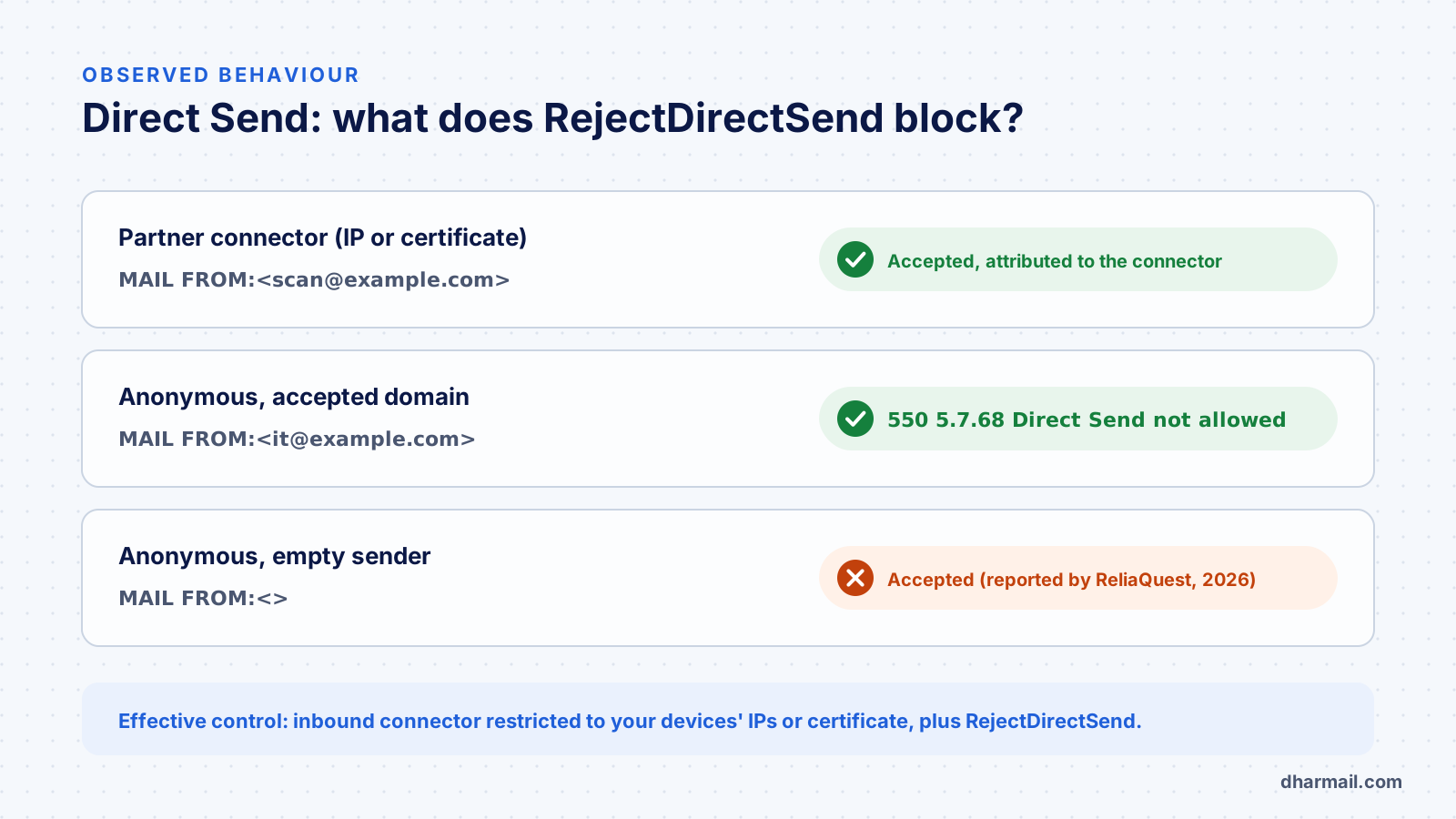
Set-OrganizationConfig -RejectDirectSend $trueIt is off by default and takes effect within about 30 minutes. An anonymous message, meaning one not attributed to any connector, whose envelope sender (MAIL FROM) belongs to an accepted domain is then refused:
550 5.7.68 TenantInboundAttribution; Direct Send not allowed for this organization from unauthorized sourcesMicrosoft spells out the limits. The check only looks at the envelope domain, not the address shown in the From field. It only covers messages that do not go through a connector. And it does not protect against spoofing of other domains, which remains the job of the usual protections.
The bypass: an empty envelope sender
On 4 September 2026, ReliaQuest published the results of two test sends. The first, with an envelope sender on the tenant’s domain, was refused as expected. The second used an empty envelope:
MAIL FROM:<>
From: IT Support <support@example.com>
It was accepted. The check has nothing to compare: an empty envelope has no domain. The visible address remains the company’s. An empty envelope is normally reserved for non-delivery reports (bounces), which makes it legitimate at protocol level.
ReliaQuest stresses that this is not a Microsoft software flaw and needs no compromised account. Its examples span campaigns from September 2025 to August 2026. Importantly, according to the same report, an IP-restricted inbound connector blocked every Direct Send attempt, including empty-envelope ones.
The configuration that closes the door
1. Inventory real Direct Send use
Before blocking, find out who uses Direct Send legitimately: printers, scanners, invoicing software, monitoring. Microsoft offers a change-tracking report in the Exchange admin center (in preview) that shows this traffic. Our article on SMTP AUTH Basic and printers covers this inventory.
2. Attach legitimate sources to a connector
Microsoft recommends a partner-type inbound connector, preferably certificate-based, otherwise based on your sites’ public IP addresses. Messages from these sources are then attributed to the connector and are no longer anonymous. For a vendor without a fixed IP or certificate, Microsoft suggests a transport rule based on a specific header.
3. Enable RejectDirectSend
Once legitimate sources are attached, enable the setting. Then check message traces (Get-MessageTraceV2, then Get-MessageTraceDetailV2) to confirm device flows go through the connector.
4. Remove exceptions that disable filtering
Delete allowed senders and domains covering your own domain, and transport rules that force a low spam score. These are what turn a spoofed message into a “trusted” one.
5. Publish an enforced DMARC policy
A p=reject policy on your domain does not replace the steps above, but it strengthens filters’ verdict on unauthenticated messages. See our guide to configuring SPF, DKIM and DMARC without breaking email delivery.
6. Watch for empty envelopes
ReliaQuest recommends searching for messages with an empty envelope sender while the displayed address belongs to your domain, separating them from genuine non-delivery reports.
A note on SPF
Recommendations differ. Rapid7 and Varonis advise strict SPF (-all) so spoofed messages fail clearly. Microsoft rather recommends ~all in some contexts to avoid rejections in complex routing. The right choice depends on your flows: decide after an inventory, not by reflex. Our article on SPF syntax explains the difference between these qualifiers.
FAQ
Is Direct Send a Microsoft 365 vulnerability?
No. It is a feature designed for internal devices. The risk comes from it being open by default and from filtering exceptions added locally.
Does RejectDirectSend stop internal spoofing?
No. It only checks the envelope sender’s domain. A message with an empty envelope is not covered, according to tests published by ReliaQuest in September 2026.
Will my printers stop sending if I enable the setting?
Yes, if they send through Direct Send without being attached to a connector. Create an IP- or certificate-based partner connector first.
Which error code signals a RejectDirectSend rejection?
550 5.7.68 TenantInboundAttribution; Direct Send not allowed for this organization from unauthorized sources.
Does DMARC p=reject protect against Direct Send?
It helps, but it is not enough if local exceptions lower filtering. Combine it with the connector and RejectDirectSend.
Conclusion
Direct Send illustrates a common risk: a handy feature, open by default, that nobody inventoried. RejectDirectSend is useful, but it does not close every door. The robust configuration combines an inbound connector restricted to your sources, RejectDirectSend, the removal of filtering exceptions and enforced DMARC. Dharmail’s domain spoofing protection service (page in French) includes this check for Microsoft 365 tenants.
Sources and references
- Microsoft Exchange Team — Introducing more control over Direct Send in Exchange Online (April 2025, updated May 2026)
- Microsoft Learn — Set up a multifunction device or application to send email using Microsoft 365
- Cyber Security News — ReliaQuest: one blank field bypasses the Direct Send control (4 September 2026)
- ReliaQuest — One blank field bypasses Direct Send control
- BleepingComputer — Microsoft 365 Direct Send abused to send phishing as internal users (June 2025)
- Rapid7 — Microsoft 365 Direct Send abuse