Many companies still have silent email flows in Microsoft 365.
A printer that emails a scan. An ERP that sends an invoice. A monitoring tool that alerts the on-call team. A NAS, a ticketing tool, an old business application.
These flows often have one thing in common: they use smtp.office365.com with a username and password.
So this is not theoretical. As Microsoft gradually retires Basic authentication for SMTP AUTH in Exchange Online, these discreet flows may be the first to break.
Important timeline update
Microsoft had announced a gradual removal between 1 March 2026 and 30 April 2026.
But it published a timeline update on 27 January 2026, then a revised version on 29 January 2026.
The new path is:
- until December 2026, SMTP AUTH Basic behaviour stays unchanged;
- at the end of December 2026, SMTP AUTH Basic will be disabled by default for existing tenants, with admins able to re-enable it if needed;
- for new tenants created after December 2026, SMTP AUTH Basic will be unavailable by default;
- in the second half of 2027, Microsoft is due to announce the final retirement date.
Official source: Exchange Team Blog, Microsoft Community Hub.
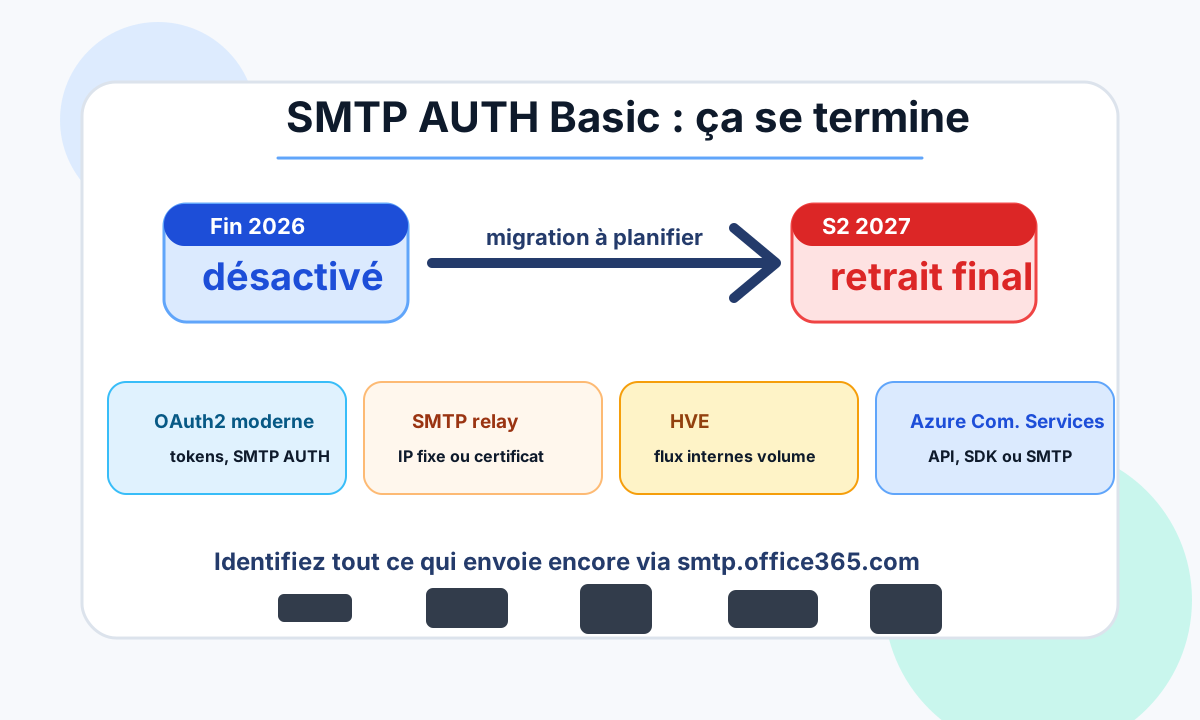
This delay must not be read as a cancellation.
It is extra time to inventory, test and migrate properly.
What is really going away
The key point is simple: SMTP is not going away.
What is targeted is legacy username-and-password authentication for SMTP AUTH in Exchange Online.
In other words, the problem is not sending email over SMTP. The problem is using an old authentication method that is hard to protect and highly exposed to password theft.
Microsoft notes that SMTP AUTH can use modern authentication with OAuth, in addition to Basic authentication.
Official source: Enable or disable SMTP AUTH in Exchange Online.
Why printers and business apps are exposed
Modern desktops rarely use SMTP AUTH directly.
The risk comes from devices and applications that were configured once, then forgotten:
- multifunction printers;
- scan-to-email scanners;
- ERP systems;
- invoicing software;
- monitoring;
- ticketing;
- NAS devices;
- internal applications;
- PowerShell scripts or scheduled tasks;
- old SMTP connectors.
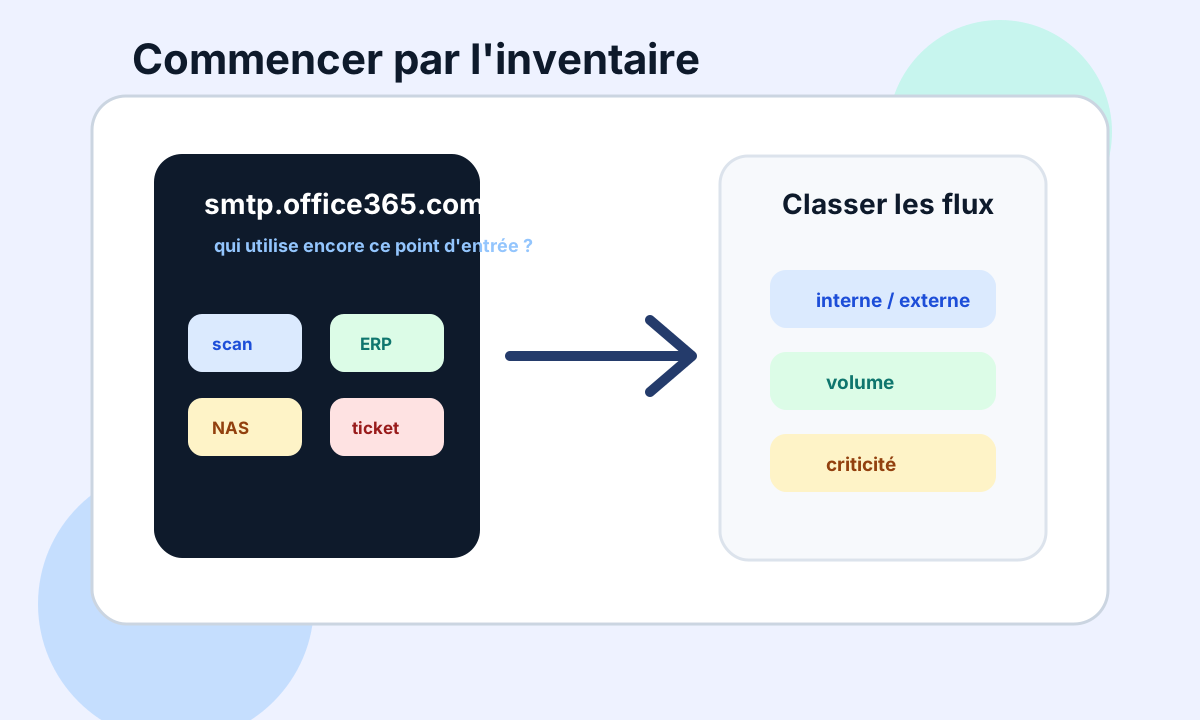
These flows are often critical, but not very visible.
The day authentication fails, the company discovers that invoices no longer go out, scans no longer arrive, or alerts are no longer sent.
First question: does the application support OAuth2?
If the application or device supports OAuth2 for SMTP AUTH, that is usually the cleanest path.
You keep SMTP AUTH, but replace the username/password pair with modern token-based authentication.
This is particularly useful when:
- the vendor officially supports OAuth2;
- the application is maintained;
- permissions can be documented;
- the accounts used can be isolated;
- authentication logs are usable.
In that case, the goal is not to work around the end of Basic. The goal is to modernise authentication while keeping a compatible SMTP transport.
If OAuth2 is not possible: look at SMTP relay
Many older printers and scanners cannot do OAuth.
In that case, a robust option is SMTP relay through a connector.
The idea is different: instead of authenticating the device with a mailbox password, you control the flow through a connector, a fixed IP or a certificate, depending on the architecture.
This can be relevant for:
- printers on a site with a fixed IP;
- network devices that will not evolve;
- simple internal flows;
- environments where you want to avoid storing a mailbox password in a device.
Relay, however, requires tightly scoping the authorised sources.
An overly broad relay quickly becomes a security weakness.
HVE: for internal application flows at volume
Microsoft also offers High Volume Email for Microsoft 365.
HVE targets application and line-of-business flows that send a lot of email, mostly within the tenant.
Microsoft’s documentation describes a dedicated SMTP endpoint, smtp.hve.mx.microsoft, on port 587, with TLS/StartTLS and authentication using HVE credentials or an OAuth token.
Official source: Manage High Volume Email for Microsoft 365.
HVE can be useful if:
- sends are mostly internal;
- volume is significant;
- the flow comes from an application;
- the company wants to separate these sends from regular user mailboxes;
- teams want a service better suited to automated sending.
It is not necessarily the answer to every external or transactional need.
So flows must be classified before choosing.
A dedicated service for application email
For transactional application email, both internal and external, a dedicated email service can be more suitable than a Microsoft 365 mailbox.
The approach changes: you move away from “a Microsoft 365 mailbox sends the emails” towards an application email service, usually through an API or an authenticated SMTP endpoint.
Update (October 2026): this article originally cited Azure Communication Services Email for this use. Microsoft has since announced its retirement on 30 September 2028. For a new architecture, see our article on ACS Email retirement and transactional alternatives.
This choice can be relevant for:
- application notifications;
- transactional email;
- larger volumes;
- applications that should be decoupled from user mailboxes;
- projects where an API is preferable to legacy SMTP.
It must, however, be treated as a real email service: sending domain, authentication, reputation, error tracking, monitoring and governance.
Choose by flow, not by urgency
The wrong reflex would be to look for one solution for everything.
A company may well need several answers:
- OAuth2 for a modern application;
- SMTP relay for older scanners;
- HVE for internal flows at volume;
- a transactional email service for a customer-facing application;
- simply stopping useless flows found during the inventory.
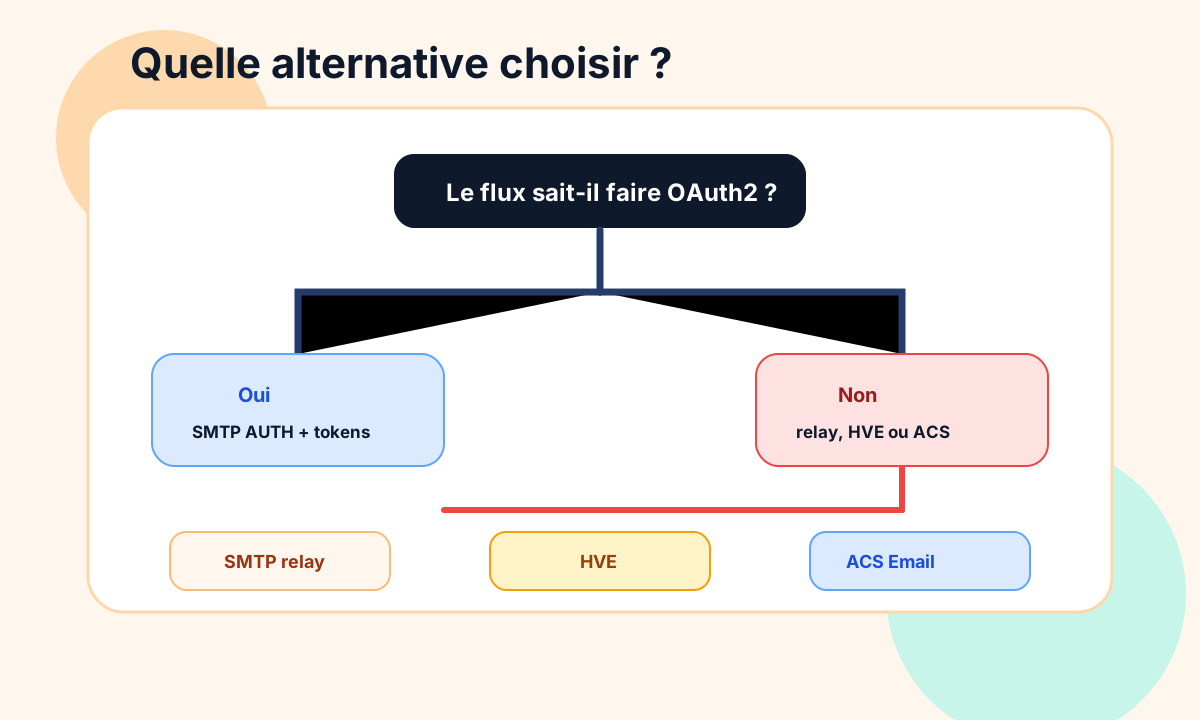
So the right question is not only: “How do we replace Basic?”
The real question is: which sending channel matches the risk, volume and criticality of the flow?
Immediate action: list everything that sends
Before migrating, you need to know what exists.
The most useful method:
- find everything that uses
smtp.office365.com; - identify SMTP AUTH accounts still active;
- check whether devices can do OAuth2;
- classify flows: internal, external, volume, criticality;
- separate printers, applications, monitoring and transactional email;
- define a target for each family: OAuth, relay, HVE, transactional service or shutdown;
- test critical flows before any switch;
- document owners and dependencies.
This is often the step where time bombs appear.
A device forgotten in a branch office. A shared account used by three applications. An old management tool still sending every alert from a personal mailbox.
Conclusion
The end of SMTP AUTH Basic in Exchange Online does not mean the end of SMTP.
It means the gradual end of a legacy authentication method that should no longer carry critical flows without control.
The delay announced by Microsoft gives time, but no reason to wait.
Companies must inventory their sends through smtp.office365.com, identify what does not support OAuth2, then choose the right alternative: OAuth2, SMTP relay, High Volume Email or a dedicated transactional email service.
The right goal is not only to avoid an outage.
It is to regain control of the application flows that send email on the company’s behalf.
To inventory these dependencies, see Dharmail’s Microsoft 365 and Google Workspace mail audit (page in French).