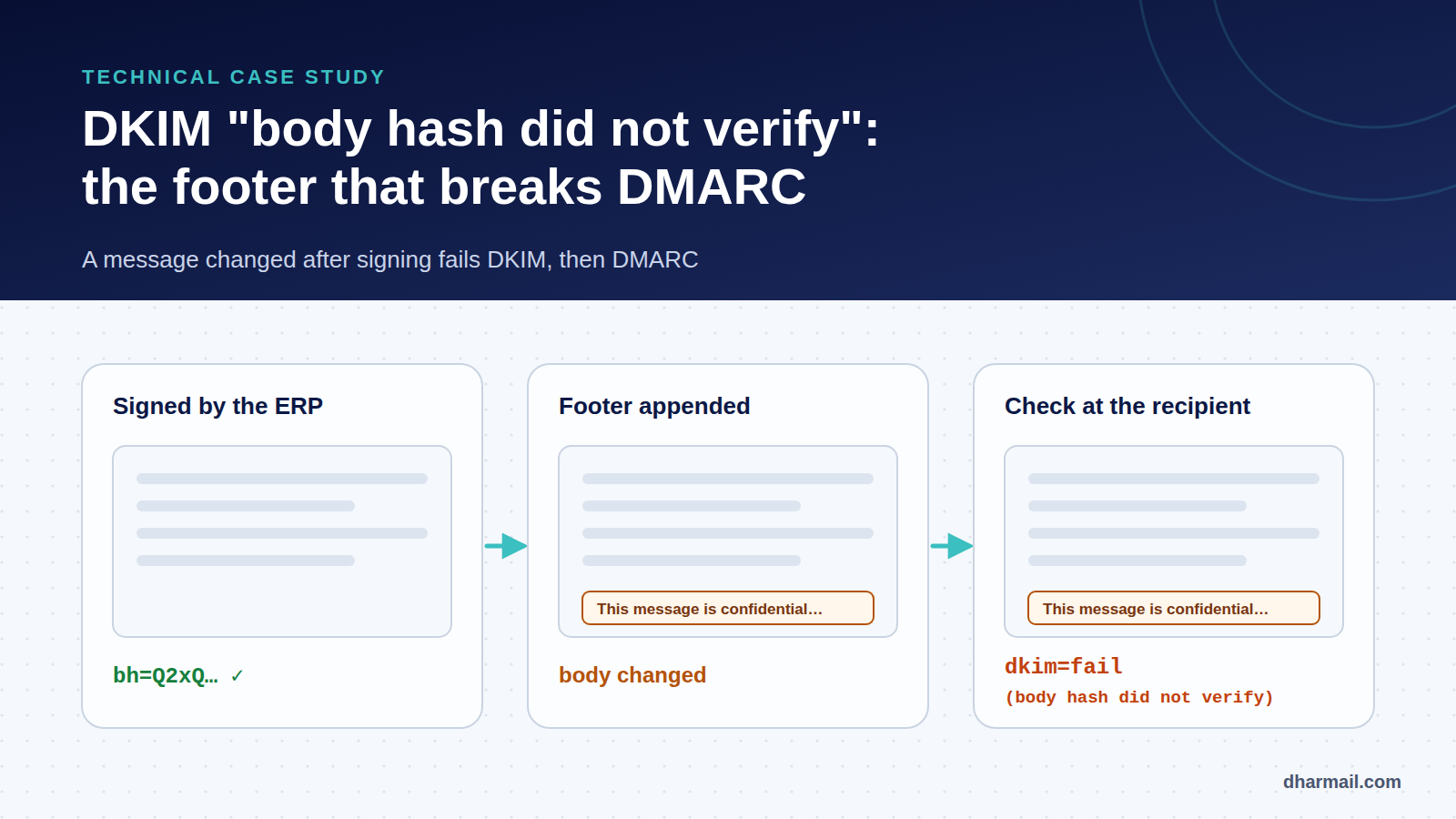
A manufacturing company sends its invoices from a cloud ERP. Messages go out through Microsoft 365. Since the DMARC policy moved to p=quarantine, several customers report that invoices land in spam, or no longer arrive. Nothing changed in the ERP. The domain does publish SPF, DKIM and DMARC.
This case shows one of the most common and least understood DKIM failures: dkim=fail (body hash did not verify). The message is modified after being signed. We follow the diagnosis step by step, from DMARC reports to the fix.
Reconstructed scenario. This case combines common situations seen during audits. Domains, tenant and provider are fictitious; no customer data is used.
Starting point: the symptoms
- Invoices sent by the ERP land in spam for several customers on Gmail and Microsoft 365.
- Emails sent manually from Outlook by employees arrive normally.
- The problem started a few days after DMARC moved from
p=nonetop=quarantine. - IT checked DNS: the SPF, DKIM and DMARC records exist and are syntactically correct.
That last point is a classic trap. Correct DNS does not prove that real messages pass DMARC. Only the headers of a received message and DMARC reports show the actual result.
Step 1: read the DMARC reports
Aggregate reports sent to the rua address give a first lead. For this flow, they show messages from Microsoft 365 IPs, with DMARC failing:
<record>
  <row>
    <source_ip>40.107.0.0</source_ip>
    <count>212</count>
    <policy_evaluated><disposition>quarantine</disposition>
      <dkim>fail</dkim><spf>fail</spf></policy_evaluated>
  </row>
  <identifiers><header_from>example.com</header_from></identifiers>
  <auth_results>
    <dkim><domain>example.com</domain><result>fail</result></dkim>
    <dkim><domain>tenant.onmicrosoft.com</domain><result>pass</result></dkim>
    <spf><domain>bounces.erp-saas.net</domain><result>pass</result></spf>
  </auth_results>
</record>
Three facts stand out. The example.com DKIM signature fails. A second signature, for tenant.onmicrosoft.com, passes but is not aligned with the From domain. SPF passes for the ERP’s bounce domain, also not aligned. Result: no aligned mechanism passes, so DMARC fails. Our guide to reading a DMARC XML report explains these fields.
Step 2: examine a real message
A customer agrees to forward an invoice as an attachment (.eml), not as a regular forward, to keep the original headers. The Authentication-Results header confirms the diagnosis:
Authentication-Results: mx.example-customer.com;
  dkim=fail (body hash did not verify) header.d=example.com header.s=erp1;
  dkim=pass header.d=tenant.onmicrosoft.com header.s=selector1-tenant;
  spf=pass smtp.mailfrom=bounces.erp-saas.net;
  dmarc=fail action=quarantine header.from=example.com
The error is precise: body hash did not verify. The public key was found and the header signature is consistent, but the message body no longer matches the hash computed at signing time. So this is neither a DNS problem nor a key problem.
Understanding the mechanism: what DKIM signs
A DKIM signature contains several tags:
DKIM-Signature: v=1; a=rsa-sha256; c=relaxed/relaxed; d=example.com; s=erp1;
  h=from:to:subject:date:message-id;
bh=Q2xQZ3Vh…=; b=Hk8vT1…d=ands=give the signing domain and selector: the public key lives aterp1._domainkey.example.com.h=lists the signed headers.bh=is the body hash, computed after normalisation.b=is the signature itself, covering the listed headers and thebh=tag.c=relaxed/relaxedsets canonicalisation, the normalisation applied before hashing.
relaxed canonicalisation tolerates small variations: trailing spaces, runs of whitespace, empty lines at the end of the body. It does not tolerate added text. Add a single paragraph, and the hash recomputed by the receiver differs from bh=.
Step 3: find out who modifies the message
We compare the message as generated by the ERP (a copy is available in its sending history) with the message received. A difference appears at the end of the body: a legal footer (“This message and its attachments are confidential…”) missing from the ERP version.
The text comes from an Exchange Online transport rule of the “Apply a disclaimer” type, created by the legal team for all outbound messages. The ERP does not send directly to the internet: it relays through an inbound connector of the Microsoft 365 tenant. Its messages therefore go through transport rules, just like employees’ mail.
You can confirm locally with dkimverify from the Python dkimpy library:
# message as received by the customer
dkimverify < invoice-received.eml
# → signature verification failed

# message as generated by the ERP (history copy)
dkimverify < invoice-erp.eml
# → signature ok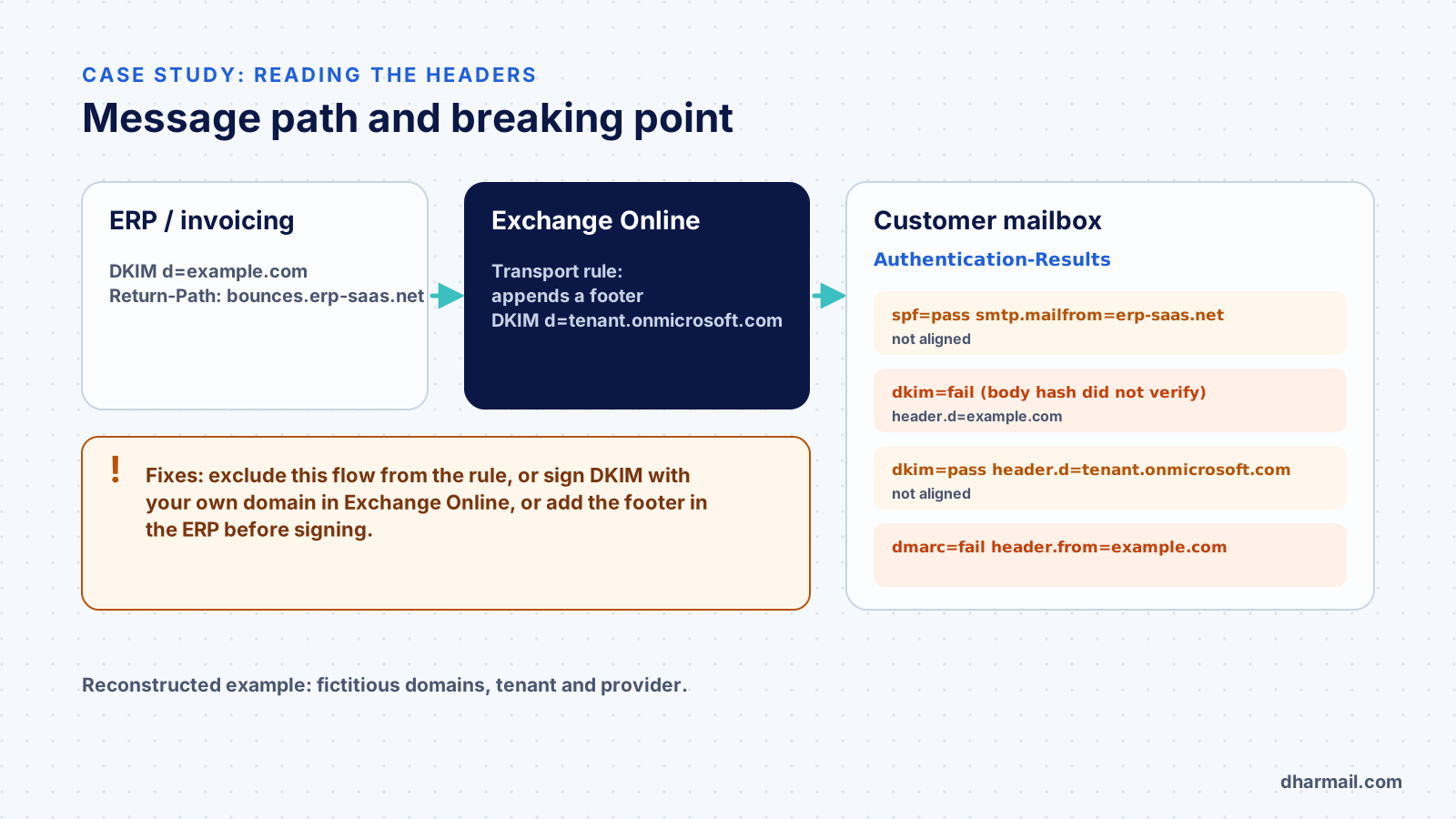
Why employees’ email passed
Emails sent from Outlook get the same footer, but they are not signed before it is added. Exchange Online signs at the end of the path, after transport rules, so their signature is valid.
The real issue was elsewhere: DKIM was not enabled for the custom domain in Microsoft 365. Exchange Online signed with the default tenant.onmicrosoft.com domain, valid but not aligned. For employees, SPF saved DMARC: their Return-Path belongs to example.com, which the SPF record authorises. For the ERP, the Return-Path belongs to the provider. Once the ERP signature broke, no aligned mechanism was left.
While DMARC stayed at p=none, this failure was invisible to receivers. Moving to quarantine made it effective. This is exactly what the observation phase is for: see our method to tighten DMARC without breaking email.
The fixes, in order of priority
1. Enable DKIM for the domain in Microsoft 365
This is the root fix. Once DKIM is enabled for example.com in the Microsoft Defender portal, Exchange Online adds an aligned, valid signature at the end of the path, even if the ERP signature is broken. DMARC passes, because one aligned, valid DKIM signature is enough.
# Exchange Online PowerShell
# create the configuration if it does not exist yet (disabled)
New-DkimSigningConfig -DomainName example.com -Enabled $false
# read the two CNAME records to publish in DNS
Get-DkimSigningConfig -Identity example.com | Format-List Selector1CNAME,Selector2CNAME
# once the CNAMEs are published:
Set-DkimSigningConfig -Identity example.com -Enabled $true
Publish the two CNAME records shown by Microsoft in your DNS zone, then enable signing. This fix also protects employees’ email, which will no longer rely on SPF alone.
2. Exclude the ERP flow from the footer rule
Add an exception to the transport rule, for example on the ERP sending address or a header it adds. The original signature then stays intact. If the footer is legally required, put it in the ERP invoice template, before signing.
3. Align SPF for the ERP flow, if the provider allows it
Some providers offer a custom bounce domain (for example bounces.example.com). SPF then aligns, adding a second way for DMARC to pass.
Avoid: the l= tag
The DKIM standard defines an l= tag that limits the signature to the first bytes of the body. It would make the signature ignore the added footer, but it also lets a third party append content to a signed message. It is not an acceptable fix.
Step 4: verify the fix
- Send a test invoice to a Gmail and a Microsoft 365 address, then read the headers: you should see
dkim=pass header.d=example.comanddmarc=pass. - Follow DMARC reports for one to two weeks: the Microsoft 365 source for this flow should switch to
pass. - Document the rule: any new system relaying through Microsoft 365 must be tested the same way.
Lessons learned
- Any change after signing breaks DKIM: footers, “external sender” banners, link rewriting by a gateway, antivirus stamps, mailing lists.
- Sign last. The last system before the internet must sign with your domain.
- A Microsoft 365 domain without custom DKIM relies on SPF alone, a fragile base as soon as a relay or forward is involved. Since November 2026, Outlook.com has also shown how quickly unauthenticated mail can be rejected.
- The
p=nonephase exists to reveal these cases. Do not cut it short, and read the reports before tightening.
FAQ
What does “body hash did not verify” mean?
The received message body does not match the bh= hash computed by the sender at signing time. The message was modified in transit, or the signature was computed over different content.
Can correct DNS produce this error?
Yes. This error is not about the public key: it appears even when the DKIM record is perfect. It points to modified content.
Why does DMARC fail when one DKIM signature passes?
Because DMARC requires a signature that is valid and aligned with the From domain. A valid signature for onmicrosoft.com does not count for example.com.
Can ARC solve this?
Not here. ARC helps a receiver trust intermediaries that modify messages, such as mailing lists. It does not replace an aligned signature for your own flow.
Do footers added by email signature tools cause the same problem?
Yes, if the tool acts after a first DKIM signature. Check where the final signing happens in the chain and test each affected flow.
Conclusion
“Body hash did not verify” is almost never a DNS problem: it is a processing chain problem. Diagnosis comes down to three questions: who signs, who modifies afterwards, and which mechanism remains aligned. If your flows cross several systems (ERP, gateway, Microsoft 365, signature tools), Dharmail’s SPF, DKIM and DMARC audit and configuration service (page in French) maps that chain before tightening your policy.
Sources and references
- IETF — RFC 6376, DomainKeys Identified Mail (DKIM) Signatures
- IETF — RFC 7489, Domain-based Message Authentication, Reporting, and Conformance (DMARC)
- Microsoft Learn — Set up DKIM to sign mail from your custom domain
- Microsoft Learn — Disclaimers, signatures, footers or headers in Exchange Online
- dkimpy — Python DKIM signing and verification library