SMTP is one of the most important protocols in email.
It comes into play when a message leaves an application, goes through an outbound server, then reaches the recipient’s server.
You rarely see it directly, but it explains many concrete problems: blocked emails, relay errors, 550 rejections, missing authentication, badly negotiated TLS, or messages accepted by a server but never visible in the inbox.
What is SMTP for?
SMTP stands for Simple Mail Transfer Protocol.
Its job is to carry an email from one server to another.
It is not used to read messages in a mailbox. To read email, you use IMAP, POP or a webmail interface.
SMTP answers a different question:
How is a message transmitted from the sender to the server that receives mail for the recipient’s domain?
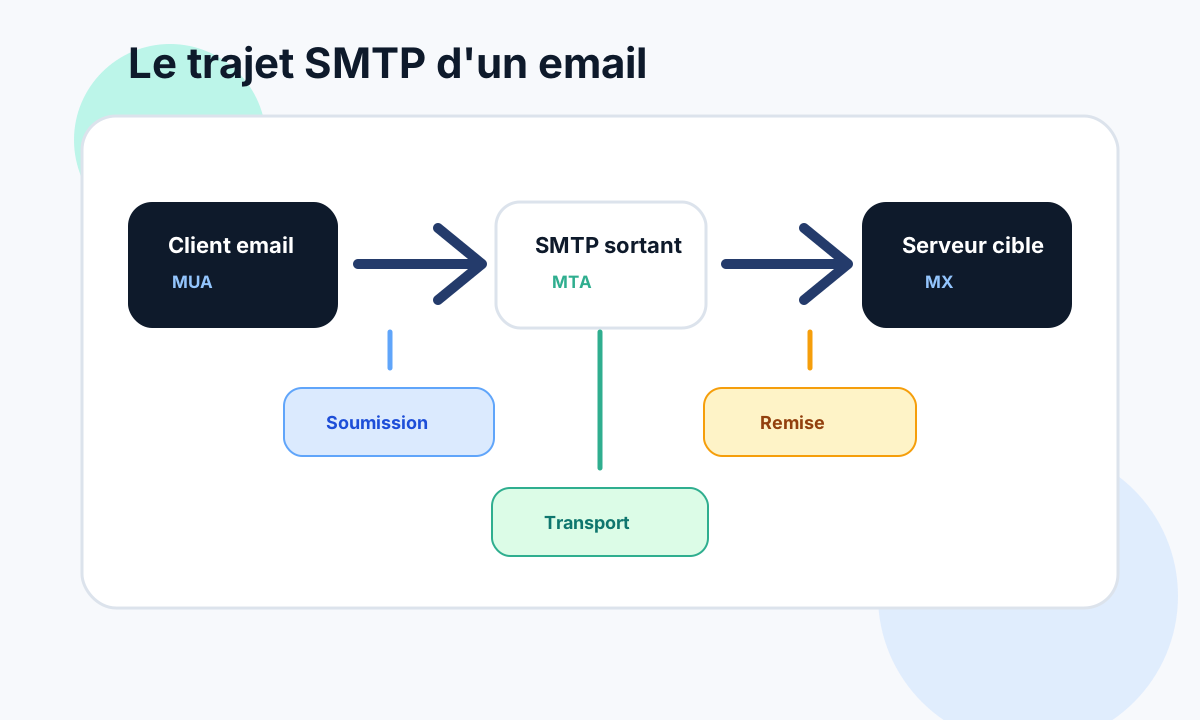
In a typical email chain, SMTP is used at several points:
- between an application and its sending server;
- between a sending server and a relay;
- between the sender’s server and the recipient’s server;
- sometimes between several security gateways before the final mailbox.
Each step can accept, refuse, filter or delay the message.
The journey of an email
When you send an email, the message does not go straight into the recipient’s mailbox.
It usually follows several steps.
- The mail client, CRM, website or marketing tool submits the message to an SMTP server.
- The outbound server checks whether the sender is allowed to send.
- It looks up the MX records of the recipient’s domain.
- It opens an SMTP connection to the server named by those MX records.
- The receiving server answers, checks the message, then accepts or refuses it.
- If the message is accepted, it may still go through internal filters before reaching the inbox.
That last point matters: a message accepted over SMTP is not necessarily shown in the main inbox.
It can be filed as spam, quarantined, redirected, deleted by a rule or held by a security gateway.
SMTP works like a conversation
SMTP is not magic. It is a structured conversation between two servers.
One server introduces itself, announces the sender, announces the recipient, sends the content, then waits for a reply.
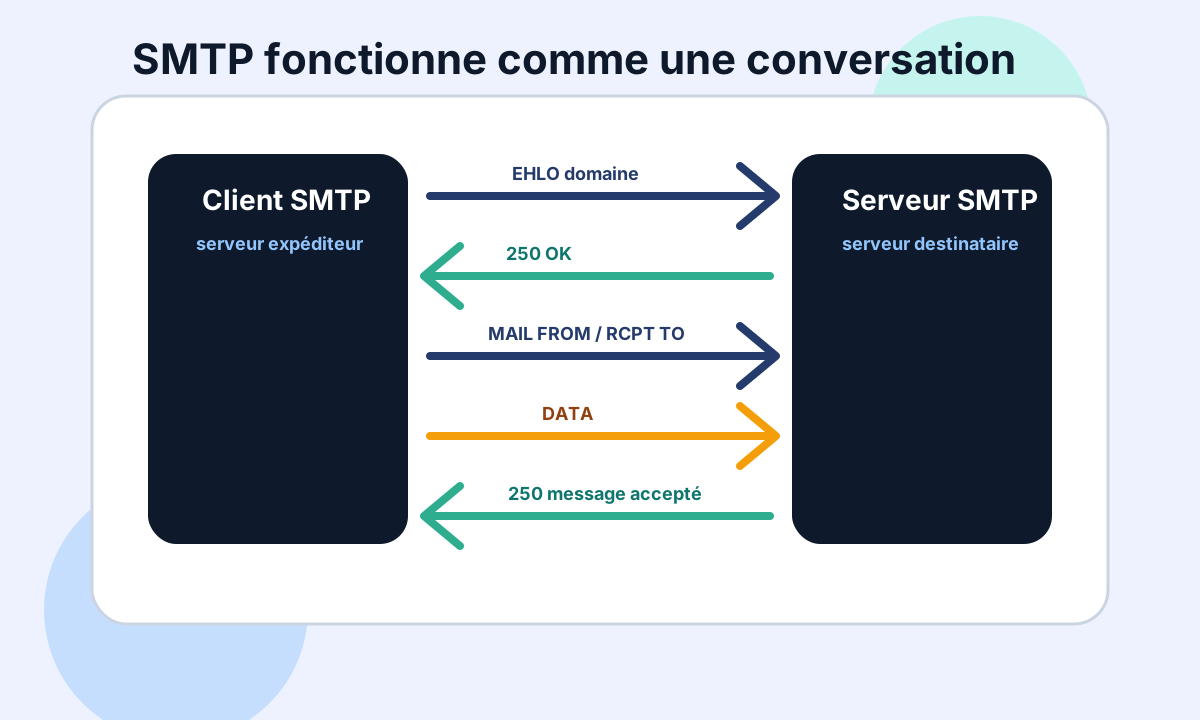
A simplified conversation looks like this:
EHLO mail.example.com
MAIL FROM:<contact@example.com>
RCPT TO:<customer@destination.com>
DATA
Subject: Test

Hello,
.
QUIT
At each step, the receiving server replies with a code:
250to say the step is accepted;421,450or451to signal a temporary problem;550,553or554to refuse the message or an address.
That is why SMTP logs are so valuable. They show exactly where the conversation fails.
The most useful SMTP commands
You do not need to memorise the whole SMTP standard to troubleshoot a problem.
But a few commands come up often:
| Command | Role |
|---|---|
EHLO |
The sending server introduces itself and announces support for modern SMTP extensions. |
MAIL FROM |
Sets the envelope sender, used notably by SPF and for bounces. |
RCPT TO |
Names the recipient that the server must accept or refuse. |
DATA |
Starts the transmission of the message content. |
STARTTLS |
Asks to encrypt the connection with TLS when the server allows it. |
AUTH |
Authenticates a user or application on a submission server. |
QUIT |
Ends the SMTP session cleanly. |
The difference between the visible sender and the envelope sender deserves special attention.
The From the user sees is not always the same as the MAIL FROM used during the SMTP transaction.
That difference explains many SPF, DMARC, bounce and alignment issues.
SMTP ports: 25, 465 and 587
SMTP can use several ports depending on the context.
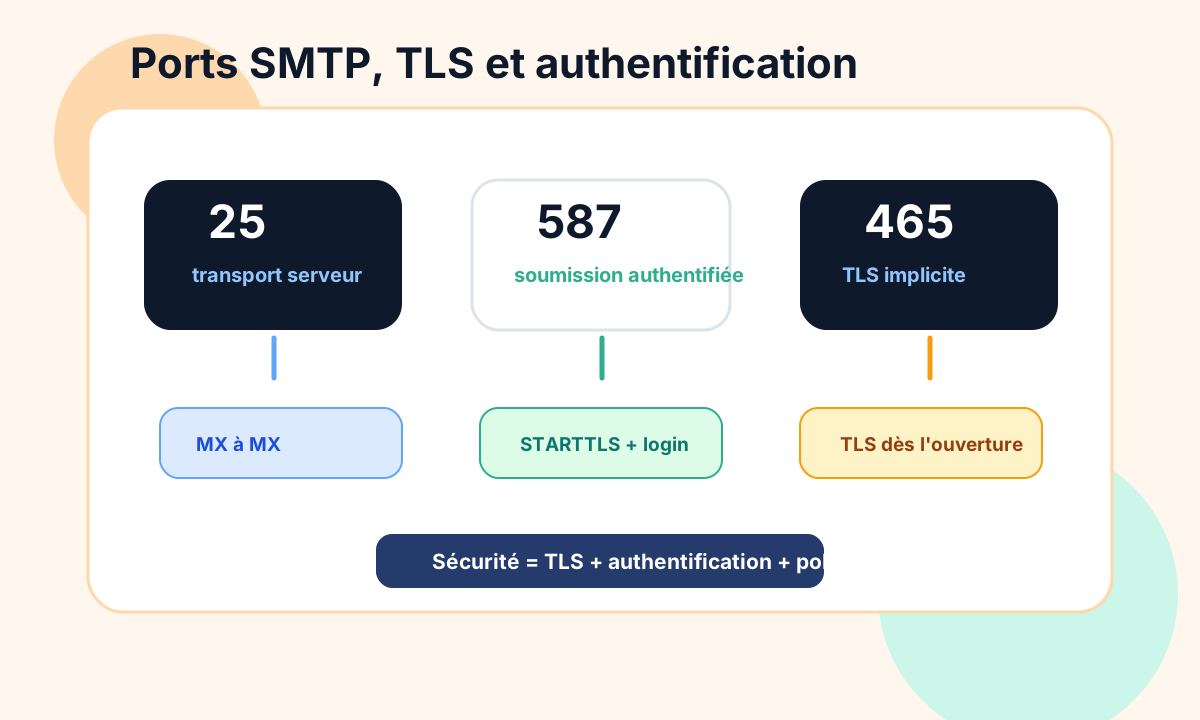
The most common:
25: transport between SMTP servers, notably MX to MX;587: authenticated submission by a client, application or sending tool;465: SMTP submission with implicit TLS from the start of the connection.
In a company, port 587 is often the cleanest option for an application that must send through Microsoft 365, Google Workspace or an authenticated SMTP relay.
Port 25 remains central for server-to-server transport, but it is often blocked or filtered on consumer connections to limit spam.
TLS alone does not make email reliable
TLS protects the connection between two servers when it is negotiated correctly.
That is important, but it is only part of email security.
A message can be sent over TLS and still:
- come from a poorly authenticated domain;
- fail SPF;
- not be DKIM-signed;
- fail DMARC;
- be sent from an IP with a poor reputation;
- contain a blocked link or attachment;
- be refused by the recipient’s policy.
SMTP carries the message. On its own, it does not guarantee that the message is legitimate, expected or well placed.
SMTP, SPF, DKIM and DMARC: who does what?
SMTP carries the message.
SPF, DKIM and DMARC help receiving servers decide whether the message is consistent with the domain that sends it.
In short:
- SMTP organises the transmission of the message;
- SPF checks whether the sending server is authorised for the envelope domain;
- DKIM checks a cryptographic signature added to the message;
- DMARC checks alignment with the visible domain and states a policy.
These mechanisms do not replace SMTP. They are added at reception to assess trust.
When an email is refused, you need to separate SMTP transport from the security verdict. Our guide to configuring SPF, DKIM and DMARC covers the authentication side.
Why an SMTP server refuses a message
An SMTP refusal can have many causes.
The most frequent:
- the recipient address does not exist;
- the mailbox is full or disabled;
- the recipient domain is misconfigured;
- the server is temporarily unavailable;
- the sender is not authenticated;
- relaying is not allowed;
- SPF, DKIM or DMARC fails;
- the IP or domain has a poor reputation;
- the content looks suspicious;
- too much volume is sent to the same provider.
The error code tells you the family of the problem.
A 550 5.1.1 often points to an invalid address. A 550 5.7.1 or 554 usually points to a security, reputation or anti-spam policy rule. Our list of SMTP errors details the most common codes.
What SMTP does not do
SMTP is essential, but it does not do everything.
It does not decide on its own whether a message lands in the main inbox, in spam or in quarantine.
It does not prove that the visible sender is legitimate.
It does not keep a contact list clean.
It does not make up for a poor reputation.
It does not fix an inconsistent DNS configuration.
The protocol carries mail. Mailbox providers then weigh many other signals.
How to troubleshoot an SMTP problem
The useful method is to start from the visible facts.
Check first:
- the full error message;
- the main SMTP code and the enhanced code;
- the recipient domain affected;
- the server or tool that sends;
- the
MAIL FROMand the visibleFrom; - the MX, SPF, DKIM and DMARC records;
- whether TLS is used;
- the reputation of the IP and the domain;
- the volume sent just before the error;
- the logs of the SMTP relay or sending platform.
The goal is not to change everything.
The goal is to understand where the SMTP conversation fails: connection, authentication, recipient, content, policy or reputation.
Conclusion
SMTP is the transport backbone of email.
It lets a message move from one server to another through a clear conversation: introduction, sender, recipient, content, reply.
Understanding SMTP helps you read errors, tell a temporary problem from a permanent refusal, and avoid random fixes.
For reliable email, SMTP must then be backed by a clean configuration: consistent DNS, SPF, DKIM, DMARC, TLS, authentication, error monitoring and a well-managed reputation.
For a concrete rejection or block, see Dharmail’s email deliverability troubleshooting service (page in French).