DMARC is not just a technical topic reserved for large companies.
For a small or mid-sized business, it mainly protects the email domain and helps regain control over what is sent.
In practice, DMARC shows who sends email with your domain, reveals misconfigured flows, reduces spoofing and better protects your customers, partners and staff against fake emails.
Its value goes further: DMARC also forces the company to put its email ecosystem in order.
DMARC protects the domain, not just campaigns
A domain name is a trust asset.
When a company uses example.com, that domain carries its brand, its business exchanges, its invoices, its notifications, its internal messages and its customer relationships.

If an attacker tries to send a fake email using that domain, the risk is not only technical. It directly affects the company’s credibility.
DMARC helps answer a simple question:
What should mailbox providers do when someone tries to send a non-compliant email with my domain?
Without DMARC, the answer is often unclear. With DMARC, it becomes gradual, measurable and manageable.
The roles of SPF, DKIM and DMARC
DMARC does not work alone.
It relies on SPF and DKIM.
SPF states which platforms are allowed to send email for a domain.
DKIM adds a cryptographic signature to the message to prove it was not altered and comes from an authorised service.
DMARC checks alignment with the domain the recipient sees and states the policy to apply on failure.
In short:
- SPF answers: is this server allowed to send?
- DKIM answers: is this message correctly signed?
- DMARC answers: is the visible domain consistent, and what happens if it is not?
For a small business, this combination creates a solid email security baseline.
What DMARC often reveals in a small business
Many companies think they send only from Microsoft 365 or Google Workspace.
In reality, there are usually more flows.
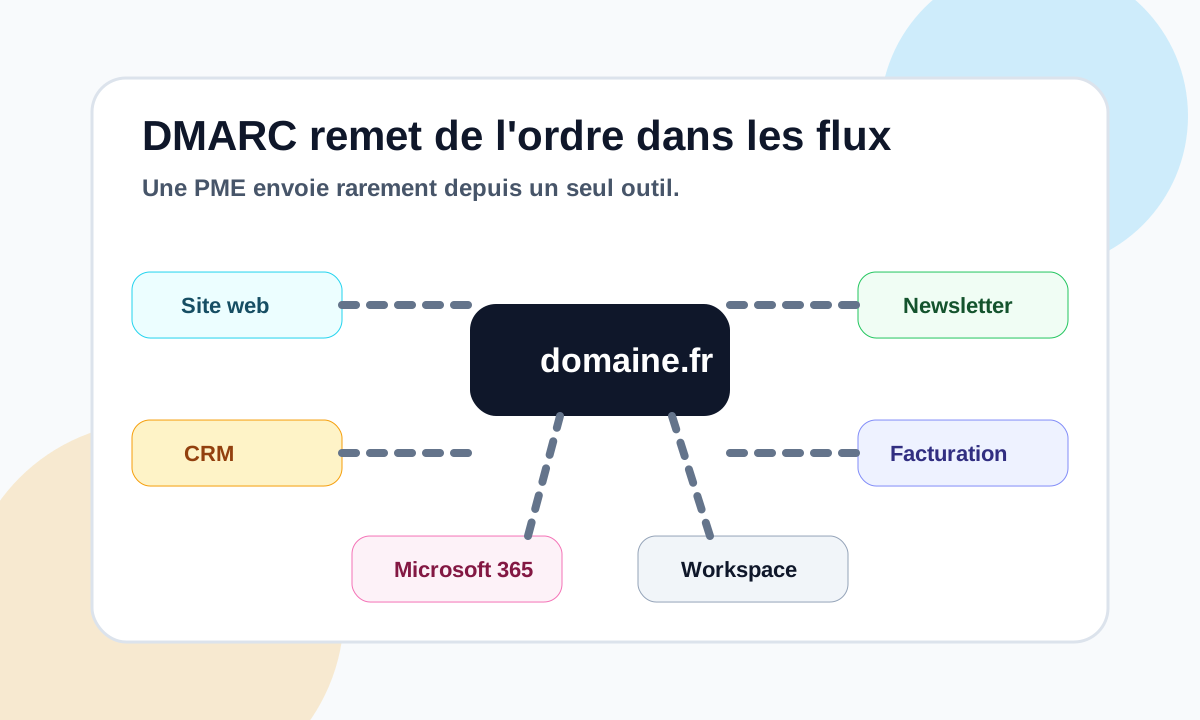
Common ones include:
- the website;
- contact forms;
- the CRM;
- the invoicing tool;
- the newsletter platform;
- transactional emails;
- Microsoft 365;
- Google Workspace;
- a support tool;
- an old business application;
- a forgotten SMTP relay.
DMARC brings these flows to light in its reports.
That is often when the company discovers that some tools send poorly, do not sign with DKIM, or use a subdomain that was never documented. Our guide to reading a DMARC XML report shows how to identify them.
Why it helps against spoofing
Domain spoofing means making people believe an email comes from your company when it does not.
It can be used to send:
- fake invoices;
- payment requests;
- phishing messages;
- fake support emails;
- fraudulent sales follow-ups;
- messages targeting your staff.
DMARC reduces this risk by giving clear instructions to the mailbox providers that receive these messages.
With a strict policy, an email that fails the checks can be quarantined or rejected.
The aim is not to make every attack impossible. The aim is to greatly reduce the room for abuse of your legitimate domain.
A gradual rollout
A good DMARC deployment does not mean jumping straight to p=reject.
For a small business, the safest method is gradual.
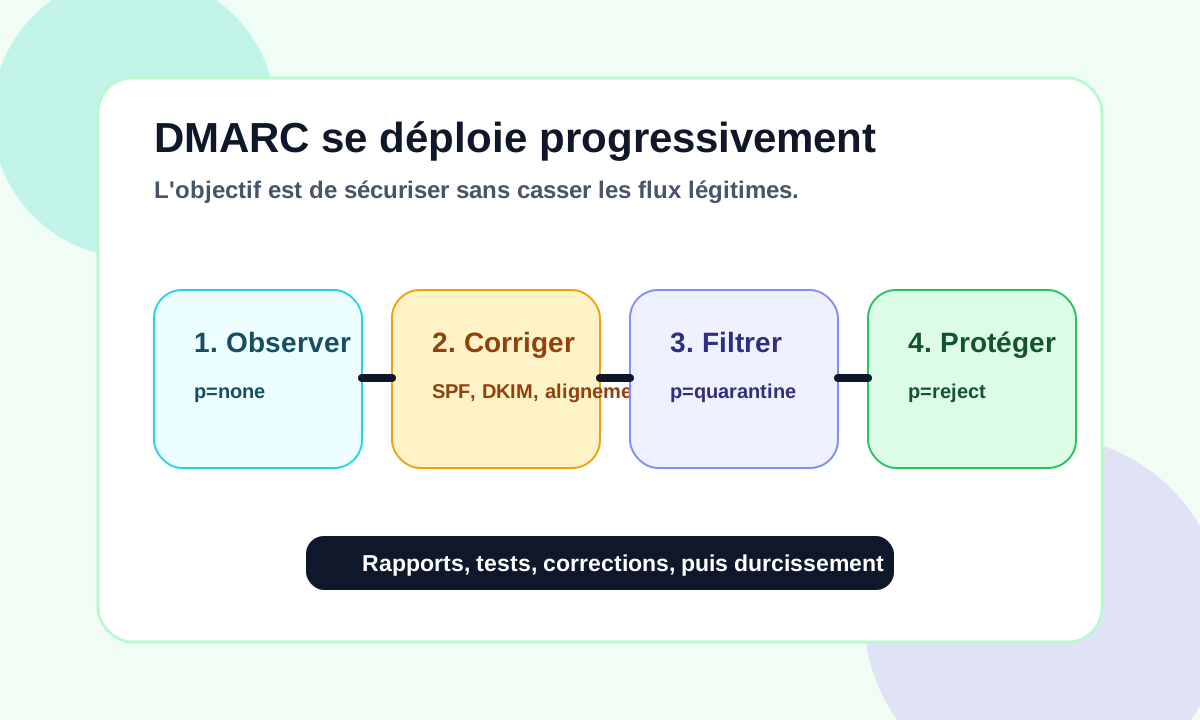
The usual steps:
- publish a monitoring policy with
p=none; - analyse the DMARC reports;
- identify the legitimate sources;
- fix SPF, DKIM and alignment;
- separate some flows if needed;
- move gradually to
p=quarantine; - go to
p=rejectonce legitimate flows are under control.
This approach avoids breaking useful emails: invoices, notifications, CRM messages, newsletters or transactional emails. Our step-by-step method to configure SPF, DKIM and DMARC without breaking email delivery details it.
DMARC must secure without blocking the business.
DMARC also brings order to your email
One of DMARC’s main benefits is organisational.
It forces the right questions:
- which tools send with the domain?
- who administers them?
- which services are still needed?
- which flows should be separated?
- which subdomains should be used?
- which platforms must sign with DKIM?
- which SPF records are too broad or too old?
For a small business, it is often an excellent entry point to regain control of its email.
This work also improves deliverability, because mailbox providers favour consistent, authenticated and well-managed domains.
What DMARC does not solve
DMARC does not solve everything.
It does not guarantee inbox placement.
It does not fix a degraded contact list.
It does not make up for a poor sending reputation.
It does not automatically protect against lookalike domains, typos or attacks using another domain name.
But it sets an essential baseline: your domain must not be usable by just anyone.
Conclusion
For a small business, DMARC is not a technical luxury.
It is a concrete tool to protect the email domain, understand sending flows and reduce spoofing.
It better protects customers, partners and staff against fake emails.
And it often brings order to email that has become scattered: website, CRM, newsletters, invoicing tool, Microsoft 365, Google Workspace or business applications.
DMARC does not solve everything. But for a small business, it is a solid basis for securing and making reliable use of its email domain.
To go further, see how Dharmail helps protect a domain against spoofing (page in French).
For a first check, test your domain with our free domain checker (page in French).