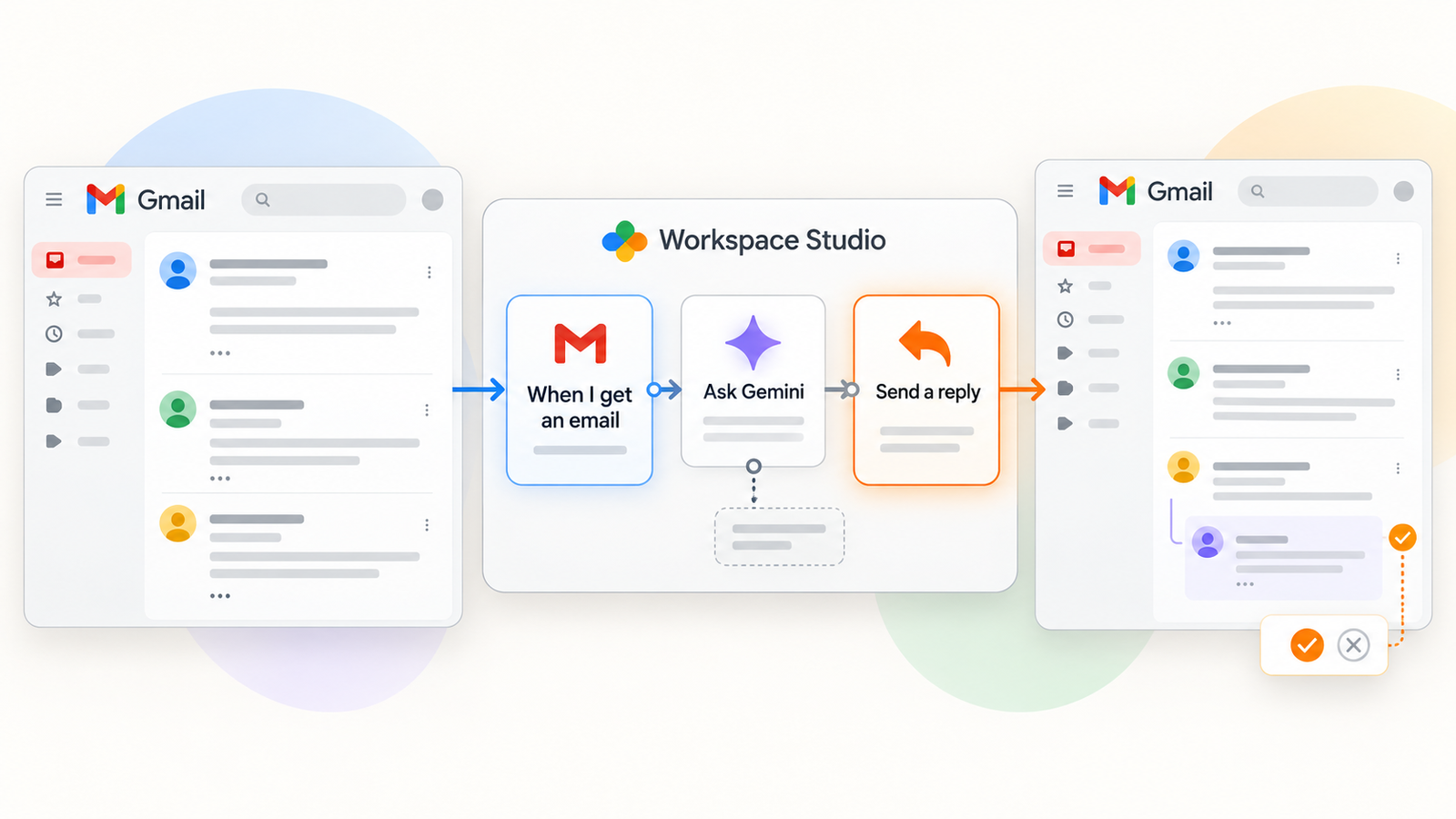
Google Workspace Studio can now reply within an existing Gmail thread. In its September 2, 2026 update, Google introduced “Reply to email” alongside three other automation steps. The apparent benefit is straightforward: acknowledge an inquiry, route a request or move a case forward without writing every message by hand. Yet an email sent in a person’s name can be read as an organizational decision. This is a security and governance change as much as a workflow feature.
Two distinctions should frame any deployment. First, this step does not automatically mean AI-generated content. A reply can contain fixed text or variables; a separate Gemini step can provide generated material. Second, Google’s help page says the reply step requires user approval if the run includes people outside the organization. That documented safeguard matters. It still leaves a practical question: who approves which message, with what context, and what happens when no one should send a reply at all?
The working rule: give an automatic reply a narrow trigger, a controlled audience, limited claims, a named owner, a way to stop it and evidence of each run. For sensitive conversations, a draft reviewed by a person is often the safer workflow.
1. What “Reply to email” actually does
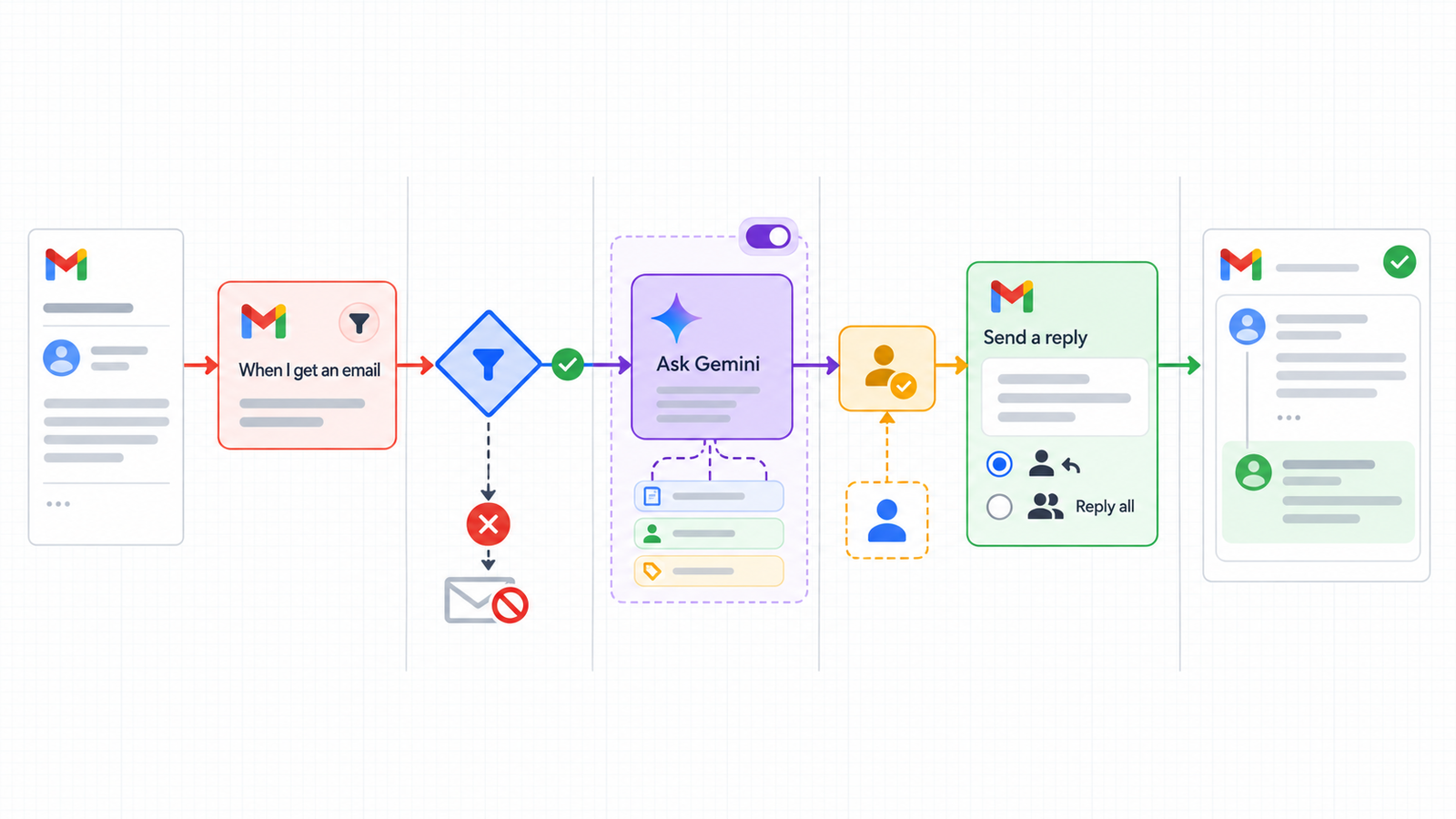
A Workspace Studio flow combines a starter with one or more steps. The “When I get an email” starter can run for a new message arriving in the inbox. Its conditions can narrow the scope by sender, recipient, subject, words, attachment or message size. The reply step selects an email from the starter or a previous step, then sends a message inside the existing conversation. Google documents reply to the sender and reply to all options, plus optional Cc and Bcc fields that can contain dynamic addresses.
Keeping the thread helps the recipient and support team follow a case. It also carries context risk. An old conversation may have additional participants, a changed request or information that is no longer appropriate to share. “Reply to all” deserves particular care when an external person or mailing list has appeared in the thread. A familiar subject line does not make every participant an authorized reader. The flow should select the right email and check the actual audience of the outgoing message.
Google says an action’s visible sender appears as “[flow name] for [your name]”. The person who owns the flow is therefore associated with the outgoing communication. A descriptive flow name can make the function clear. A misleading name can make accountability harder, especially when several teams automate messages from similar mailboxes.
2. Automation and generated text are different risks
A fixed acknowledgment can say that a request was received and give a genuine route to human help. A reply with variables may include the sender’s name, a case reference or text from another step. A generated reply can interpret the incoming email and suggest a specific answer. These are different levels of autonomy, and each needs its own review criteria.
Even a fixed sentence can be harmful if it falsely promises that an urgent incident is being handled. A badly selected variable can expose personal data or text from an unrelated message. A generated answer might invent a policy, miss an attachment, confuse two cases or follow a malicious instruction embedded in the incoming email. Studio’s product safeguards are useful, but they do not make every statement from an unknown sender trustworthy. In a flow that uses Gemini, treat incoming message content as untrusted data and keep outgoing claims within a verifiable scope.
Google also offers a “Draft an email” step. A draft is a meaningful alternative when preparing the reply saves time but deciding to send still requires a person. For HR, legal or finance correspondence, that distinction may matter more than which model writes the initial text. Reviewers need the complete thread and any relevant records, not only a polished proposed sentence.
3. Admin controls and what approval really covers
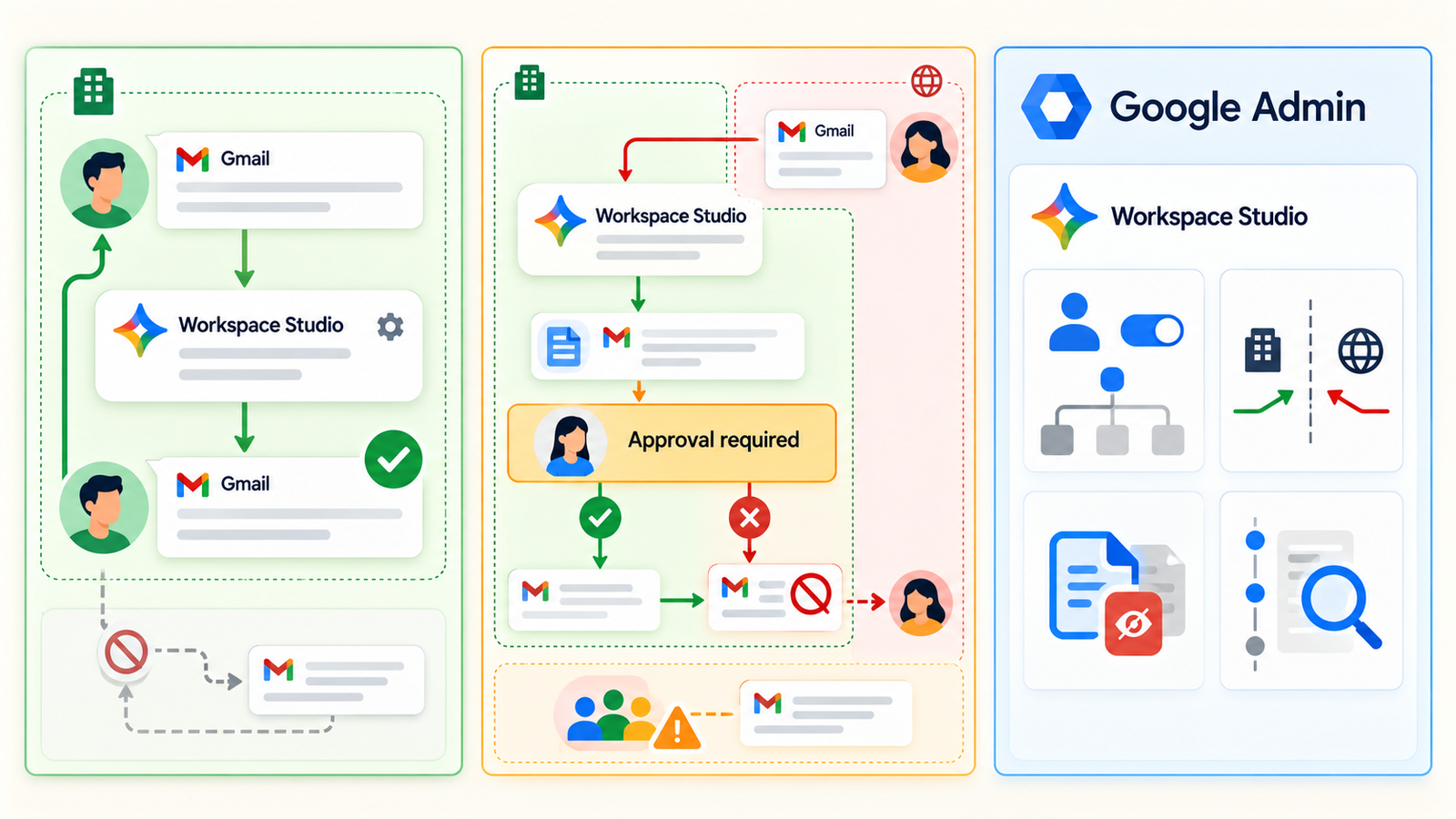
Google’s announcement says administrators can disable individual steps and require end-user approval when actions may share data outside the organization. It also says the new step is available by default if Gemini for Google Workspace steps are allowed. An administrator should inspect the effective settings of the domain rather than assume a new action is dormant until someone switches it on.
The help entry for this specific reply step is explicit: a run including people outside the organization requires user approval. An organization may set further rules. It would be unsafe, however, to infer that every internal reply gets a human review. An internal message can still expose restricted information to the wrong team or create a false commitment. Product approval is a run-time guardrail; a business policy must decide which categories of reply demand human judgment regardless of the recipient’s domain.
A useful approval should let the person inspect the exact outgoing text, the relevant conversation and every recipient, including Cc and Bcc. The reviewer must be able to reject a bad reply while preserving the underlying service request for manual handling. Google’s approval tools support pending requests, but the team should test the actual experience. A button clicked in batches without reading provides little protection. Where the stakes are high, an assigned queue and a reviewed draft usually produce a clearer record of the decision.
4. Where mistakes happen
| Situation | Plausible failure | Practical control |
|---|---|---|
| Long or reused thread | Reply addresses an older request | Narrow the starter and test mixed-context threads |
| Reply to all | A forgotten participant receives private details | Default to sender only; review the final recipient list |
| Dynamic Cc or Bcc | A variable adds an unexpected address | Avoid dynamic recipients or enforce an approved list |
| Generated wording | The flow asserts an incorrect decision or price | Restrict claims and review replies that make commitments |
| Attachment or personal data | Sensitive content is copied into the response | Exclude sensitive cases and minimize data passed between steps |
| Executive or shared operational mailbox | Automation appears to speak with excessive authority | Limit owners and define which accounts may use the flow |
The most effective control is often to limit what the flow may conclude. “We have received your request” makes a narrower promise than “Your refund is approved.” A link to a public support route is easier to verify than an individualized case summary. The first can be automated within a defined service process. The second may need a person to check the facts and the legitimacy of disclosure.
External recipients introduce confidentiality and reputation risks. An email cannot be treated like an editable draft once sent. Google’s approval pause gives an opportunity to intervene, but it does not prove that the proposed interpretation is accurate or that sharing the information is authorized. The same discipline covered in our Gmail AI agent security guide applies: limited access, a clear owner, auditability and rapid revocation if a workflow goes wrong.
5. Reasonable uses and high-risk categories
First-line support can acknowledge receipt with a standard message, provided a real team monitors and processes the request afterward. Internal triage can route a message or notify the right group without deciding the case. A simple internal workflow can confirm the arrival of a non-sensitive document. In each case, keep the wording modest, name the follow-up channel and define the escalation path. Start with a small pilot, measure manual corrections and expand only when the process is working.
By contrast, HR mail can reveal a personal situation or create expectations about employment decisions. Legal correspondence may contain facts and wording with formal consequences. Finance messages can prompt changes to bank details, invoice routing or payment approval. Executive, security and incident-response accounts can receive urgent or manipulative requests. For these categories, a generated message that is sent without review is a poor default, even if the destination is internal.
Personal data needs a separate assessment: who will see it, why each step needs it, where outputs and activity records are stored, and what happens if an integration is added. Google’s guide warns that third-party integration steps can share Workspace account data. A service appearing in a flow is not proof that it is approved for every data class. Apply internal privacy and retention rules to the entire chain, not just the Gmail reply action.
6. Avoid reply loops and silent failures
Google’s troubleshooting documentation says starters ignore messages sent by flows by default to avoid a flow repeatedly triggering itself or another flow. The “Include messages sent by flows” setting can change that behavior. Keep the default unless there is a documented, tested reason to include those messages. This does not eliminate all loops: an external auto-responder may answer, a forwarded message may come back or another organization may have its own automation.
Set narrow starting conditions, a stopping rule and a manual route. For example, permit one acknowledgment for an initial request, then send later replies in the same case to a team. Do not use the word “urgent” alone as a trigger for an authoritative response. Test out-of-office replies, delivery failures, threads with several participants and mail generated by another automation system. A flow that behaves in a small internal test can still create a nonsensical conversation with a supplier’s ticketing system.
Google documents usage limits and protective measures that can stop some runs. They are not a substitute for business monitoring. Watch failed runs, approvals waiting too long, unusual response patterns and customer messages left without a next step. Decide in advance who can turn off the flow, who takes over the queue and how to correct a reply that has already reached someone.
7. Logs, ownership and periodic review
A flow should have the same basic ownership as a small business application: purpose, accountable owner, backup owner, reviewer, review date and incident contact. Google exposes flow activity for examining runs and errors. That interface alone should not be assumed to meet every internal audit or retention requirement. Check what the team can actually see, how long records remain available and whether a specific outgoing Gmail message can be linked to the decision that caused it.
If a flow is shared and copied, the copy has its own owner and run history. The original designer should not assume they can see every copy’s activity. Maintain an inventory of deployments, approved use cases and owners. Treat changes to reply text, audience or trigger conditions like application changes. A flow approved for last quarter’s support process can become unsafe after a contract, team or escalation route changes.
Responsibility does not transfer to the product. The organization sets the scope, approval policy and data sources. A user who approves an external message should know what they are approving. The service team should be able to explain why a recipient received a particular reply. If the issue concerns sender authentication or placement, our SPF, DKIM and DMARC guide addresses that separate layer. Those controls do not determine whether an automatic response is true or appropriate.
8. Security checklist before enabling the flow
- Define the use case: owner, message category, follow-up channel, expected volume and cost of an incorrect reply.
- Review admin settings: step availability, disabled steps and approval policy for external audiences.
- Narrow the starter: recipient address, senders, keywords, attachments and exclusions; test ambiguous cases.
- Choose the automation level: fixed acknowledgment, limited variables, draft or generated reply. Use automatic sending only where the residual risk is acceptable.
- Inspect the conversation and audience: sender-only by default; explicitly review reply-all, Cc, Bcc and mailing lists.
- Minimize data: remove unnecessary fields, exclude sensitive HR/legal/finance scenarios where needed and review each third-party integration.
- Test approvals: external recipient, approval, rejection, unavailable approver and the message actually delivered.
- Test loops: keep the default exclusion for flow-sent messages; try external auto-responders, forwarding and repeated threads.
- Set up monitoring: activity, errors, pending approvals, anomaly thresholds, incident owner and stop procedure.
- Review regularly: owners, copied flows, wording, permissions and incidents; retire flows that no longer serve a controlled purpose.
A pilot with realistic, anonymized cases can reveal context errors before they become public. Have the people who handle the service review the results, not only the flow’s author. If the reply commits the organization to a decision or discloses case details, turn the final action into a draft or a task requiring human judgment.
Conclusion
Workspace Studio can remove a repetitive step by replying in the right Gmail thread. The new action still needs a precise policy because every send combines content, audience, context and owner identity. Google’s documented approval for runs with external people is valuable. It does not settle internal disclosure, poor source selection or approvals given without meaningful review.
Start with bounded acknowledgments that can be measured and corrected. Use generated content and autonomous sending only when the organization can verify claims, record decisions and stop the workflow quickly. If you need to map messaging access, outbound paths and the related controls, Dharmail can help with an audit.
Sources
- Google Workspace Updates, “Automate Drive, Gmail, and Google Chat actions with new steps in Workspace Studio,” September 2, 2026.
- Google Workspace Studio Help, “Send a reply”.
- Google Workspace Studio Help, “Guide to Starters & Steps”.
- Google Workspace Studio Help, “Troubleshoot issues with flows”.
- Google Workspace Studio Help, “Manage flow approval requests”.