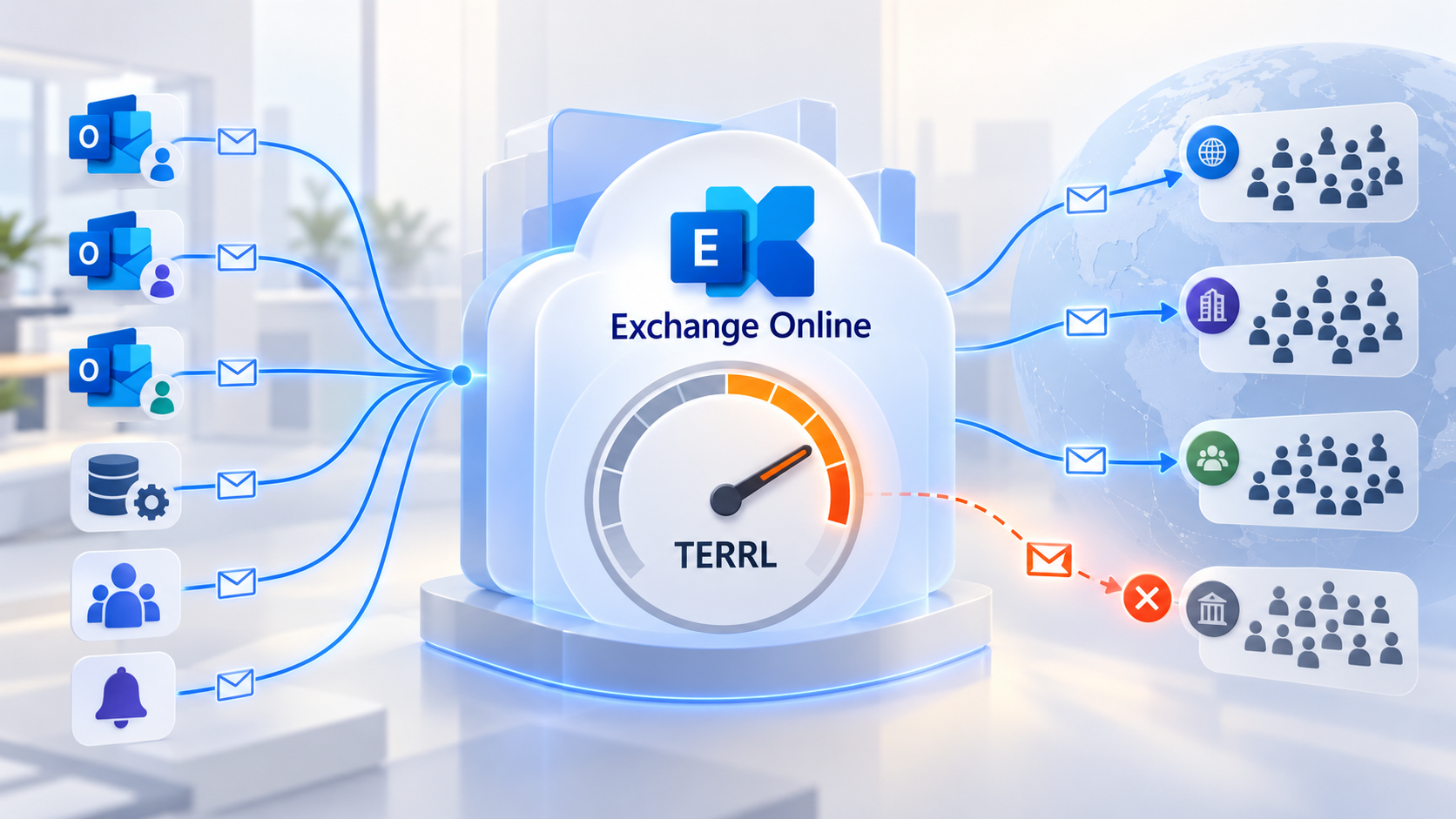
Exchange Online TERRL changes the way organizations should investigate outbound mail failures. A user may be well below their personal daily limit, yet their messages to customers are rejected because other senders have exhausted a tenant-wide allowance. A CRM campaign, ERP batch or faulty alert loop can affect employees who had nothing to do with the high-volume send.
Microsoft calls this allowance the Tenant External Recipient Rate Limit. The Exchange Team’s announcement and August 2026 update explain how it works and how special tenant categories are changing. The operational questions are more specific: which recipients count, what quota is actually active, how does a block appear, and which applications belong on another sending platform?
Key point: TERRL counts external recipients across the tenant over a rolling 24-hour window. It is not a per-user email count or a per-minute throughput limit. Exchange Online is not intended to become a bulk-email engine for an organization.
1. Definition: a shared external-recipient allowance
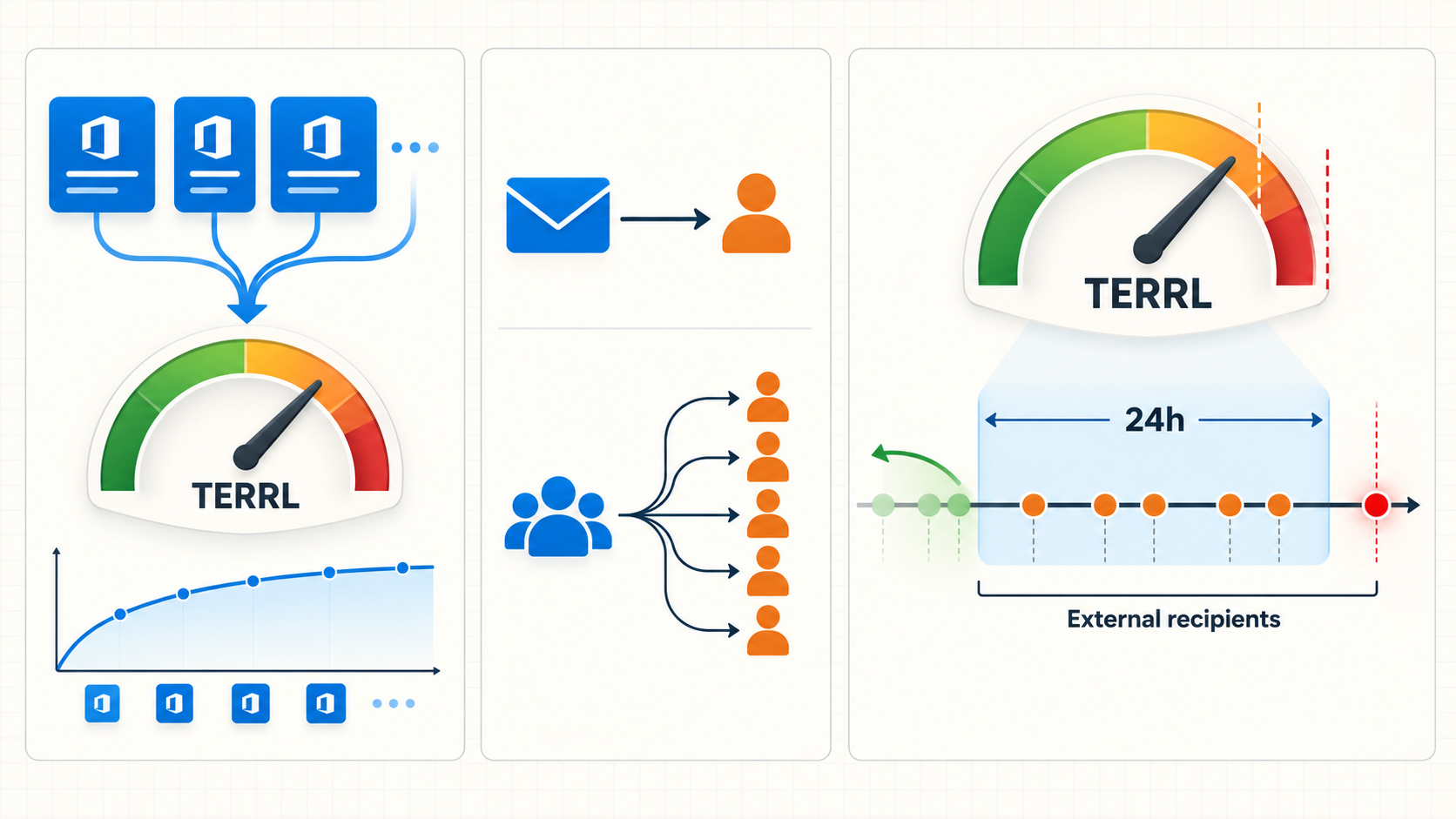
TERRL is the maximum number of external recipients that all senders in an Exchange Online tenant together can reach within the preceding 24 hours. For this rule, a recipient is external when their email address domain is not an accepted domain in the tenant. A partner in another Microsoft 365 tenant is external. An address in one of your accepted domains is internal for TERRL purposes, even if your mail routing is more complex. Microsoft’s Exchange Online limits documentation states that definition.
The unit is a recipient, not a message. A single message to several external people uses several units. For distribution groups, Exchange counts external members after the group and nested groups have been expanded. A group that looks like one address to its sender can therefore consume hundreds or thousands of units. A list of external contacts in a tenant group is not a way to hide volume from TERRL.
The 24-hour window slides. It does not reset at midnight. An afternoon export continues to occupy capacity the following morning until its recipients fall outside the window. Capacity planning needs room for both predictable batches and unexpected transactional spikes.
How it differs from mailbox and message limits
The per-mailbox Recipient Rate Limit (RRL) applies to an individual sender and counts both internal and external recipients over 24 hours. TERRL applies across the tenant and counts external recipients. Separate limits govern the recipients in one message and the rate at which a mailbox submits messages. Passing one check does not grant an exemption from the others.
Distribution groups illustrate the distinction. Microsoft’s service description says a group in the organization’s address book counts as one recipient for the per-mailbox recipient rate limit. TERRL counts that group’s external members individually after expansion. An estimate based only on how many messages each mailbox sent can badly understate the tenant’s external-recipient usage.
| Control | Scope | Counts | Diagnostic question |
|---|---|---|---|
| Recipient rate limit (RRL) | Individual sender | Internal and external recipients in 24 hours | Is one mailbox sending too much? |
| Recipients per message | One message | To, Cc and Bcc addressees | Is this message too broad? |
| TERRL | Whole tenant | External recipients in a rolling 24 hours | Are all workflows together exhausting the tenant? |
2. Why Microsoft introduced it
Microsoft describes TERRL as a service protection against abuse and overuse of shared Exchange Online resources. A mailbox-only limit leaves a gap: an organization can distribute a large send across many accounts or applications while each individual account remains below its personal ceiling. TERRL measures the aggregate external reach of the tenant.
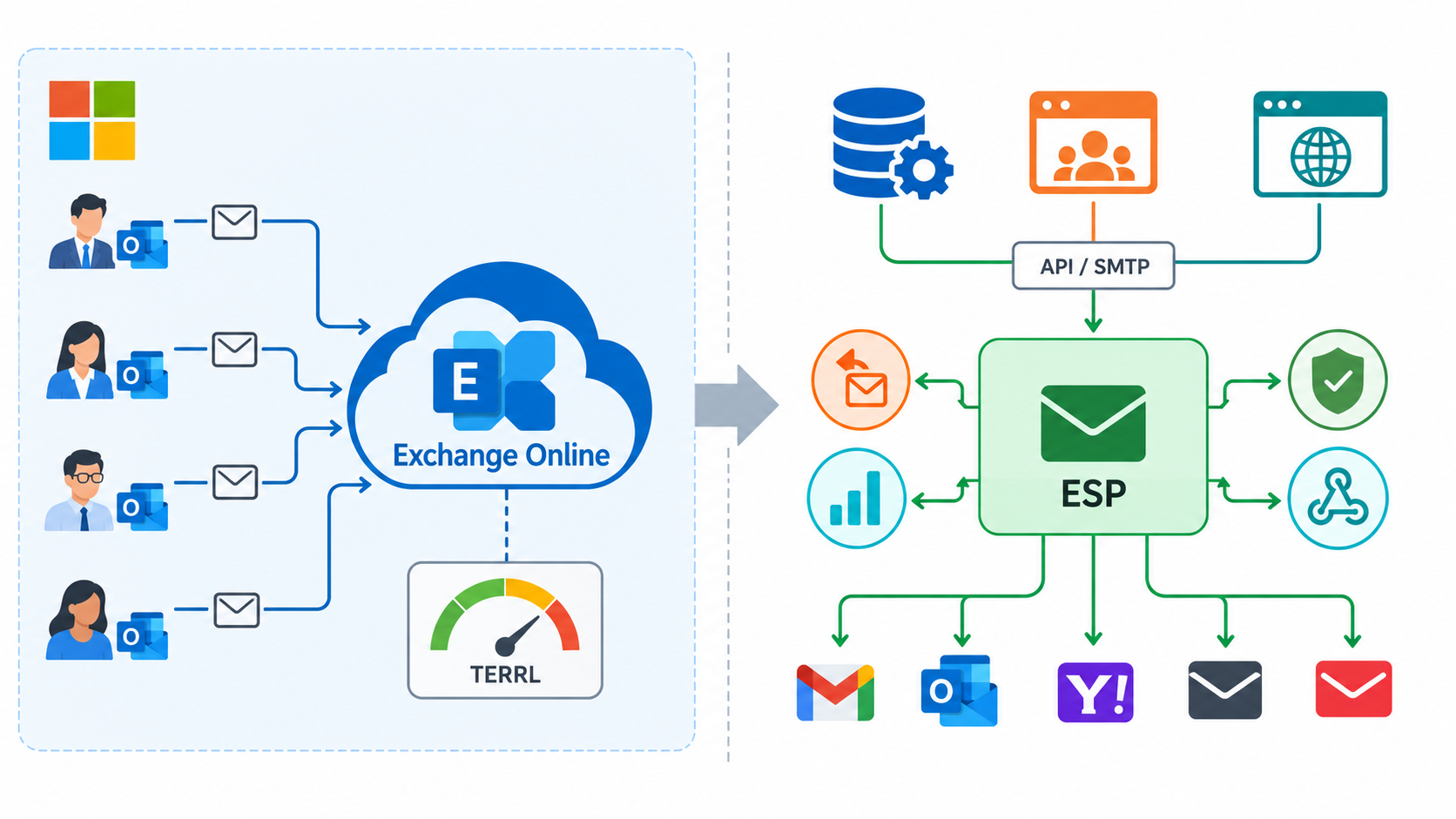
The policy also exposes an architecture mismatch. Collaborative mailboxes are suitable for human correspondence and moderate notifications. They are not a substitute for campaign infrastructure with list management, unsubscribe handling, bounce processing, delivery telemetry and dedicated reputation controls. Microsoft directs commercial newsletters to specialist providers. Its 2025 TERRL announcement named Azure Communication Services Email for high-volume application mail, but Microsoft announced on September 23, 2026 that ACS Email will retire on September 30, 2028. It is no longer a durable target for a new architecture. Buying mailboxes solely to increase a calculated quota does not answer which service should own the workflow.
A TERRL spike is not proof of spam or compromise. Legitimate invoices, order notifications, monitoring alerts and marketing sends can cause it. An unexplained spike still warrants a security investigation. Identify the senders and business processes before deciding whether the answer is a bug fix, rescheduling or a different platform.
3. How the quota is calculated
For an established commercial tenant outside a trial and without free Education licenses, Microsoft publishes this standard formula. L is the number of qualifying non-trial email licenses:
Standard TERRL = 500 × (L ^ 0.7) + 9,500 external recipients / 24 hoursLicenses for, or including, Exchange Online or Exchange Online Protection count. Growth is not linear: twice as many licenses do not yield twice the allowance. Microsoft gives 22,059 recipients for 100 licenses as an example. The relevant figure is the tenant’s email-license count, not merely the number currently assigned to users. For an operational decision, use the quota displayed by Exchange Online rather than assuming a spreadsheet reproduces your tenant’s active value.
Microsoft’s August 13, 2026 update, scheduled to begin rolling out on September 14, 2026, announces different treatment for particular tenants. The announced trial-only maximum becomes 500 external recipients per day; during rollout, read the applied threshold from your tenant report. For newly created tenants, Microsoft describes 10% of the standard calculated quota before day 31, 25% from days 31 through 60, and 100% after day 60. Tenants with free Education licenses have a separate formula that weights purchased and free licenses differently. The commercial expression above is not a universal formula for these categories.
These numbers are service ceilings, not recommended campaign sizes. Rollout can be phased, and sovereign cloud environments have separate schedules. Microsoft Learn may still display an earlier trial figure while the updated change is being applied. If published pages disagree, check the tenant’s enforcement state and the current Exchange Team update. Do not publish a generic number as every organization’s fixed daily limit.
4. What happens when TERRL is reached
If enforcement is enabled and the tenant passes its threshold, further outbound mail to external recipients is blocked until usage in the previous 24 hours drops below the allowance. The rejected message is not held in a guaranteed queue for later delivery. Microsoft documents the non-delivery report 550 5.7.233 for non-trial tenants exceeding TERRL; the Exchange Team announcement specifies a separate trial-tenant code. Investigate the NDR rather than labeling the incident a general delay.
The impact is collective. A staff member who sent only a few emails may be unable to contact an external customer after another system’s batch send. Internal recipients do not consume TERRL, although other sending rules still apply. Per-mailbox rate limits, outbound spam restrictions and compromised-account controls have different triggers and remedies; check the actual error and the tenant report before changing settings.
A TERRL rejection is also different from poor deliverability at Gmail or Outlook. A blocked message has not reached the destination provider. A message accepted by Exchange Online may later be filtered because of authentication, reputation or recipient policy. Dharmail’s guides to SMTP error codes and SPF, DKIM and DMARC help separate those diagnoses.
5. Where to view and monitor it
Open the Exchange admin center and navigate to Reports > Mail flow > Tenant Outbound External Recipients Rate. The report shows the tenant quota, observed usage, share consumed and enforcement state. The Exchange Team also documents the Exchange Online PowerShell command Get-LimitsEnforcementStatus; Threshold, ObservedValue and EnforcementEnabled distinguish the allowance, recent observed volume and whether blocking is active.
Use message trace and top-sender reports to assign peaks to real applications. The tenant-level chart is not an application inventory. One service mailbox may represent several jobs, while one SMTP connector can aggregate several source systems. Record application, owner, mailbox or connector, external volume, scheduled time, failures and business criticality. Review enough history to see month-end billing and occasional campaigns, not only a quiet weekday.
Set an internal warning well before exhaustion and preserve headroom for invoices, security notices and human conversations. Microsoft Learn gives 80% as an example alert point; it is an operational choice, not a mandatory Microsoft threshold. Test who receives the warning and who can pause or reroute a noncritical batch. A dashboard that nobody owns will not protect a critical workflow.
6. Which applications can consume the allowance?
CRM and ERP. Quotes, reminders, invoices, orders and customer notices can be steady external traffic. A month-end or afternoon batch may overlap with human correspondence and other systems. Measure peak windows and distinguish critical transactions from promotional messages.
Scanners and multifunction devices. A scan sent to an external address uses TERRL if it leaves through Exchange Online. An SMTP AUTH client or connector-based relay still follows the applicable Exchange rules. A scan to an internal accepted domain does not add an external recipient. Our Microsoft 365 printers and scanners article covers authentication separately from TERRL.
Monitoring and transactional flows. Ticket updates, password messages, order confirmations and security alerts can have a low daily average but a large incident-time spike. An outage that generates thousands of near-identical notifications can consume the margin just when other mail is most important. Deduplicate alerts, control cadence, classify priority and provide another route for essential notices.
Marketing and newsletters. One large audience can use most of the shared tenant capacity. Move campaign mail to a service designed for lists, consent, unsubscribe requests, bounces and delivery analysis. Dharmail explains the architectural reason in why Microsoft 365 is not a marketing ESP.
SMTP relays and business applications. The ingress method does not erase the tenant count. Microsoft says external messages routed through the tenant can qualify even when they originate on-premises or arrive through a connector. A Microsoft 365 SMTP relay may suit a device or moderate application load; it is not a TERRL bypass. An independent relay delivering directly to the Internet without traversing the Exchange Online tenant is a different architecture with its own limits and responsibilities.
7. Architectures to avoid
Avoid a universal service account that sends invoices, alerts, newsletters and sales campaigns from one mailbox. It concentrates credentials, obscures ownership, hits mailbox-specific controls and consumes TERRL. Splitting the same campaign across several Exchange mailboxes may avoid one per-mailbox threshold while still exhausting the tenant-wide limit.
Do not treat the license-based formula as a marketing capacity plan. Campaign audiences grow according to business calendars; TERRL grows nonlinearly with email licenses and includes exceptions for tenant age and license type. A batch that fits today may collide with the next alert storm or license change. Preserve margin rather than designing for the published ceiling.
Finally, avoid sending internal workflows out to a third-party gateway and back without testing the actual route and recipient classification. Signature services and connectors can complicate interpretation. Separating application and marketing streams also makes deliverability analysis easier.
8. Better options for each sending pattern
| Need | Architecture to assess | Check before moving |
|---|---|---|
| High-volume internal notices | A Microsoft option intended for internal application mail, or a dedicated application route | Confirm recipients and service-specific limits |
| Low-volume device or application mail | Connector-based Exchange Online SMTP relay when appropriate | External recipients still use TERRL |
| External transactions: orders, invoices, codes | A transactional ESP such as SendGrid | API or SMTP fit, queues, error handling, domain authentication, privacy |
| Newsletter or campaign | Specialist ESP such as Brevo with list and unsubscribe controls | Consent, segmentation, bounces, reputation |
| Several critical automated streams | Dedicated sending architecture with separate domains or subdomains, routing and monitoring | Ownership, recovery, volume, cost and delivery evidence |
October 17, 2026 update: the 2025 TERRL announcement named ACS Email, but Microsoft’s retirement guide now lists ACS Email for retirement on September 30, 2028. For a durable new architecture, assess a transactional ESP such as Brevo, SendGrid or another provider based on features, data location, pricing and operations. Evaluate recovery from API errors, bounce data, authentication, monitoring and contractual requirements rather than choosing only the largest advertised allowance.
For campaigns, a dedicated sending subdomain helps separate traffic and read reputation signals. Configure SPF, DKIM and DMARC for the provider, then test real delivered messages. Moving to another platform does not itself guarantee inbox placement; it provides the controls needed to manage a different kind of traffic.
9. Administrator checklist
- Read the Tenant Outbound External Recipients Rate report for the applied quota, observed value and enforcement state.
- Compare several rolling 24-hour periods, including billing, alerts and campaign peaks.
- Assign major senders and connector traffic to named application and business owners.
- Inspect distribution groups for external members after expansion.
- Separate internal, transactional, marketing and human traffic in the capacity picture.
- Set an internal warning and document how to diagnose NDR
550 5.7.233. - Check special rules for new, trial and Education tenants before using a manual calculation.
- Move high-volume streams to suitable services; test authentication, bounces and recovery.
- Confirm TERRL usage falls after migration without interrupting business processes.
Conclusion
TERRL makes a shared dependency visible: external mail traversing Exchange Online competes for one tenant allowance. The useful response is not to search for another mailbox or Microsoft 365 relay that evades the rule. Read the applied threshold, attribute usage to applications, reserve capacity for essential correspondence and place large campaigns or transactions on infrastructure designed for them. A Dharmail messaging audit can turn these measurements into an accountable sending architecture.