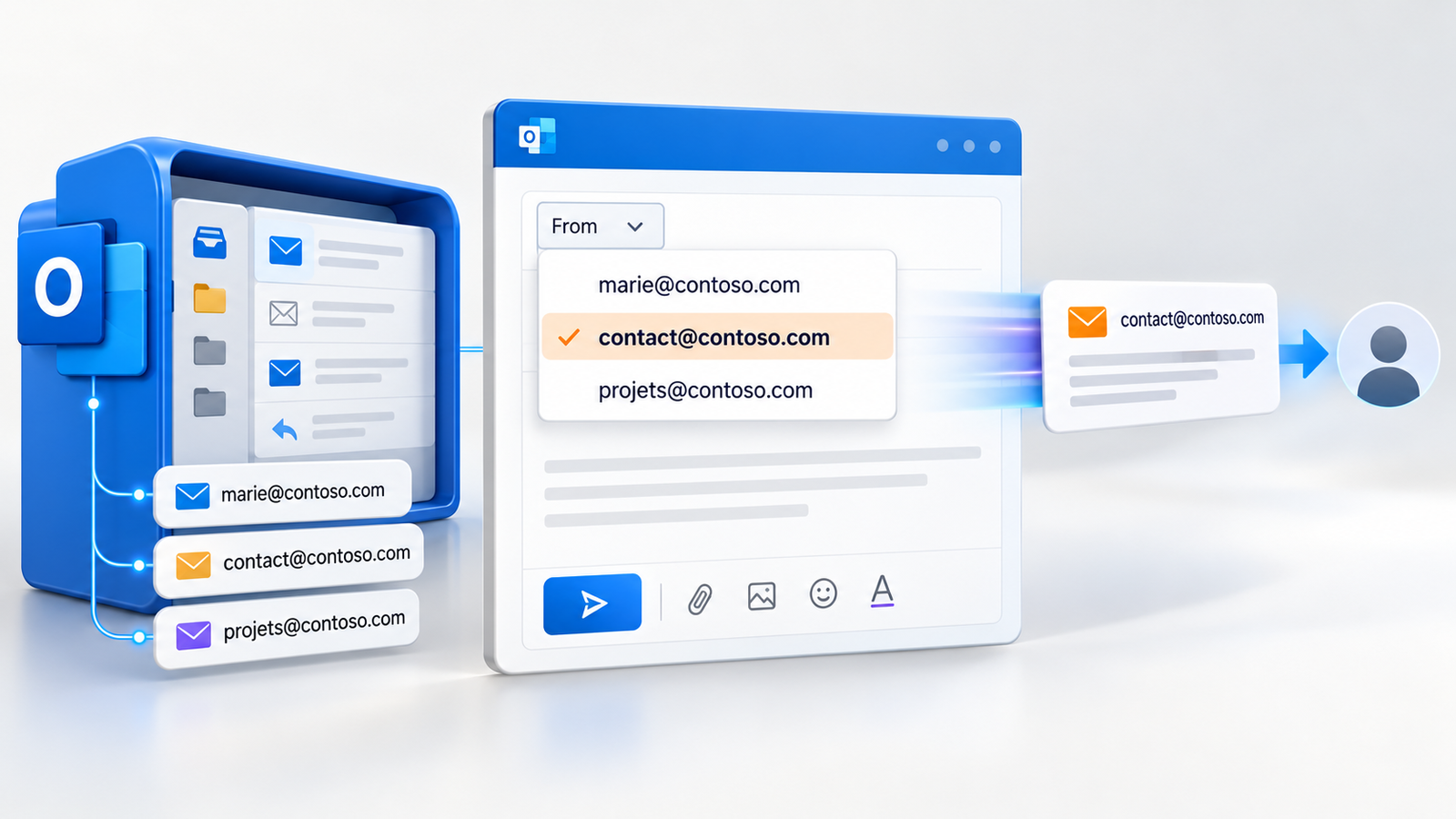
On October 7, 2026, the Exchange Team announced general availability of send from alias in Exchange Online. A person who receives mail at both hello@example.com and firstname@example.com in one mailbox can now choose either address when writing. Previously, outgoing mail normally exposed the mailbox’s primary SMTP address even when a user tried to send from an alias. The switch sounds small, but it affects Outlook workflows, mail flow rules, message tracing and domain authentication.
This guide turns Microsoft’s announcement into an implementation plan. It separates confirmed service behavior from the results you need to observe in your own outbound messages, especially the envelope sender, DKIM signature and DMARC alignment.
In brief: an alias is another public address on one Exchange Online mailbox. It is not another mailbox, a delegation permission or a separate history. Enable the tenant setting, then test each domain and client your organization actually uses.
1. What an SMTP alias is
An Exchange mailbox has a primary SMTP address and can have additional secondary or proxy addresses. Incoming mail to any configured proxy address reaches the same mailbox. Microsoft explains the relationship in its mailbox address documentation. The primary is normally the default reply address; the secondary addresses provide other ways to reach the person.
In Exchange recipient properties, EmailAddresses / proxyAddresses commonly shows the primary with uppercase SMTP: and secondary SMTP addresses with lowercase smtp:. This is a property of the recipient object, not a collection of invisible extra mailboxes. An administrator can check the addresses assigned to a particular mailbox in Exchange Online PowerShell:
Get-Mailbox -Identity firstname@example.com |
  Format-List PrimarySmtpAddress,EmailAddresses
The address used for alias sending must actually be configured on the mailbox, within a domain the organization can use. Typing an arbitrary address into Outlook’s From field does not make it a mailbox alias. Administrators manage user aliases in the Microsoft 365 admin center, then decide which domains should allow outbound use.
How this differs from plus addressing and distribution lists
Plus addressing, such as firstname+receipts@example.com, adds an arbitrary tag to a valid receiving address. It is useful for sorting inbound messages or registering with services. It is receive-only: Microsoft says users cannot send from plus addresses. A plus address is not a configured proxy address in proxyAddresses. See Plus Addressing in Exchange Online.
A distribution list distributes mail to members. It does not provide the team with a mailbox containing a shared conversation history. A user can have delegated Send As rights on certain groups, but that is a different mechanism from sending from a secondary address on their own mailbox. An address that looks similar in the From field can therefore represent very different ownership and recordkeeping.
2. What general availability actually changes
Exchange Online now supports outgoing mail from a secondary SMTP address on an Exchange Online-hosted mailbox. According to the Exchange Team, replying to a message received at an alias automatically uses that alias. Users can choose which aliases are displayed in supported clients. This is valuable when one person legitimately corresponds under several public addresses.
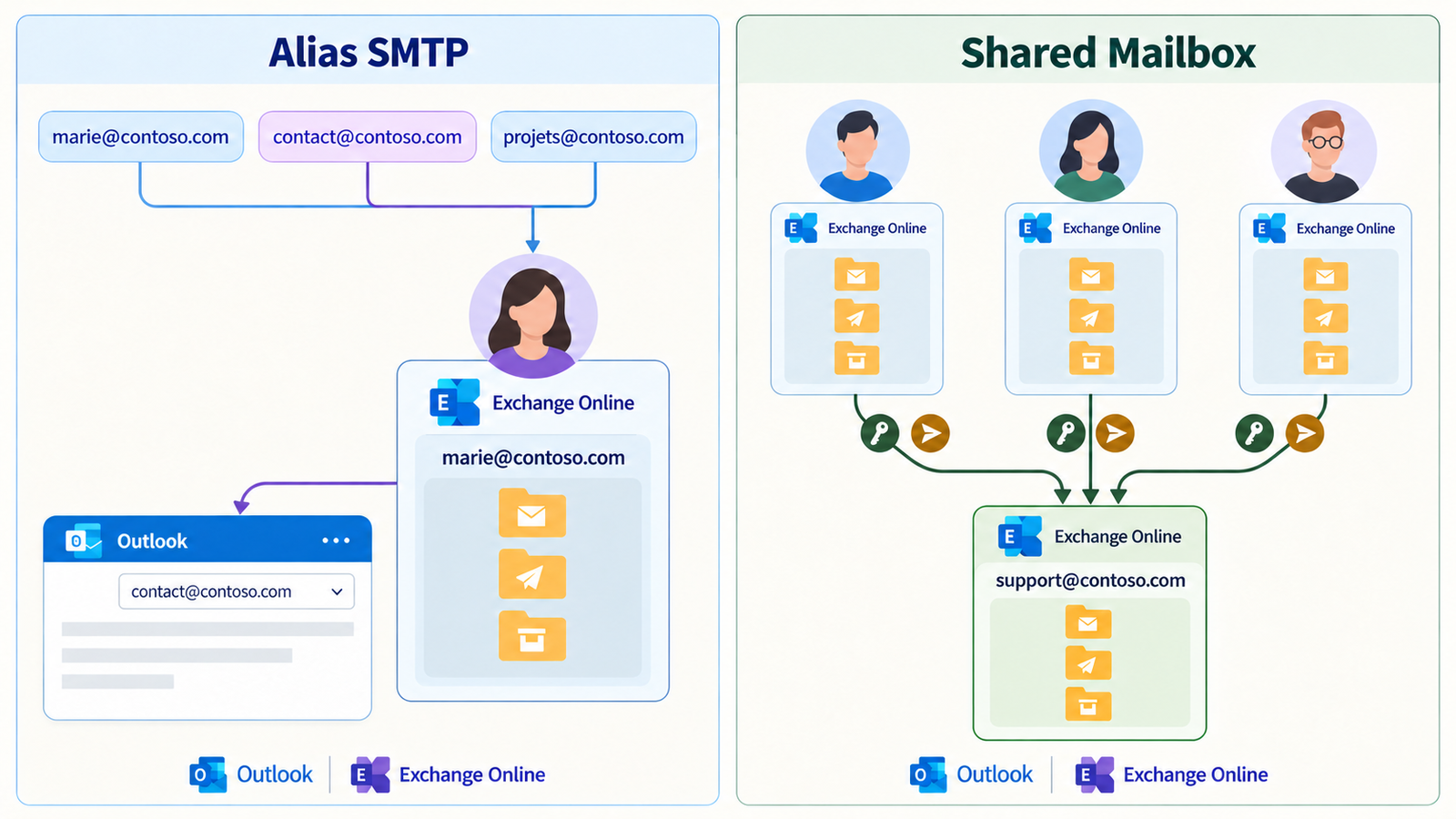
An alias remains tied to one mailbox owner. It does not create a team inbox, delegate access or a separate history. Microsoft lists per-alias display names and calendar support as possible future work, not features in this release.
The distinction matters operationally. sales@brand.example may be a sensible alias for one salesperson who owns every conversation. Once colleagues must cover leave, share the queue or retain correspondence after that person leaves, the choice of mailbox object matters more than the ability to select a From address.
3. Enable the feature and review available addresses
The switch is tenant-wide. Microsoft documents this Exchange Online PowerShell command:
Set-OrganizationConfig -SendFromAliasEnabled $True
Get-OrganizationConfig | Format-List SendFromAliasEnabled
Alternatively, use Exchange admin center > Settings > Mail flow > Turn On Sending from Aliases. Microsoft says the change can take up to 60 minutes to become effective. Start with an agreed pilot group and allow for propagation before treating an unsuccessful test as a client defect. Because the control applies to the organization, prepare an inventory before enabling it broadly.
Review each user’s addresses in the Microsoft 365 admin center. Record the business owner, public purpose and domain of each secondary address. Identify legacy or technical addresses that should receive mail but should never appear in outbound correspondence. An old alias can become an unexpected visible identity once sending is available.
The Exchange Team describes a Receive Only setting for an entire domain in the Microsoft 365 admin center. It also points to SendingFromDomainDisabled and SendingToDomainDisabled on Set-AcceptedDomain for domain-level direction controls. These controls are broad. More precise restrictions require mail flow rules or organizational policy. Hiding an alias from a user’s picker should not be treated as a complete security boundary.
4. What users see in Outlook, and how replies work
In Outlook on the web, users go to Settings > Mail > Compose to view and select aliases. The Exchange Team corrected its original wording on October 8; older references to “Compose & Reply” may not match the current interface. In Outlook desktop for Windows and Mac, users select an address from the From dropdown or enter the alias manually. In Outlook mobile, they tap From and select an available alias. The From field may first need to be shown in the compose interface.
In a pilot, send externally from every client in use, then reply to a message addressed to the alias. Microsoft says replies retain that alias; test forwarded threads, old drafts and signatures too. Check the received message rather than relying on the compose window.
Cached contacts can obscure the SMTP address. Microsoft warns that a client’s From display may change where its configured identity differs from the mailbox’s. Inspect received headers to confirm the public sender.
A specific shared-mailbox limitation
For an alias on a shared mailbox, Microsoft’s announced support is Outlook on the web only, when a delegate opens the shared mailbox using “Open another mailbox.” Sending from a shared mailbox alias is not supported in Outlook clients in the release as described. If a team depends on desktop Outlook, test this limitation before changing its published address or promising users a multi-alias shared mailbox workflow.
5. When should you use an alias or a shared mailbox?
| Requirement | Alias on a personal mailbox | Shared mailbox |
|---|---|---|
| One person needs several public sender addresses | Good fit: one mailbox and several From addresses | Usually unnecessary |
| Several people read and answer one queue | Poor fit: mail belongs to one person | Good fit with access and delegation |
| History must survive an employee’s departure | Requires a separate continuity plan | Common history remains in the team mailbox |
| A team identity must be separate from an employee | No separate mailbox ownership | Separate recipient and permission model |
| Multiple aliases on the team mailbox in desktop Outlook | Not applicable | Current limitation: sending from a shared mailbox alias is unsupported there |
A shared mailbox is its own recipient and message store. Delegates may need Full Access, Send As or Send on Behalf, depending on the task. Full Access lets someone open and manage the mailbox but does not itself grant sending rights. Send As makes the message appear to come from the mailbox or group. Send on Behalf visibly identifies the delegate as sending on behalf of that identity. Microsoft explains these permissions in Manage permissions for recipients in Exchange Online.
An alias on Alice’s own mailbox is neither Send As nor Send on Behalf: she is sending from an address assigned to her mailbox. If support@example.com already belongs to a shared mailbox or distribution list, it is not simultaneously Alice’s personal alias. Moving that address requires a deliberate recipient and permission migration, rather than simply typing it into the From field.
A distribution list suits one-to-many delivery and, where configured, delegated group sending. It does not provide the folders, common history or coordination expected of a support inbox. For a support team, use a shared mailbox or a ticket system according to the workflow. For an executive writing under two brand domains while keeping one personal inbox, an alias is usually the simpler model.
6. From, Return-Path, SPF, DKIM and DMARC
The message’s From header is the identity visible to recipients and the domain used as the reference for DMARC. The Return-Path usually reflects the SMTP envelope sender (MAIL FROM) used for delivery status reports. They can differ. Seeing an alias in From therefore does not prove that the envelope sender changed to the same address.
SPF authenticates the authorized sending source for the MAIL FROM domain. DKIM signs the message with a d= domain. DMARC requires at least one successful SPF or DKIM result to align with the domain in From. Microsoft’s DMARC guidance explicitly separates these identities. Publishing SPF for the alias domain without knowing the actual envelope domain does not demonstrate SPF alignment.
If the alias uses another domain, confirm that domain is configured for sending in Microsoft 365, that SPF covers the services which actually send for it, that DKIM is configured for the domain, and that its DMARC policy fits the organization’s mail flows. Microsoft recommends separate DKIM setup for each custom domain or subdomain used to send. None of this lets us claim, without a test, that selecting an alias automatically changes the SPF identity, Return-Path or DKIM signing domain.
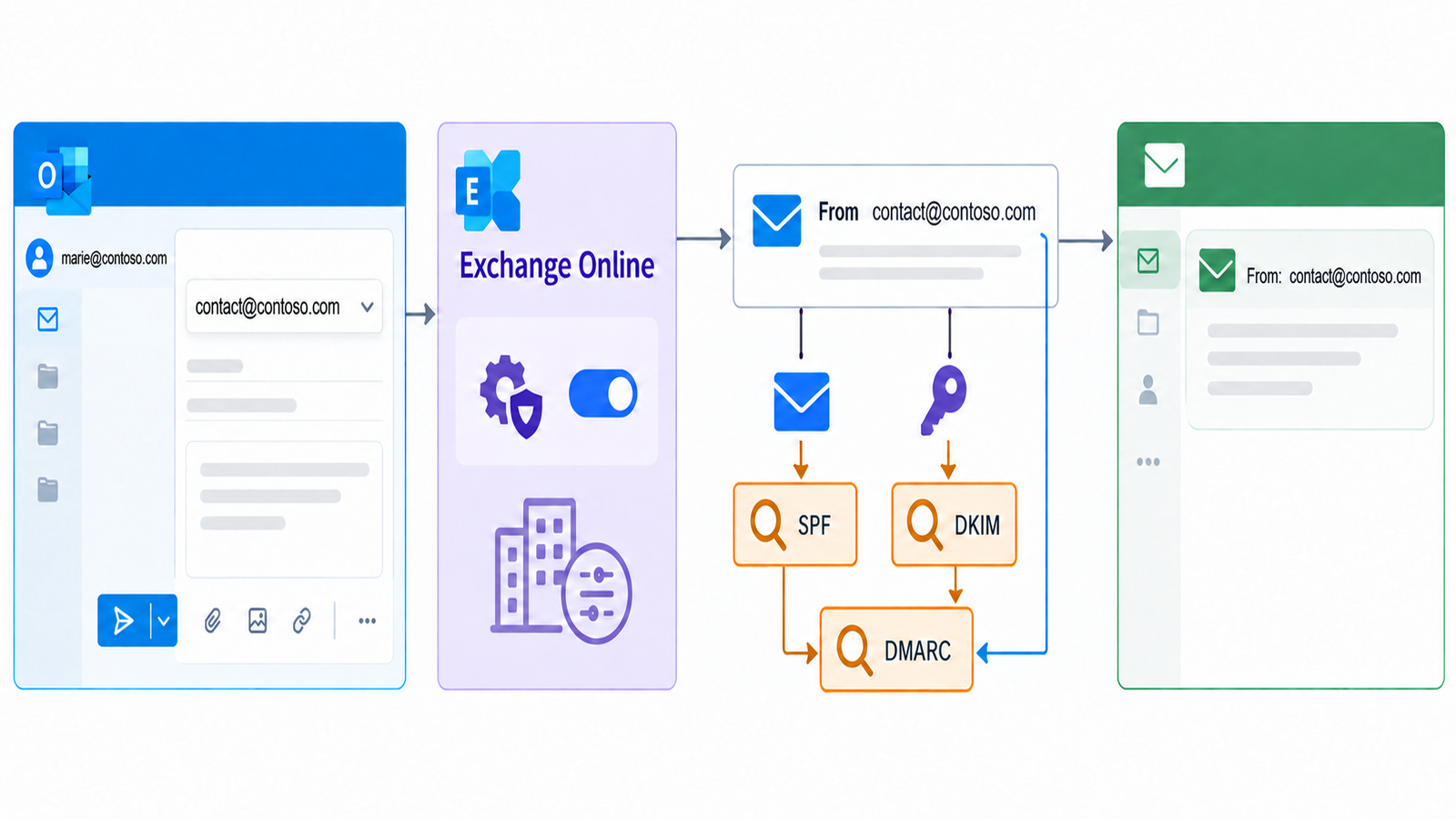
Use a practical test: send from the alias to an external mailbox where you can read full headers. Record From, Return-Path, Authentication-Results (smtp.mailfrom, header.d, header.from) and DKIM-Signature. Check SPF, DKIM and DMARC results. Repeat for each sending domain and, where relevant, every connector, application and client. A downstream relay or forwarding step can change the envelope or message after Exchange Online has handled it.
Test the actual production route. A message composed in Outlook and sent directly through Exchange Online may differ from one submitted by a CRM through an SMTP connector. Our SPF, DKIM and DMARC guide covers the DNS foundations; our Exchange Online transport-security analysis covers a different layer of mail security.
7. Operational behavior administrators should not miss
Message tracing. A Message Trace query for only the primary SMTP address does not include messages sent using an alias, according to the Exchange Team. Search using the alias itself when investigating mail sent to or from it. Update reports and alerting built around a single primary address before a delivery incident makes the gap visible.
Rules and journals. Mail flow, routing, hygiene and journaling rules that match a literal email address may miss the alias. Conversely, some functions operate on mailbox identity and cannot distinguish which address was used. Exercise critical rules: anti-spoof exceptions, compliance copies, connectors, signatures and domain-specific routes. A policy matching firstname@example.com should not be assumed to cover hello@example.com without a test.
Hybrid and on-premises mail. The feature is for Exchange Online-hosted mailboxes. Messages passing through on-premises servers may have their aliases rewritten. Microsoft also describes a hybrid routing case where mail to a mail.contoso.onmicrosoft.com address retains that routing address; an out-of-office reply may then expose it instead of the public domain. Include this in your pilot if Exchange remains on premises. A clean cloud-only test does not certify a hybrid flow.
Display names and calendar. The displayed name may not match the brand identity intended for the alias. Microsoft is investigating per-alias display names and calendar support but has not committed them as GA features. Validate meeting invitations and signatures separately from ordinary email if they matter to the business.
8. Four useful scenarios
Several brands, one correspondent. A salesperson answers at alice@brand-a.example and alice@brand-b.example while keeping one mailbox. An alias is efficient if she owns both relationships and a combined history is acceptable. Check DKIM and DMARC for each domain, and validate signatures and visible display names with real recipients.
Domain change. During a move from old.example to new.example, keep the old address receiving mail and, where needed, replying to existing conversations. Define when the new address becomes primary and how long the old alias remains. If the old domain should only receive, use the domain-level sending restriction. Document which address users should choose for new conversations.
Merger or acquisition. Several inherited domains may lead to a single employee mailbox. Aliases can avoid unnecessary extra inboxes, but they do not move past messages or free an address already assigned to another recipient. Test directory entries, existing rules, hybrid routing and domain authentication before rolling the pattern across the new organization.
One employee, several public roles. A person may correspond as a regional representative and as an international specialist. Aliases are suitable where those relationships remain the individual’s responsibility. If an address must survive their departure or be handled by a department, use a shared mailbox with explicit delegation.
These scenarios do not turn Exchange Online into a campaign delivery service. An alias changes the visible identity, not sending limits or reputation. Dharmail’s article on Microsoft 365 and marketing email architecture covers that decision, while our TERRL guide explains the tenant-wide external-recipient limit.
9. Production checklist
- Inventory aliases, owners, domains and purpose. Mark addresses that should remain receive-only.
- Choose the recipient model for each address: personal alias, shared mailbox, distribution list or dedicated application. Confirm history and delegation requirements.
- Review domains and their outbound settings. Prepare SPF, DKIM and DMARC for domains used in a public
Fromaddress. - Enable
SendFromAliasEnabledfor a planned pilot window. Allow up to 60 minutes for propagation and verify the configuration value. - Test supported clients actually deployed: Outlook on the web, Windows, Mac and mobile. For shared mailboxes, test the specific supported OWA path.
- Test new mail and replies received on the alias. Check signatures, display names and meeting invitations separately.
- Inspect external headers and DMARC alignment for every domain and sending path. Fix the component that truly fails.
- Review rules and traces. Search the alias in Message Trace and test mail flow, journaling, security controls and hybrid routing.
- Document operations: which From address to use, who supports users, and how to retire an alias or domain safely.
Conclusion
General availability removes a longstanding workaround: people can send and reply from their secondary addresses in Exchange Online. The harder decision is the ownership model. An alias is a practical way to give one person several addresses; a shared mailbox remains the right object for a queue owned by several people.
Before a wider rollout, validate clients, rules and authentication using actual externally received messages. An alias in From is a visible promise to recipients. DMARC alignment, traceability and reply behavior must support it. A Dharmail email audit can help map addresses, domains and mail paths in an older or hybrid tenant.
Sources
- Microsoft Exchange Team, “Sending From Email Aliases – General Availability” (October 7, 2026; updated October 8).
- Microsoft Learn, “Add or remove email addresses for a mailbox in Exchange Online”.
- Microsoft Learn, “Plus Addressing in Exchange Online”.
- Microsoft Learn, “Manage permissions for recipients in Exchange Online”.
- Microsoft Learn, DMARC and DKIM configuration guidance.