
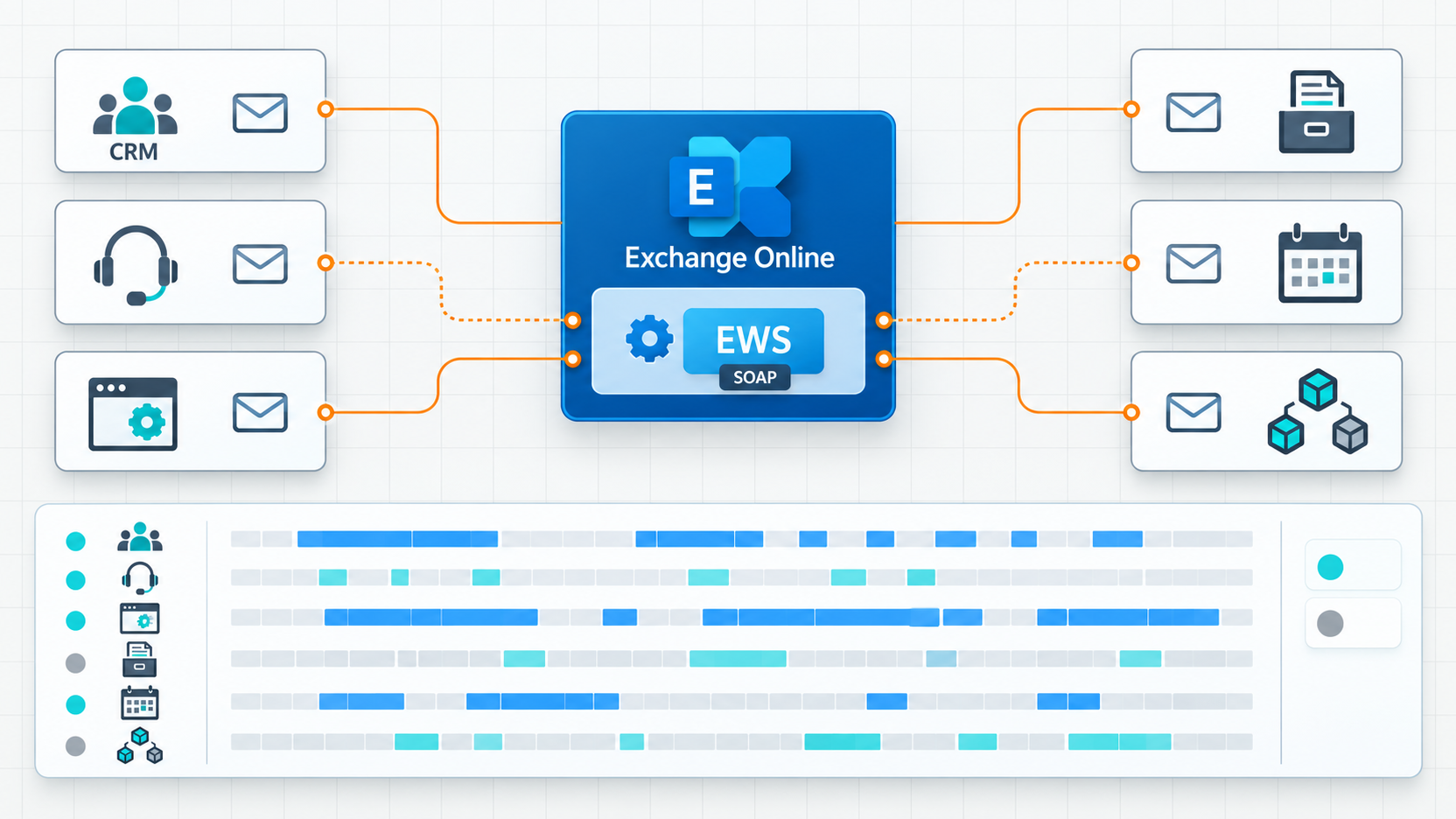
EWS retirement in Exchange Online is an application continuity issue. An integration may be almost invisible to the Microsoft 365 team while it creates customer tickets, collects job applications, files invoices or feeds an archive. When it stops, the first symptom is often a broken business process, not an obvious Exchange alert.
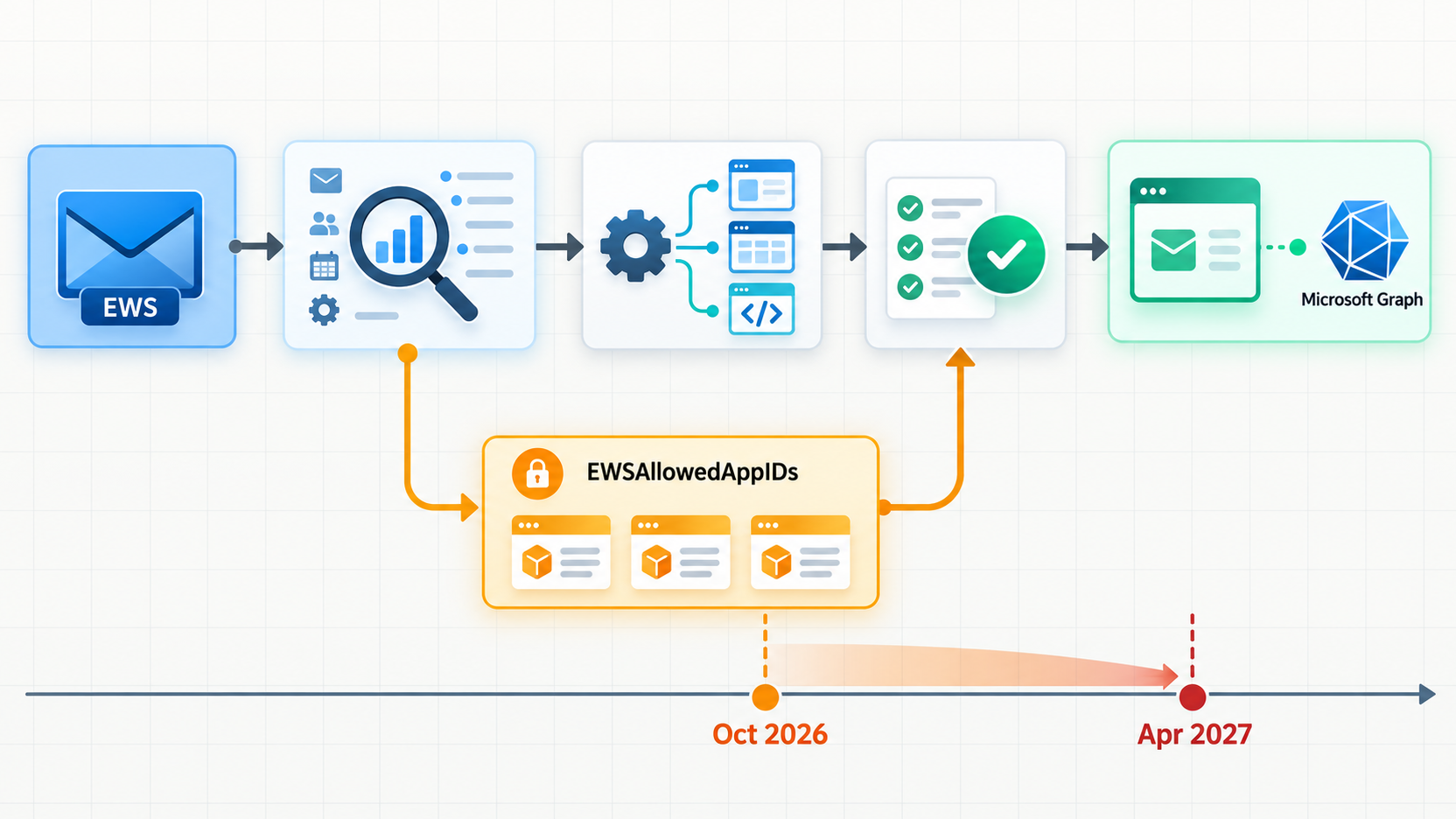
The Microsoft Exchange Team introduced EWSAllowedAppIDs to help organizations manage the transition. It can temporarily permit identified applications to keep using Exchange Web Services while they migrate. It is not a permanent operating model. The practical task is to discover each dependency, move its behavior to a supported API, verify the business result and remove the exception.
Key point: putting an application ID on an EWS allow list does not migrate the application. Work is complete when it no longer calls EWS, its workflow passes real acceptance tests and its temporary access has been removed.
What EWS is and why it remains embedded
Exchange Web Services is a legacy Exchange API for working with messages, folders, calendars, contacts and mailbox settings. Applications send SOAP operations, sometimes through the EWS Managed API. EWS has existed since Exchange Server 2007. Microsoft stopped active investment in EWS APIs for Exchange Online and recommends Microsoft Graph for cloud integrations.
Many integrations outlive their original projects. A recruitment system may watch a hiring mailbox. A CRM may copy correspondence into customer records. A ticketing product may read and move support mail, then reply as an agent. An archiving product may extract messages and attachments. A line-of-business application may create calendar entries or inspect availability. Even if the product has been upgraded, its Exchange connector might still call EWS.
Treat scanners and multifunction devices carefully. Many merely send email through SMTP; EWS retirement does not apply to that action. A document capture connector might instead read a mailbox through EWS. Establish the actual protocol before putting every scanner on an EWS migration list. The same rule applies to HR platforms, backup tools and CRM systems: the product category is not evidence of the API it uses.
The announced retirement is for EWS in Exchange Online. It does not, by itself, remove EWS from an on-premises Exchange Server. Hybrid architectures may still make EWS calls into the cloud, so inventory the location and direction of each call. Working Outlook clients tell you little about a service integration that runs overnight.
The timetable as of August 27, 2026
Microsoft plans phased disablement beginning in October 2026, tenant by tenant, followed by a final Exchange Online EWS shutdown on April 1, 2027. October is the start of enforcement, not a promise that every tenant changes on the first morning of the month. Use the Exchange Team’s retirement timetable and your tenant’s Microsoft 365 message center notices to track the process. The safe planning assumption is that a critical application must be ready before the phased rollout can affect it.
The organization setting EwsEnabled matters. Before retirement enforcement, its default Null state permits EWS; False blocks it. With True, an App ID allow list can restrict who continues to call EWS. Microsoft plans to move tenants left at Null to False during the phased rollout. Setting True with a qualified list can preserve selected dependencies temporarily. It is not a route around the April 2027 endpoint shutdown.
A list is not a service guarantee. A missing App ID, another EWS access policy, absent OAuth consent or an underprivileged account can still break a connector. Broadly approving unknown IDs to suppress warnings extends unmanaged access and makes the final migration harder. Time-bound exceptions should be tracked against a named owner and release plan.
EWSAllowedAppIDs: a controlled bridge
EWSAllowedAppIDs contains Microsoft Entra application IDs allowed to use EWS when the corresponding EWS configuration enforces the list. These are not product names, mailbox addresses or User-Agent strings. Adding an App ID does not translate SOAP requests into Graph, grant OAuth consent, or set mailbox permissions. It only affects whether a remaining EWS dependency may pass that access control during the transition.
The ID may belong to a vendor’s multitenant application rather than an App Registration your team created. Connect each entry to the vendor, product version, internal business owner, affected mailboxes and observed operations. If an ID is unfamiliar, investigate it before granting an exception. Ask the supplier for a Graph-capable release and a documented cutover date.
Older EwsAllowList and EwsBlockList controls match User-Agent values; EWSAllowedAppIDs matches an Entra application identity. Review both policy types when they coexist. An App ID on the list cannot override organization-wide EwsEnabled: False, and an older User-Agent restriction may still deny a listed app. Microsoft’s EWS access control documentation describes the settings.
Before writing anything through Exchange Online PowerShell, capture the current EwsEnabled value, User-Agent policies and App ID list with Get-OrganizationConfig. Treat Set-OrganizationConfig -EwsAllowedAppIDs as a controlled change to a full allow list: preserve the known entries, verify the App IDs, stage tests and record a rollback. Microsoft’s examples use a comma-separated string. An unreviewed production command is a poor discovery method.
From EWS to Graph: redesign the behavior and identity
An EWS to Microsoft Graph migration is more than a URL change. EWS uses SOAP operations; Graph exposes REST resources and operations. Microsoft’s EWS-to-Graph API mapping links FindItem to listing messages, GetItem to retrieving a message, SendItem to sending, and SyncFolderItems to delta queries. These mappings are a starting point. Pagination, identifiers, notifications, synchronization state and error handling need tests against the actual workload.
A support connector polling a mailbox must decide whether to use delta queries or change notifications, recover after outages and avoid duplicate tickets. A calendar integration must check time zones, recurring meetings, delegates and shared mailbox rights. An archive or backup product must verify the exact folders, metadata and operations it requires; a Graph API for ordinary mail does not prove complete coverage of its archive workflow. Match the observed EWS SOAP actions to business requirements, then prove the replacement behavior.
Graph is not the API for an on-premises Exchange mailbox. An application serving both local and cloud mailboxes may temporarily need separate technical paths or a changed architecture. Raise that constraint with the vendor early. A product note saying “supports OAuth” does not establish that it has stopped calling EWS.
Modern authentication is not an API migration. An EWS client using OAuth still depends on EWS. A Graph client needs an identity in Microsoft Entra and appropriate Graph permissions: delegated permissions when a signed-in user acts, or application permissions for unattended processing. Microsoft explains these models in its EWS and Graph authentication comparison.
Revisit service accounts rather than cloning their old privileges. An EWS integration that reads twenty mailboxes should not automatically receive tenant-wide Mail.ReadWrite. Separate reading, writing, sending and calendar operations; Mail.Send and Mail.ReadWrite are different permissions. For app-only access, scope target mailboxes with Exchange Online application RBAC where appropriate. Check that an unscoped Entra consent does not defeat the intended scope. Assign an owner to certificates or secrets and plan rotation.
EWS use, Graph option, risk and priority
| Observed EWS use | Graph alternative to assess | Risk of inaction | Priority |
|---|---|---|---|
| Ticketing reads, moves and replies from a support mailbox | Messages, folders, delta/notifications, Mail.ReadWrite and Mail.Send as needed |
Missing or duplicate tickets; failed replies | Critical |
| CRM synchronizes email and appointments | Graph messages and calendars with targeted permissions | Incomplete customer history or calendars | High |
| HR system processes a recruitment mailbox | Message and attachment reads with delta | Lost applications; sensitive data exposure | Critical |
| Archive or backup exports mailbox content | Relevant Graph APIs after a functional coverage test | Gaps in preservation or recovery | Critical |
| Business application creates appointments or checks availability | Graph events and getSchedule, depending on use |
Incorrect schedules or blocked work | High |
| Scanner sends a document | First verify SMTP versus EWS; consider Graph sendMail if relevant |
Wrong remediation or stopped scanning | Depends on workflow |
| Legacy service-account script processes mail | Graph app identity with constrained mailbox scope | Silent failure or excessive privileges | High |
This is a decision aid, not a parity guarantee. Record the exact SOAP actions, target mailboxes, required permissions and acceptance tests for each row. An SMTP-only scanner belongs to a different project; Dharmail’s article on SMTP AUTH Basic and printers or scanners covers that separate dependency.
An eight-step migration method
1. Inventory the calls, not just the products
Use the Microsoft 365 EWS usage report. It shows App IDs, SOAP actions, call volume and last activity, with 7-, 30- and 90-day views and a CSV export. Data is aggregated weekly and can take up to ten days to appear. A quiet week does not rule out a monthly process. Add application logs, scheduled jobs, vendor contracts and support tickets to the inventory.
2. Identify each application and its owner
Match IDs with Microsoft Entra Enterprise Applications and App Registrations. Ask vendors for product version, authentication mode, target mailboxes and Graph connector release date. Assign both a business owner and a technical owner. A familiar App ID may belong to a retired workflow; an unfamiliar one may support payroll or customer support.
3. Qualify the workflow
Record triggers, EWS operations, frequency, sensitive data, shared mailboxes, service accounts and failure behavior. Rank impact on customers, hiring, billing, support and compliance. A monthly process that fails silently may deserve higher priority than a noisy low-risk connector. Decide what evidence will prove that the workflow is healthy after migration.
4. Check Graph coverage and gaps
Map each SOAP action to Microsoft documentation. Label it “direct mapping”, “design change” or “gap requiring vendor work”. Test notifications, delta sync, attachments, calendaring, permissions and archives with real data. If the vendor has no Graph path, obtain a written roadmap or plan a replacement. Do not accept “modern authentication” as proof of API migration.
5. Migrate with minimum permissions
Create or revise the Entra App Registration. Choose delegated or application access, request only necessary Graph permissions and scope mailboxes where possible. Replace old credentials, document admin consent and create a controlled parallel run of the new connector. Switch the production workflow only after comparing results with the EWS path.
6. Test the business outcome
Confirm that a ticket appears, an applicant is captured, an invoice is filed and an appointment lands in the right calendar. Test expired tokens, missing consent, throttling, duplicates, large attachments, shared mailboxes and recovery after downtime. Compare created records, not just successful HTTP responses. Bring the business owner into acceptance testing.
7. Monitor the cutover
Watch application errors, processing queues, completion time and the EWS report. EWS calls for a migrated app should fall to zero. Because the usage report lags, retain application-side telemetry too. Set a time-limited rollback and a business decision point. Any allow-list exception should expire internally before Microsoft’s final EWS shutdown.
8. Remove the exceptions
After the Graph workflow has remained stable across its normal operating cycle, remove the application’s ID from EWSAllowedAppIDs. Revoke obsolete consents and credentials, disable the EWS connector and update runbooks. Repeat until the list and the tenant’s EWS dependencies are gone. A forgotten allow-list entry is an access and maintenance liability.
Security checks that outlive the API change
Inventory existing EWS.AccessAsApp grants, Graph permissions and the mailboxes genuinely required by each integration. An App ID permitted through EWS is not a blanket security approval. Confirm identity ownership, permission scope and logging. Require vendors to provide an escalation contact and a Graph-capable version before their exception becomes the only way to keep a critical workflow operating.
Keep adjacent projects clear. EWS retirement does not itself retire SMTP or change SPF, DKIM and DMARC. An application migration that sends mail can nevertheless change the sending identity, permission path and message flow, so test received messages. Dharmail’s guides to Microsoft 365 sending architecture, SPF, DKIM and DMARC and Exchange Online DNSSEC, DANE and MTA-STS provide related security context. A messaging audit can connect the technical inventory to the workflows it supports.
Conclusion
EWSAllowedAppIDs is a bridge through the retirement phase, not a permanent migration strategy. The decisive work is to find real calls, name accountable owners, validate Graph coverage, redesign permissions and test business outcomes. Start with the usage report, but finish with evidence that every critical process works without EWS and with its temporary exception removed. That is how an API retirement remains a planned change instead of becoming a business outage.
Sources and references
- Microsoft Exchange Team — Introducing EWSAllowedAppIDs: Preparing for the Final Phase of EWS Retirement
- Microsoft Learn — EWS usage report
- Microsoft Learn — Migrate EWS apps to Microsoft Graph
- Microsoft Learn — EWS to Microsoft Graph API mappings
- Microsoft Learn — EWS and Graph authentication differences
- Microsoft Learn — Control access to EWS
- Microsoft Learn — Exchange Online application RBAC